
AI Grammatic
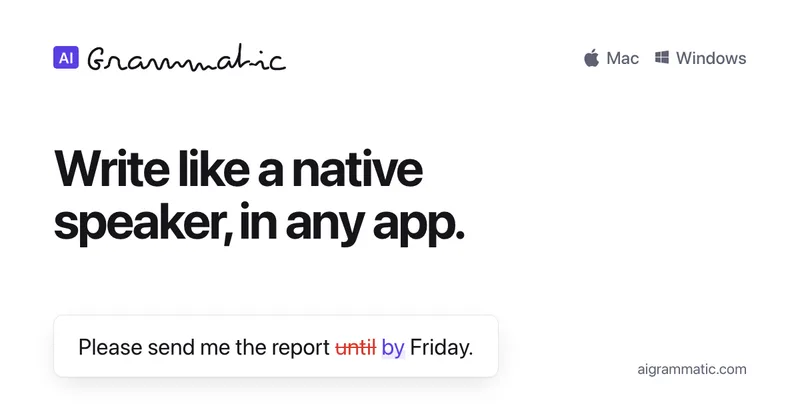
AI Grammatic rewrites selected text for natural phrasing, tone, and translation through a desktop shortcut. It helps non-native speakers and professionals produce clearer messages in Mac and Windows apps.
Who it's for
- Non-native English speakers who want workplace messages rewritten to sound more natural.
- Developers who want to revise PRs, commits, and tickets without leaving their editor.
- Professionals who write across apps such as Slack, Outlook, Gmail, Word, or Teams and need casual or formal wording.
Not the right fit if…
- Teams that need more than 50,000 rewritten words per day under the stated plan cap: the subscription covers up to 50,000 words daily.
How it fits your workflow
Install the Mac or Windows app, select text in an app where text can be selected and pasted, then use the system-wide shortcut. The rewrite replaces the selection in place, and undo restores the original.
Assign shortcuts to languages for rewrites or translation, and add Shift for a formal version. The page lists more than 30 supported languages and allows users to choose among OpenAI, Claude, Gemini, and DeepSeek models.
Pricing
Free: A 7-day subscription trial requires a card; the selected subscription begins on day 8 unless canceled. The page also offers five free rewrites per day in its no-sign-up text tester.
Monthly
$7.99 per month after a 7-day free trial.
- · AI included, with no API key or separate token costs
- · Up to 50,000 words per day
- · Choice of OpenAI, Claude, Gemini, or DeepSeek
- · More than 30 languages, casual and formal tones, and custom writing instructions
Yearly
$59 per year after a 7-day free trial; the page states this saves 38% compared with monthly billing.
- · AI included, with no API key or separate token costs
- · Up to 50,000 words per day
- · Choice of OpenAI, Claude, Gemini, or DeepSeek
- · More than 30 languages, casual and formal tones, and custom writing instructions
Prices checked on Nov 26, 2026 from the vendor's site. They can change; confirm before you buy.
Key features
- Rewrite text in place
- Select text in an app and use a keyboard shortcut to replace it with a rewrite. The page says the rewrite takes about a second and that undo restores the original text.
- Natural phrasing and corrections
- Rewrites text that may be grammatically correct but sound translated, including word-for-word phrasing, stiff wording, incorrect prepositions, and missing articles.
- Tone options
- Offers casual and formal rewrites, with Shift added to the shortcut for a formal version.
- Translation and language-specific shortcuts
- Supports more than 30 languages and lets users assign each language its own shortcut, such as writing in one language and receiving a rewrite in another.
- Choice of AI model
- Users can choose among OpenAI, Claude, Gemini, and DeepSeek models; AI usage is included in the subscription.
- Custom writing instructions
- The subscription includes the ability to provide the user's own writing instructions.
Works with
- Desktop apps via system-wide shortcut
- OpenAI, Claude, Gemini, and DeepSeek
Limitations to know
- Supported desktop systems listed are macOS 14 or later and Windows 10 and 11.
- The subscription covers up to 50,000 rewritten words per day.
- Starting the 7-day trial requires adding a card; the subscription starts on day 8 unless canceled.
- The page says payments are not refunded.
Alternatives to consider
-
Engram
Choose it if you prefer a web-based writing toolset for grammar checking, paraphrasing, and translation to English, rather than AI Grammatic's system-wide desktop shortcut workflow.
-
Grammarly
Choose it if you want a broader writing assistant for grammar, clarity, tone, and style across apps and documents, rather than a tool specifically focused on natural phrasing and translation for second-language writing.
Getting started
macOS 14 or later, or Windows 10 and 11.
- Download the app for Mac or Windows.
- Select text in an app where text can be selected and pasted.
- Use the shortcut for the target language; add Shift for a formal rewrite.
Frequently asked questions
Is there a free trial?
Yes. The first seven days are free, and a card is required when starting. The subscription begins on day 8 unless canceled before the trial ends; the page says it sends an email three days before the trial ends.
Do I need my own AI API key?
No. AI is included in the plan, and users can choose OpenAI, Claude, Gemini, or DeepSeek without separate token or usage charges. The plan covers up to 50,000 words per day.
What happens to my text?
Text passes through AI Grammatic's server to the AI provider and is discarded once the rewrite comes back. The service counts how many words were rewritten each day, not what was written.
Does it work in every app?
It works in apps where text can be selected and pasted, using a global shortcut. The page names apps including Slack, Outlook, Gmail, Word, Notion, and Teams; undo restores the original text.
Does it work on Windows?
Yes. AI Grammatic supports Windows 10 and 11 as well as macOS 14 or later. On Windows, the shortcut is Win+Alt+E, with Shift for a formal version; Ctrl+Z restores the original. One subscription covers a Mac and a Windows PC at the same time.
Which languages does it support?
More than 30 languages, including English (US and UK), German, Spanish, French, Portuguese, Italian, Dutch, Polish, Ukrainian, Russian, Japanese, Korean, and Chinese.
How do I cancel?
Cancel through the billing portal using Manage subscription in the page footer. Cancel during the trial to avoid being charged. After cancellation, access continues until the end of the paid month or year; payments are not refunded.