
AIImageAgent
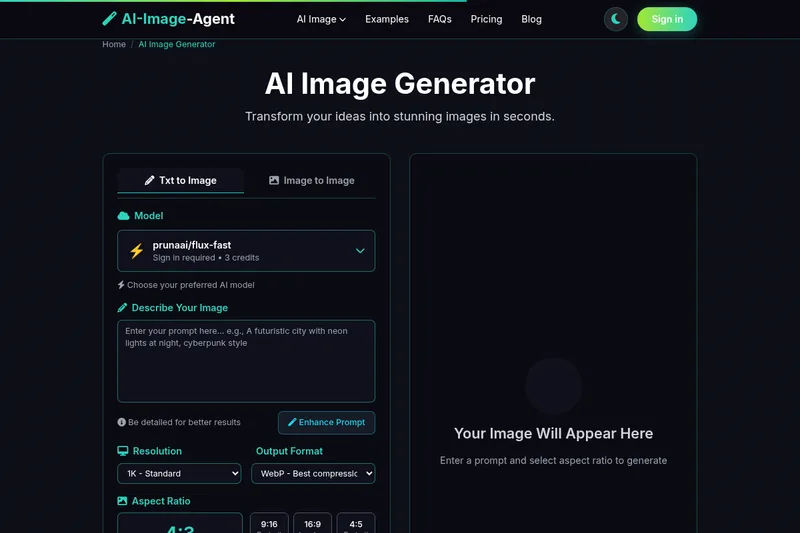
AI-Image-Agent generates images from text prompts and edits uploaded images using eight selectable AI models. Creators and visual-content teams can compare outputs and download images using a shared credit balance.
Who it's for
- Visual-content creators who want text-to-image generation with a choice of models, aspect ratios, resolutions, and output formats.
- Designers or creative teams who need to edit images using uploaded references and written instructions.
- Professionals creating images for client or marketplace work who need paid-plan commercial usage rights.
Not the right fit if…
- People who need anonymous access to all models or image-to-image editing: anonymous use is limited to Flux Schnell, while the other models and image-to-image editing require an account.
How it fits your workflow
In a browser, enter a text prompt or upload up to five reference images (JPG, PNG, or WebP, up to 10MB each) and describe the desired image or edit.
Choose a model and output settings, including aspect ratio, resolution, and format. The model's credit cost is shown before generation; the selected model processes the request on provider servers.
Wait for the generation to finish, then download the image. Creations are saved in the account for 30 days unless deleted earlier.
Pricing
Free: The page offers 10 free credits on signup. Users can also try Flux Schnell without an account, subject to a per-device cap; anonymous use is limited to that model.
Starter
$9.90/month
- · 150 credits
- · Commercial usage rights
One-off credit pack
Starts at $30 for 500 credits
- · Credits can be purchased without a subscription
Prices checked on Oct 28, 2026 from the vendor's site. They can change; confirm before you buy.
Key features
- Eight image models
- Choose among Flux Schnell, Flux 2 Klein 4B, prunaai/flux-fast, Google Nano Banana, Nano Banana Pro, Seedream 4, Seedream 4.5, and GPT Image 2. Model credit costs are shown before generation.
- Text-to-image generation
- Enter a text prompt to generate a new image. The page recommends detailed prompts and offers an Enhance Prompt option.
- Image-to-image editing
- Upload up to five reference images and provide an instruction to edit or transform them. Supported upload formats are JPG, PNG, and WebP, with a 10MB limit per file.
- Output controls
- Select from nine aspect ratios, 1K, 2K, or 4K resolution options, and JPG, PNG, or WebP output. The resolution options available depend on the selected model.
- Shared credit balance
- Use one credit balance across the available models. The displayed cost varies by model, and failed generations are automatically refunded.
- Saved creations
- Generated images are kept in the user's account for 30 days and can be deleted by the user.
Works with
- Supabase Auth
- Creem
Limitations to know
- Image-to-image requests allow up to five uploads, each no larger than 10MB.
- Anonymous use is limited to Flux Schnell and is capped per device; an account is needed for the other models, image-to-image editing, and saved images.
- Model availability for 1K, 2K, and 4K output depends on the selected model.
- Images are automatically deleted 30 days after creation unless deleted sooner by the user.
Alternatives to consider
-
AI Image Editor
Choose it if you also need image enhancement, background removal, or short-video creation in the same workspace.
Getting started
A modern browser (Chrome, Edge, Firefox, or Safari) on desktop or mobile and an internet connection; no GPU or high-end machine is required.
- Open the generator and sign in or use the anonymous Flux Schnell option; signup provides 10 free credits.
- Enter a prompt or upload up to five reference images for image-to-image editing.
- Select the model and desired aspect ratio, resolution, and output format; check its credit cost.
- Generate the image and download the result when ready.
Frequently asked questions
How do I generate an image?
Write a prompt or upload up to five reference images for image-to-image editing, choose the model and output settings, then press Generate. The model's credit cost is shown before generation.
What image formats and upload limits are supported?
JPG, PNG, and WebP are supported for uploads and downloads. Uploads are limited to five files per request and 10MB per file.
How much does each model generation cost?
The listed costs are 1 credit for Flux Schnell, 2 for Flux 2 Klein 4B, 3 for prunaai/flux-fast, 12 for Seedream 4, 16 for Google Nano Banana, 16 for Seedream 4.5, 40 for Nano Banana Pro, and 45 for GPT Image 2.
Are commercial usage rights included?
Commercial usage rights are included with paid subscriptions starting with Starter at $9.90 per month. Free trial credits are for evaluation, not commercial work. Users can email support to request written license terms.
Does the service support batch generation?
No. Batch generation is marked as coming soon and is not included in any plan. Each image is currently a separate request.
What hardware is required?
The page states that a modern browser on desktop or mobile and an internet connection are required. Models run on providers' servers, so a GPU or high-end machine is not needed.
How long are images retained?
Uploaded and generated images are stored in account-tied cloud storage and deleted 30 days after creation, or immediately if the user deletes them.
Can I try the service for free?
The page offers 10 free credits on signup. An anonymous user can generate with Flux Schnell, subject to a per-device cap; creating an account unlocks the other models, image-to-image editing, and saved images.