
AIYardDesignStudio
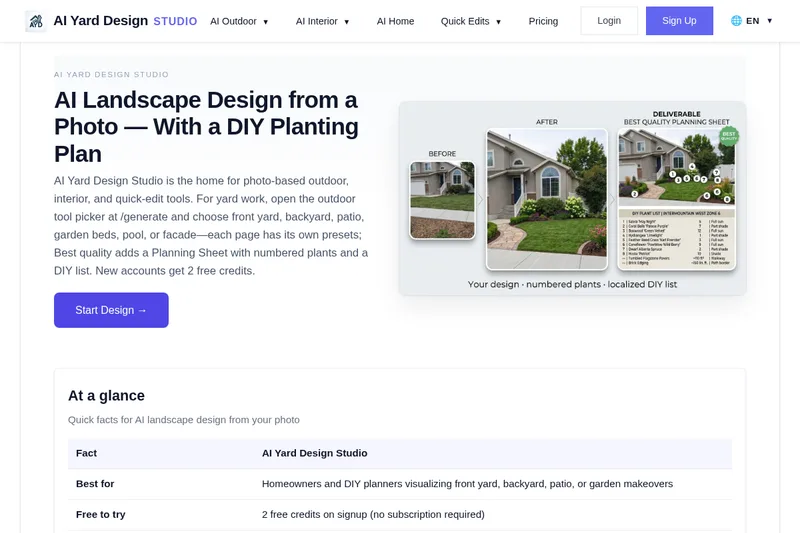
AI Yard Design Studio turns photos of outdoor spaces, interiors, and home exteriors into AI-generated redesigns. Its outdoor Best quality option includes a Planning Sheet with numbered plants and a location-aware DIY list.
AIYardDesignStudio is ai software teams evaluate for ai workflows. Use this page to review pricing, integration signals, and the best alternatives before you commit.
Profile facts come from the vendor source. AiMatch labels unknown pricing or API details instead of estimating them.
Review official source →Used in These Packs
Quick Overview
Best for: AI workflows
What it does
AI software for decision-makers comparing workflow fit and alternatives.
Best fit
AI workflows
Pricing snapshot
Pricing available from Free; new accounts receive 2 credits.
Next step
Compare AIYardDesignStudio with similar tools before you shortlist it.
Compare this tool before you shortlist it
Review alternatives, pricing posture, and workflow fit side by side.
AI Yard Design Studio is a photo-based design tool for outdoor spaces, interiors, and house exteriors. Users upload a photo, select an area and design options, and generate a proposed makeover. Outdoor tools cover spaces such as front yards, backyards, patios, gardens, pools, and side yards; interior tools cover rooms including living rooms, kitchens, bedrooms, and bathrooms.
For outdoor projects, the Best quality option includes a clean design view, numbered plant callouts, and a localized DIY planning list with plant names, quantities, light needs, and brief hardscape notes. The service is aimed at homeowners and DIY planners, and also offers a large-scale landscape design option for parks, commercial sites, and HOA common areas.
Professional AI Landscape Design Platform AIYardDesignStudio is a Landscape Visualization Tool featured on Dang.ai. Learn more about AIYardDesignStudio's AI tool.
Own this listing?
Claim this page for a one-time $29 to add pricing, features, screenshots, verified owner details, and a clearly labeled 30-day category position after the profile is live.
Claim this listing for $29Key Features
Photo-based design generation
Upload a photo of a yard, room, or exterior and generate a design based on the selected area and style.
Outdoor area and style presets
Outdoor tools cover front yards, backyards, patios and terraces, side yards, garden retreats, pools and spas, and house exteriors, with area-specific styles, functions, or layout presets.
Location-aware planting suggestions
For outdoor designs, the localized DIY planning list includes climate-zone plant names, quantities, and light needs.
Best quality Planning Sheet
Outdoor Best quality results include a clean design view, numbered items from 1 to 8, and a localized planning list with plants and brief hardscape notes.
Interior and exterior design tools
The platform includes room-specific interior design tools and a house exterior tool for previewing facade details such as cladding, roof, color palette, and entry details.
Quick Edits
Single-change photo edits include virtual staging, decluttering, house paint colors, object removal, and outdoor or backyard and patio edits.
Refine and share designs
Users can fine-tune a generated design, view it at full size, then download or share it.
Pricing
New accounts receive 2 free credits, with no subscription required to try the service.
Free signup credits
Free; new accounts receive 2 credits.- Credits can be used to generate designs.
- The FAQ says two credits are enough for one Best quality Planning Sheet at 1K or two Quick previews.
Credit packs
Price not stated.- Credit packs are available for more runs.
- The site says buying a pack enables more runs and cloud save.
Use Cases
Plan a yard or garden makeover
Homeowners can visualize a front yard, backyard, garden, or side yard from a photo and use the planning list to inform a DIY project.
Explore patio, deck, or pool concepts
Users can preview outdoor living layouts and styles for patios, terraces, decks, pools, and spas.
Preview a home exterior update
Users can visualize facade changes and review material notes for a contractor or DIY paint list.
Refresh an interior room
Users can generate room redesigns from photos, with tools for spaces such as living rooms, bedrooms, kitchens, bathrooms, and home offices.
Visualize larger landscape sites
The large-scale landscape design option is presented for parks, commercial sites, and HOA common areas.
Integrations
No verified integration details are available.
Benefits
Limitations
Frequently Asked Questions
What can I design with AI Yard Design Studio?
Do outdoor and interior tools share one account and credits?
What is Best quality and the Planning Sheet?
What are Quick Edits compared with full design tools?
Is it free to try?
Which tool should I start with?
Getting Started
- 1 Create an account or sign in; new accounts receive two free credits.
- 2 Upload a clear photo of the yard, room, or project site.
- 3 Choose the area type and select a style, function, elements, and location where applicable.
- 4 Generate the design, refine it, then view it at full size and download or share it.
Support
Contact support at [email protected].
FAQ and guides
The site provides FAQs, design guides, articles, and a changelog.