
Amni-CAD
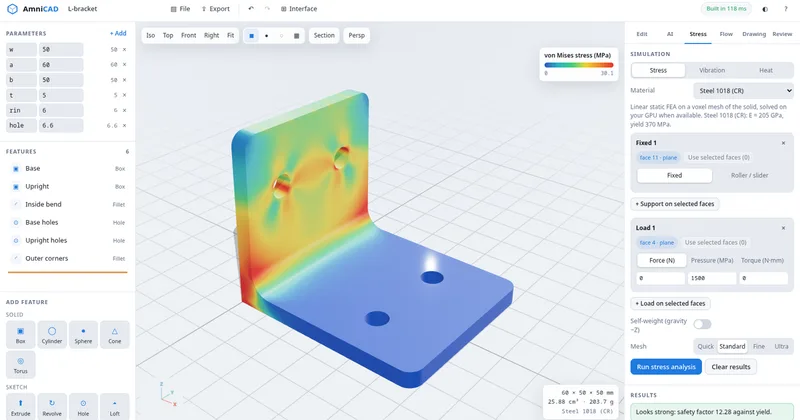
Amni-CAD lets engineers and manufacturing teams design parts, run local stress and flow studies, and prepare quotes and shop outputs in a browser. Its AI co-design workflow can build and check a part from plain-language requests, with user approval for changes.
Who it's for
- Mechanical engineers designing parametric parts who need stress or flow studies alongside their CAD work.
- Job-shop teams preparing quotes, sheet-metal flat patterns, toolpaths, G-code, or setup sheets.
- Trade schools and CTE programs licensing CAD for class and shop work on school machines.
Not the right fit if…
- Students doing paid or commercial work on the Student plan: the page explicitly excludes paid and commercial use from that plan.
How it fits your workflow
Create a part, drawing, or assembly in the browser, or describe a design in plain language for AI co-design. Review and approve AI-proposed changes.
Run stress or flow studies on the local computer, check manufacturing prices, and prepare outputs such as flat DXF, toolpaths, G-code, and setup sheets. Export drawings, meshes, or STEP files for compatible CAD programs.
Pricing
Free: The Free plan is $0 forever and includes modeling, Form, drawings, exports, guided design, the AI assistant, instant quotes, flat DXF, and the first stress, flow, and G-code report.
Free
$0 forever
- · Modeling, Form, drawings, and exports
- · Guided design and the AI assistant
- · Instant quotes and flat DXF
- · First stress, flow, and G-code report
Pro
$15 per month or $150 per year
- · Unlimited stress, flow, and G-code
- · Personal encrypted vault (PDM)
- · User's drawing formats and standards
- · Headless API
Enterprise
$99 per month or $990 per year, for up to 10 people
- · Everything in Pro for the team
- · Hosted team vault with approvals
- · Watch-folder automation
- · One key and one bill
Lifetime
$500 once for one person; 1-year, 3-year, and 5-year update options are listed at $500, $1,000, and $1,500 respectively
- · Everything in Pro, paid once
- · Updates for the selected 1-, 3-, or 5-year period
- · After the update period, keep the last version or any earlier version
- · Runs offline from one file
Student
$5 per month for one student with a school email
- · Everything in Pro
- · For classes, learning, and personal projects
- · Not for paid or commercial work
Shop quote widget branding
Add-on: $10 per month or $100 per year
- · Add the shop's branding to the quote widget
Prices checked on Nov 26, 2026 from the vendor's site. They can change; confirm before you buy.
Key features
- CAD design and drawings
- Create parametric parts and organic shapes, and draft drawings. The page also describes sculpting and animating in Form.
- AI co-design
- Describe a design request in plain language. The AI builds the part, checks its work, and runs a study; users approve each change. The page names Claude Sonnet 5.5, ChatGPT, Gemini, Grok, and models running on the user's computer.
- Local stress and flow studies
- Run stress and safety-factor analysis, along with wind and water tunnel studies, on the user's computer.
- Manufacturing quotes
- View a shop price for each process while designing, including instant quotes for laser, waterjet, or milling. The page also describes an overseas online estimate for CNC parts and price-by-quantity information.
- Sheet-metal design
- Design flanges, returns, hems, and Z bends, then unfold the design to a flat DXF with bend lines, a bend table, and press-brake force information.
- CAM and shop outputs
- Generate and simulate toolpaths, G-code, and setup sheets. The page labels CAM as beta and describes operations step by step.
Works with
- STEP-compatible CAD programs
- AI models
- Export formats
Limitations to know
- CAM is identified as beta.
- The Free plan includes the first stress, flow, and G-code report; unlimited reports are listed under Pro.
- The Student plan is restricted to classes, learning, and personal projects and is not for paid or commercial work.
- For a machine that is never online, the page says to contact the company about a fixed-term or perpetual license key.
Alternatives to consider
-
Aircad
Choose it if you need a browser-based CAD workspace whose optional AI agent prepares changes for review and whose stated focus includes team collaboration.
Getting started
- Open Amni-CAD from the product page or choose Start a Guided Design.
- Create a design or describe the desired part in plain language for AI co-design.
- Review and approve any AI-proposed changes, then run an available study or prepare an export or shop output.
Frequently asked questions
Do my designs leave my computer?
The page says no: geometry, simulations, and drawings are computed in the browser, and designs are saved only there or in files the user downloads. The free tier has no account and no activity logging. Optional cloud features are described separately on the page.
Which CAD programs can I exchange files with?
Any program that reads STEP, including SOLIDWORKS, Inventor, Fusion, Creo, NX, CATIA, Solid Edge, Onshape, and FreeCAD. Drawings export as PDF, SVG, and DXF, and meshes as STL, 3MF, OBJ, glTF, and PLY.
Does it work offline?
Yes. License keys are checked on the device. For a machine that is never online, the page says to contact the company about a fixed-term or perpetual key.
Can I cancel anytime?
Yes. The page says subscriptions can be canceled from Pro → Manage billing in Amni-CAD. The key works through the end of the paid period, after which everything in Free keeps working.
Can I get a refund?
Yes. Email [email protected] within 14 days of a monthly, yearly, or Lifetime payment for a full refund. The page notes that the refund ends what that payment bought.
Can a trade school or CTE program license this?
Yes. A seat covers one instructor or one lab computer, and a site license covers students and instructors in a program on school machines for class and shop work, not paid commercial jobs. Amni-Construct is included on the same quote; contact [email protected].