
Beatsflow
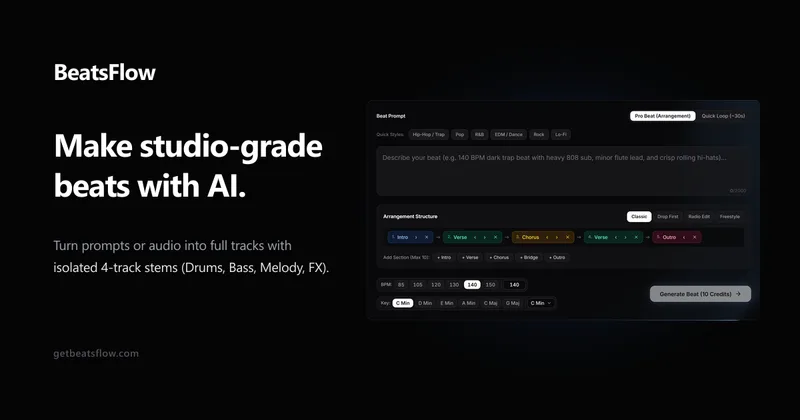
BeatsFlow generates instrumentals from text prompts or reference audio, then creates structured arrangements and four exportable stems. It is aimed at producers and artists who need original beats for recording or DAW production.
One of 54 tools in Music
Who it's for
- Music producers who want to generate instrumentals from genre, tempo, key, and mood prompts.
- Recording artists and producers who need arranged backing tracks with verse, chorus, and other song sections.
- Producers using FL Studio, Ableton, or Logic who want drums, bass, melodic chords, and FX exported as separate stems.
Not the right fit if…
- People who need to release beats commercially on the free plan: Starter is limited to personal use and does not allow commercial release.
- Producers who need immediate access to the paid plans: the Creator and Studio Pro calls to action say “Join Waitlist.”
How it fits your workflow
Enter a text prompt describing the instrumental, or upload an MP3 or WAV reference. The page says users can specify musical details such as genre, tempo, and key, and that reference analysis extracts groove and chord movement.
Generate a beat, then create a multi-section arrangement or variations. Isolate drums, bass, melodic chords, and FX into a ZIP package for use in FL Studio, Ableton, or Logic.
Pricing
Free: Starter costs $0/month and includes 15 Studio Credits per month, 10 cloud-saved beats, and high-quality MP3 export. It is for personal use only and does not allow commercial release.
Starter
$0/month
- · 15 Studio Credits per month
- · 10 cloud-saved beats
- · High-quality MP3 export
- · Standard generation speed
Creator
$19/month
- · 250 Studio Credits per month
- · 50 cloud-saved beats
- · Lossless WAV and MP3 export
- · Four-stem multitrack isolation
Studio Pro
$39/month
- · 650 Studio Credits per month
- · 250 cloud-saved beats
- · Lossless WAV and MP3 export
- · Four-stem multitrack isolation
Prices checked on Oct 21, 2026 from the vendor's site. They can change; confirm before you buy.
Key features
- Prompt-to-instrumental generation
- Turn text descriptions of genre, tempo, melodic mood, and other musical details into instrumentals. The page lists custom BPM from 60–180 and musical scale keys.
- Reference groove cloning
- Upload an MP3 or WAV reference, including a vocal track or sample loop, for analysis of groove, swing, syncopation, and chord movement used to create an original beat.
- Four-stem multitrack isolation
- Separate a generated beat into drums, bass, melodic chords, and FX, then export the tracks as a ZIP package for use in a DAW.
- Multi-section arrangements
- Generate arrangements with sections such as intros, verses, choruses, bridges, and outros, along with drum dropouts and energy risers.
- Theme and pattern variations
- Create alternative drum patterns, half-time or double-time breakdowns, syncopated fills, and stripped melodic variations from a musical idea.
- Audio guardrails and headroom
- The page describes DSP filters for clipping, low-frequency mud, and phase cancellation, with stated -0.3 dB True Peak headroom protection.
Works with
- FL Studio
- Ableton
- Logic
Limitations to know
- The Starter plan is for personal use only and does not allow commercial release.
- The Starter plan uses standard generation speed, while the paid plans offer priority queues.
- The Creator and Studio Pro plan calls to action say “Join Waitlist.”
Alternatives to consider
-
SOUNDRAW
Choose it if you want AI-generated royalty-free tracks with perpetual licensing, rather than BeatsFlow’s prompt-or-reference beat workflow and four-stem workstation.
-
Nafy AI
Choose it if you want a tool described as generating full rap songs and lyrics as well as beats, rather than a workstation focused on instrumental generation, arrangements, and stems.
Getting started
- Use the instant Google sign-in option; the page says no credit card is required for the free offer.
- Type a prompt and select a genre, or upload an MP3 or WAV reference.
- Generate the beat and, if needed, create an arrangement or export four isolated stems.