
Collager.ai
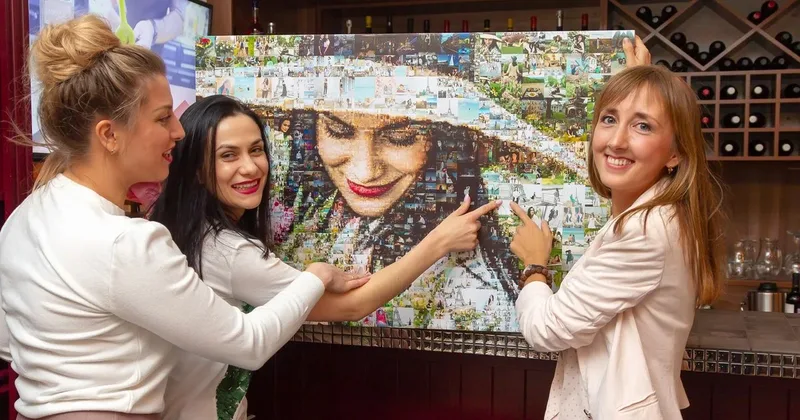
Collager.ai turns a user's photo collection into a mosaic of a chosen image, with a preview for review and an HD file available for printing. Event organizers, organizations, and developers can also use its viewer, REST API, or MCP server.
Who it's for
- Families and individuals who want to turn an album into a mosaic portrait or keepsake.
- Event organizers, schools, and organizations creating photo displays or online viewers for guests and members.
- Developers building photo-mosaic workflows into an app or MCP-compatible assistant.
How it fits your workflow
Upload a main image and a collection of your own photos. The main image must be at least 1,000 px, uploaded photos must be at least 300 px, and at least 30 photos are required. You can star favorites and adjust crops.
Collager.ai selects and color-matches photos for the mosaic, then emails a watermarked preview, usually in 10–30 minutes. Review the included styles before deciding whether to use a credit for an HD JPEG.
For developer workflows, connect through the REST API or MCP server. For events and organizations, Collager.ai can set up an online viewer on request.
Pricing
Free: A free account provides a watermarked preview at about 5,000 px, with all styles included. No payment is due unless the user downloads an HD file.
Preview
Free
- · Full picture at about 5,000 px
- · Watermark
- · All styles included
HD file
$9.95 per credit
- · One HD picture download
- · About 12,000 px on the long side
- · No watermark
- · Up to 25,000 px on request
Credit packs
5 for $39.85; 10 for $67.75; 20 for $99.55
- · Credits for HD file downloads
- · The page says packs save up to 50%
- · Unused credits never expire
Business volume pricing
Separate pricing; contact [email protected]
- · For companies, schools, or series of events needing larger volumes of credits
Prices checked on Nov 25, 2026 from the vendor's site. They can change; confirm before you buy.
Key features
- Photo mosaic creation
- Combines a main photo with the user's own collection of photos, placing smaller images across the main image to form a mosaic.
- AI photo selection and color matching
- The AI selects a photo for each area of the main image based on color, with gentle tinting where the photo collection lacks a needed shade.
- Face-aware cropping
- The system looks for faces before cropping to help keep them in frame. Users can check crops and move them by hand.
- Favorites and tile sizing
- Users can star favorite photos to make them larger in the mosaic and prioritize their placement. The page also says users can re-crop or delete photos.
- Photo reuse handling
- Each uploaded photo is used once before any photo is repeated. The service also keeps repeats apart.
- Multiple mosaic styles
- Several styles are included in the free preview, allowing users to review them before choosing.
Works with
- MCP-compatible assistants and clients
- REST API
- OpenRouter, DeepSeek, Kimi, Gemini, Mistral, LangChain, Zapier, and Make
Limitations to know
- The main photo must be at least 1,000 px, and uploaded photos must be 300 px or larger.
- At least 30 uploaded photos are required.
- The free preview includes a watermark; a credit is required for a watermark-free HD download.
- Preview processing usually takes 10–30 minutes and can take up to 60 minutes at busy times.
Getting started
A free account; a main photo at least 1,000 px; and at least 30 uploaded photos, each 300 px or larger.
- Create an account to receive the preview by email.
- Upload a main photo and at least 30 of your photos.
- Review the emailed preview and available styles; adjust crops or favorites as needed.
- Use a credit to download the watermark-free HD JPEG if desired.
Frequently asked questions
What is an AI collage maker?
The page describes it as a tool that puts many photos together into one picture. Collager.ai uses AI to sort, crop, and color-match the photos, and says it does not draw anything.
How much does an AI collage maker cost?
The preview is free, and an HD download costs $9.95 for one credit. Packs cost $39.85 for 5, $67.75 for 10, and $99.55 for 20.
Can I download AI collages without a watermark?
Yes. The free preview has a watermark; an HD download uses one credit and has no watermark.
Do I need an account?
Yes. The account lets Collager.ai email the preview and lets users return to a project to change the main photo, add photos, or build again.
How many photos can I add?
The page says at least 30 are needed, most users upload between 30 and 1,000, and thousands can be added. A few hundred is described as the sweet spot.
How long does it take to make a collage?
A preview usually arrives by email in 10–30 minutes after uploading, and can take up to 60 minutes at busy times.
How does Collager.ai handle privacy?
The page says photos are used only to build the picture and, if ordered, the assembly video; they are not used to train models. Users can delete a project from their account.
Can I print the HD file on canvas?
Yes. The page says the HD file is made for printing on canvas or other materials, and users can print it themselves or ask Collager.ai.
What file do I get?
The download is a JPEG. The preview is about 5,000 px across with a watermark; the HD file is about 12,000 px on the long side, up to 25,000 px on request.
Is volume pricing available for businesses?
Yes. Companies, schools, and event organizers needing many pictures can contact [email protected] for separate credit pricing.