
Datatomcp
datatomcp connects team spreadsheets, databases and business apps so AI agents can return database-computed answers using approved definitions. Finance, operations, revenue and product teams can audit questions and trace answers to dataset versions.
Who it's for
- Finance and operations teams using spreadsheets alongside databases or business apps who need agents to return consistent, computed answers.
- Revenue and product teams linking data such as orders, customers and regions to query across datasets from MCP-compatible agents.
- Consultants and agencies setting up separate data workspaces and agent access for client teams.
Not the right fit if…
- Teams that need AI agents to run raw SQL: datatomcp explicitly provides validated query tools instead of raw SQL.
How it fits your workflow
Connect files, Google Sheets, databases or supported apps; each source becomes a dataset with versions, sync and an import report. Link datasets using shared identifiers, then review and approve definitions drafted from the columns.
Add the remote MCP endpoint to a compatible agent and sign in, or use the REST API with a Bearer API key. The agent asks through validated tools; the database computes results, which identify the dataset version and can include charts or dashboards.
Review agent questions, queries, durations and errors in the audit view, compare repeated questions, and export audit records as CSV. Workspace access can be assigned to owners, editors and viewers.
Pricing
Free: Free plan includes 3 datasets, up to 100,000 rows per dataset, 1,000 queries per day, one workspace for two people, linked datasets, on-demand refresh, MCP and REST access, and 30-day audit retention. No card is needed.
Free
€0
- · 3 datasets
- · 100,000 rows per dataset
- · 1,000 queries per day
- · 1 workspace with 2 people
Pro
€12/month or $12/month
- · 25 datasets
- · 2,000,000 rows per dataset
- · 50,000 queries per day
- · 3 workspaces, with 5 people each
Business
Custom quote
- · More workspaces
- · 20+ people
- · Higher limits
- · Help setting up data
Prices checked on Nov 13, 2026 from the vendor's site. They can change; confirm before you buy.
Key features
- Data source connections and versioning
- Import CSV or Excel files, link files, select Google Sheets, or connect PostgreSQL, MySQL, Stripe, HubSpot and Airtable. Sources become versioned datasets with sync and an import report describing issues such as unreadable lines or inconsistent values.
- Linked datasets
- The product detects shared identifiers or column pairs across datasets and displays their links. Confirmed links let agents filter, group and total data across datasets in one query; unmatched rows are counted.
- Approved definitions and glossary
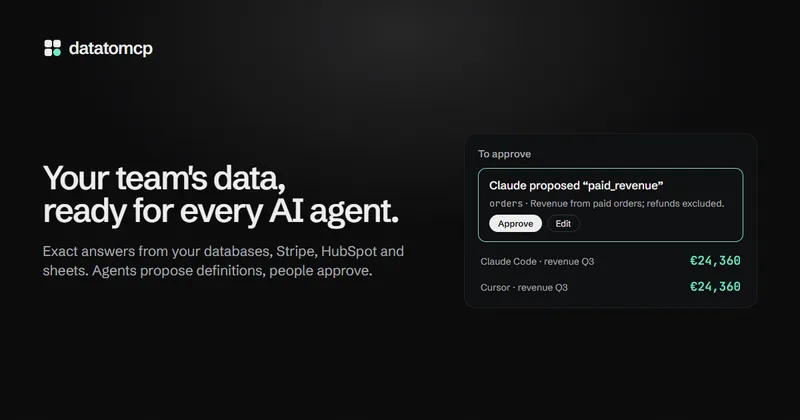
- datatomcp drafts metric definitions from columns, and a person can approve or edit each definition. Agents use approved definitions, answers identify who approved a definition, and a glossary records team-specific terms.
- MCP server and REST API
- AI clients can connect to the remote MCP server using OAuth sign-in, while applications and agents can use the REST API with a Bearer API key. The MCP tools include read and aggregate queries, charts, dashboards and issue reporting.
- Agent audit and comparison
- The audit log records who asked, which agent and dataset were involved, the query, duration and errors. Repeated questions can be compared, and audit records can be exported as CSV.
- Charts and dashboards
- Agents can draw charts in chat and create dashboards as a board or a short story of slides. Team members can refresh dashboards on the latest data; the product describes a library of 52 chart types.
Works with
- Data sources
- MCP-compatible clients
- REST API
- AI providers for the in-app assistant
Limitations to know
- Agents cannot run raw SQL; they use validated query tools instead.
- A query call is capped at up to 1,000 rows.
- Free is limited to 3 datasets, 100,000 rows per dataset, 1,000 queries per day, one workspace and two people.
- Pro is limited to 25 datasets, 2,000,000 rows per dataset, 50,000 queries per day and three workspaces with five people each.
- AI cleaning suggestions require an editor to opt in and approve proposed cleanup rules.
Getting started
An MCP-compatible client for the remote MCP connection, or an application that can call the REST API. The page provides OAuth sign-in for MCP and Bearer API key authentication for REST.
- Create an account through the Start free link.
- Connect a supported data source by uploading a file, selecting a Google Sheet or connecting a database or app.
- Review the import, link related datasets and approve or edit definitions.
- Connect an agent using the MCP URL and sign in, or call the REST API with a Bearer API key.
Frequently asked questions
Which data sources can I connect?
The page lists PostgreSQL and MySQL, Stripe, HubSpot, Airtable, Google Sheets, Excel and CSV. PostgreSQL and MySQL connections can use a table or a read-only query. Additional sources can be requested.
Which agents can use datatomcp?
Any client that supports remote MCP servers can connect, including Claude, ChatGPT, Cursor and Claude Code. Agents without MCP support, n8n workflows and custom applications can use the REST API.
Can agents run SQL?
No. Agents use a set of validated query tools rather than raw SQL; the page says queries are read-only and capped at up to 1,000 rows per call.
Can it read private Google Sheets?
Yes. Users select specific sheets through Google's file picker, and datatomcp receives access to those files only, not the rest of the user's Drive.
Can it draw charts and dashboards?
Yes. Agents can draw charts in a conversation and create dashboards in the workspace. Team members can refresh dashboards on the latest data.
Is data sent to an AI provider?
The page says AI processing is opt-in and data is not used for training. AI cleaning suggestions send a column summary and at most 50 sample rows to Mistral in the EU when an editor asks; the in-app assistant uses the user's own AI key.
What happens when a plan limit is reached?
The page says users receive an email at 80% of daily query limits, agents receive an error at 100%, and the count resets at midnight UTC. Datasets that exceed a row limit are refused at import with the reason.
Can I cancel Pro?
Yes. The page says Pro can be cancelled from the billing portal at any time; access continues until the end of the billing period. On Free, existing datasets remain readable, subject to Free plan limits.