
Ecrettmusic
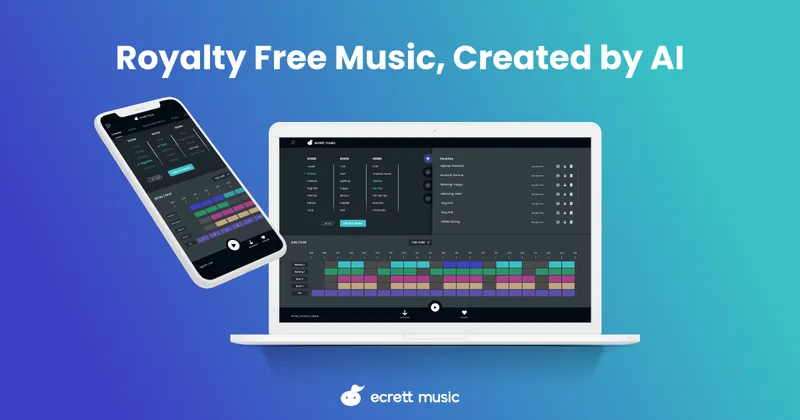
Ecrett Music lets video, game, podcast, and advertising creators generate and customize royalty-free background music from scene, mood, and genre selections. Subscription plans cover commercial use under individual or company licenses.
Who it's for
- Video creators who want to generate background music from scene, mood, and genre choices and check its fit against an uploaded video.
- Game and podcast creators who need music they can customize and incorporate into their content.
- Individuals or companies producing commercial or monetized content who need a corresponding music license.
Not the right fit if…
- People who want to sell or distribute generated tracks as standalone music files: the license prohibits reselling, sublicensing, or redistributing the files separately from the content.
- Creators who need to download music only on a phone or tablet: the FAQ says a PC is required for downloads.
How it fits your workflow
Select at least one scene, mood, or genre and create music. Ecrett generates different results even when the same settings are used.
Customize the instruments and structure, and optionally upload a video to check whether the music fits.
Save tracks in Favorites or download them. Paid subscriptions offer unlimited downloads and commercial use under an individual or company license; downloaded music must be incorporated into content rather than distributed as a standalone file.
Pricing
Free: The free plan allows users to download preview music and save and manage created music.
Free
$0
- · Download preview music for free
- · Save and manage created music
Individual
$4.99/month billed annually, or $7.99/month
- · Unlimited royalty-free music downloads
- · Use music for commercial projects and YouTube monetization
- · License applies to the individual
Business
$14.99/month billed annually, or $24.99/month
- · Unlimited royalty-free music downloads
- · Use music for commercial projects and YouTube monetization
- · License applies to the company
Prices checked on Oct 31, 2026 from the vendor's site. They can change; confirm before you buy.
Key features
- AI music generation
- Generate music by selecting at least one scene, mood, or genre. The page says the system creates different music each time, even with the same settings.
- Music customization
- Change the melody, backing, bass, and drum instruments, and adjust the music structure by switching blocks on or off.
- Video review
- Upload a video to review whether generated music matches the content.
- Music management
- Use Favorites, Download History, and Create History to manage music. The page says the last 10 created tracks are saved automatically.
- Royalty-free licensing for content
- Paid subscriptions include use in personal and commercial projects, including monetized content. The music must be incorporated into a work rather than distributed as a standalone music file.
Limitations to know
- A PC is required to download music; creating, editing, and saving music is available on phones and tablets.
- Music cannot be shared, sold, sublicensed, or redistributed as a standalone music file, even for free.
- The site recommends a minimum internet speed of 5 Mbps for music creation.
- The page prohibits using the music in content it describes as harmful, sexual, or hateful.
Alternatives to consider
-
AirMusic
Choose it if you want AI-generated music plus AI-driven music videos, rather than Ecrett's scene, mood, and genre selection with track customization.
-
Musick
Choose it if you want to generate music from text prompts or use vocal options, rather than Ecrett's scene, mood, and genre-based workflow.
Getting started
The FAQ recommends a minimum internet speed of 5 Mbps for creating music. A PC is required to download music.
- Create a free account; the page says account creation is free.
- Open Create Music and select at least one scene, mood, or genre.
- Choose Create Music, then customize instruments or structure as needed.
- Save a favorite or download music using a PC.
Frequently asked questions
Can I download music using a mobile device?
The FAQ says a PC is required to download music. Users can create, edit, and save music on a phone or tablet, then open Favorites on a PC to download it.
Can I use Ecrett music in commercial projects?
The page says subscription plans include personal and commercial use, including use in projects such as videos and advertisements. The music may not be resold, sublicensed, or distributed as a standalone file.
Can I keep using music after canceling a subscription?
The page says users can continue using music they downloaded before cancellation, but they can no longer download music after canceling.
What internet speed does Ecrett recommend?
The FAQ recommends a minimum internet speed of 5 Mbps to create music.
Can I edit music I have already created or downloaded?
Yes. The FAQ says users can choose Re-edit from the Favorites, Download History, or Create History tabs.