
fullreviews
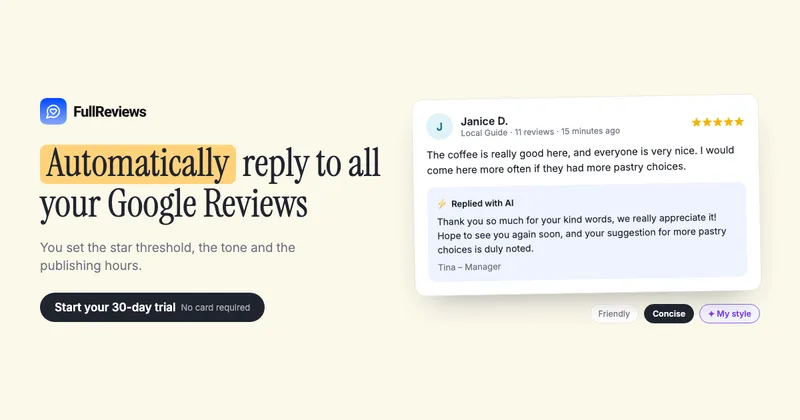
FullReviews drafts and manages Google review replies using business-defined tone, rules, and schedules. Local-business and hospitality teams use it to handle replies and review insights across their Google Business Profile locations.
Who it's for
- Restaurant and retail teams that want to automate eligible Google review replies while keeping sensitive feedback for human review.
- Hospitality operators managing multiple Google Business Profile locations who want consistent reply rules and per-location billing.
- Home-service businesses such as plumbers and locksmiths that need a workflow for Google review replies and customer feedback.
Not the right fit if…
- Teams that need guaranteed Google Maps ranking, rating, or traffic improvements: FullReviews explicitly does not guarantee those outcomes.
- Teams that need the described review-reply workflow for platforms other than Google: the page describes connecting Google Business Profile and replying to Google reviews.
How it fits your workflow
Connect the Google Business Profile locations you manage, then set a rating threshold, tone, reply rules, and publishing schedule. Eligible new reviews can receive AI-written replies that are published according to those settings.
Reviews below the threshold or cases that may need context are held for human handling. For older unanswered reviews, review each generated batch before it goes out.
Use the dashboard to monitor ratings, review volume, customer feedback themes, and Google listing performance; listing details can also be edited from the dashboard.
Pricing
Free: A 30-day free trial is available with no credit card required.
Local
€14 per active business location per month, or €9.99 per month per location when billed annually (€119.90 per location per year).
- · Automatic replies to reviews
- · Batch replies to past reviews
- · Unlimited replies per month
- · Custom tone, style, and trigger rules
Prices checked on Nov 1, 2026 from the vendor's site. They can change; confirm before you buy.
Key features
- AI review replies
- Generates Google review responses using a selected tone, custom guidelines, and, optionally, a style profile based on replies the business has already published.
- Automatic replies with rules and scheduling
- Businesses set a rating threshold, publishing rules, a delay, and the hours when replies can go out. Reviews below the chosen threshold are not automatically published and can be handled by a person.
- Past-review batch replies
- FullReviews can catch up on older unanswered reviews. The business reviews each batch before those replies are published.
- Google Business Profile listing edits
- The dashboard can edit listing details such as hours, holiday hours, photos, description, phone, website, categories, name, and address, with a preview of the listing as it looks on Google Maps.
- Review analytics and customer insights
- Tracks review counts and average ratings over time, and summarizes themes customers praise or complain about so businesses can monitor changes.
- Local SEO performance metrics
- Shows Google Maps and Search views, calls, direction requests, website clicks, and searches that led people to a business listing.
Works with
- Google Business Profile
Limitations to know
- The described review-reply workflow is for Google reviews connected through Google Business Profile.
- Reviews involving legal threats, health or safety topics, aggressive language, or staff names are intended for human review rather than automatic publication.
- The product does not guarantee improvements to Google Maps rankings, ratings, or traffic.
Alternatives to consider
-
UltimaReviews
Choose it if you need review management across major platforms, including review requests and reminders, rather than a workflow focused on Google Business Profile.
-
Uberall
Choose it if you need a broader multi-location marketing platform that also manages listings, local pages, and social publishing alongside reviews.
Getting started
- Start the 30-day trial; no credit card is required.
- Connect the Google Business Profile you manage.
- Set reply rules, tone, and publishing schedule.
- Review the first responses or past-review batch and adjust the rules.
Frequently asked questions
How long is the free trial, and can I cancel?
The free trial lasts 30 days and starts when you sign up; no card is required. You subscribe when you decide to, and you can cancel a subscription at any time.
How does pricing work?
FullReviews is billed per active business location: €14 monthly, or €9.99 per month when billed annually (€119.90 per year).
Is there a limit on the number of replies?
No. The page says replies are unlimited on both monthly and annual plans for active locations.
Can I manage multiple locations?
Yes. You can connect multiple Google Business Profile locations, including locations from separate Google Business Profile accounts. Each active location is billed at the per-location price.
Which reviews can be published automatically?
You choose the rating threshold and publishing rules. Reviews that may require context, including legal threats, health or safety topics, aggressive language, or staff names, are intended for human review.
Will automatic replies improve my Google Maps ranking?
FullReviews does not guarantee a Google Maps ranking, rating, or traffic outcome. The page describes consistent replies as part of a customer-feedback workflow, while noting that results depend on many factors.
Can I edit my Google Business Profile listing?
Yes. The dashboard can edit hours, special hours, photos, description, phone, website, categories, name, and address, and provides a live preview. Changes that could prompt Google to verify the business again require confirmation first.
Can I use FullReviews without technical skills?
The page says setup consists of connecting Google Business Profile, selecting reply rules, and reviewing the first responses.