
Kata Send
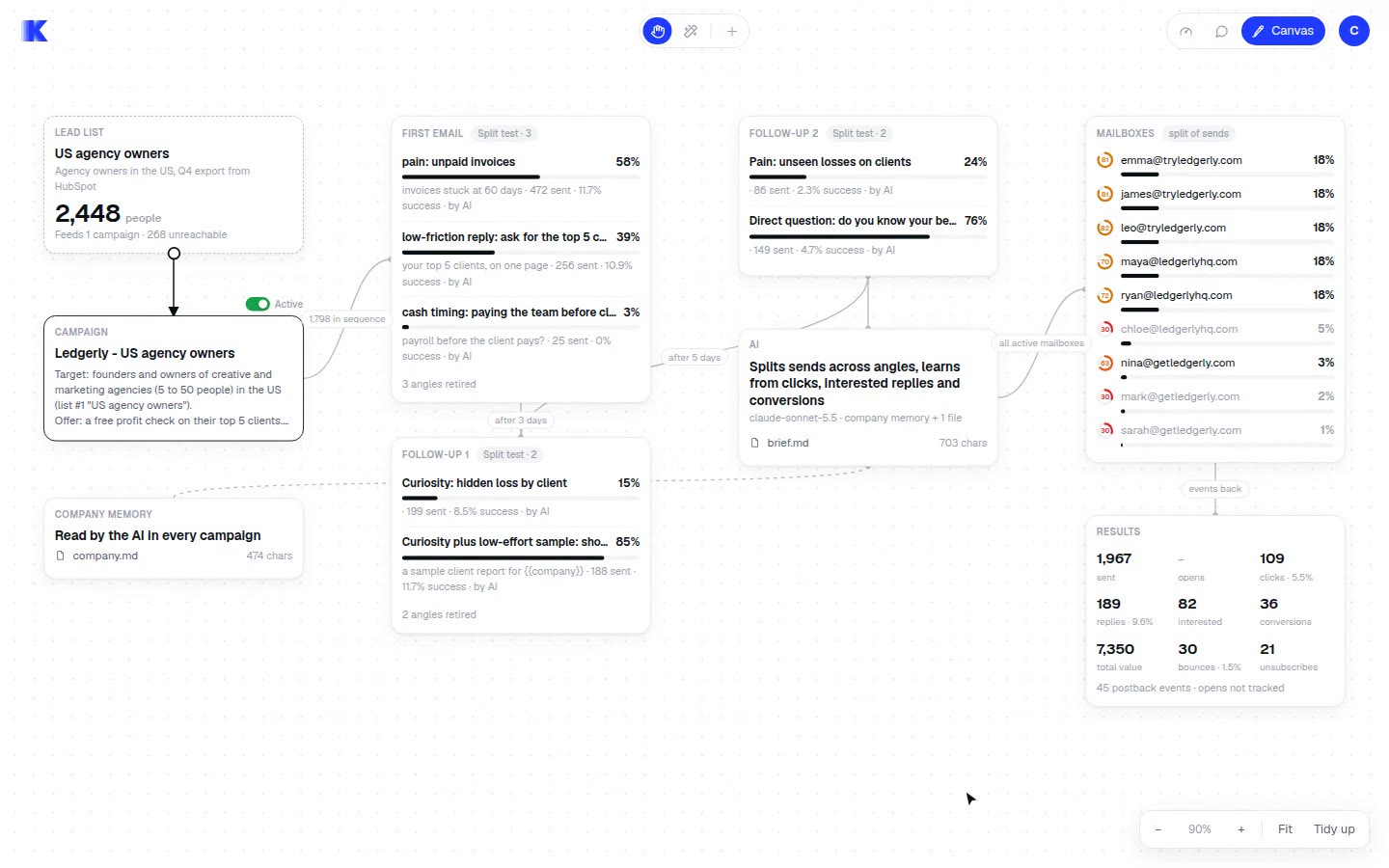
Kata Send gives sales, marketing, and SaaS teams cold-email infrastructure that they can operate through AI agents. It manages sending, follow-ups, and campaign testing using Kata inboxes or connected inboxes.
Who it's for
- Agency marketing teams that want to run cold-email campaigns through Claude, ChatGPT, or Cursor without managing all sending infrastructure themselves.
- B2B sales teams that want to send personalized outreach to lead lists and track replies and campaign outcomes.
- SaaS teams that want to connect their site and use sign-ups, booked calls, or sales as campaign signals.
How it fits your workflow
Connect an agent using the prompt provided by Kata, then give it a campaign request and a lead list. Teams can use Kata's warmed inboxes or connect Gmail, Outlook, or SMTP inboxes.
Kata checks addresses, sends personalized emails, and handles follow-ups. Users can preview emails, send a test email, and pause a campaign.
Kata tracks opens, clicks, and replies; connecting a site adds sign-ups, booked calls, and sales as signals for testing and adjusting campaign emails.
Pricing
Free: $10 in starting credits, described as 250 credits for sending emails.
Kata inboxes
$0.04 per email
- · 1 credit equals 1 email
- · Pay only for emails sent
- · No daily sending cap stated; sending is limited by available credits
- · $10 in free starting credits, equal to 250 credits
Starter
$29 per month
- · 50,000 emails
- · Use your own inboxes
Growth
$79 per month
- · 150,000 emails
- · Use your own inboxes
Scale
$249 per month
- · 500,000 emails
- · Use your own inboxes
Lead enrichment
$0.05 per successful lead
- · Pay only when enrichment succeeds
Prices checked on Nov 10, 2026 from the vendor's site. They can change; confirm before you buy.
Key features
- Agent-driven campaign sending
- Users can connect an agent through a prompt and ask it to send campaigns, including campaigns based on a lead list such as a CSV file.
- Warmed sending inboxes
- Kata offers ready-to-use warmed inboxes on a pay-per-email basis. Users can also connect existing inboxes or create new ones through Kata.
- Address checks and bounce controls
- Kata checks addresses, removes bad addresses, applies daily caps, and can pause sending when bounces rise.
- Personalized email content
- The product adds company facts when they improve an email and describes emails as being written for individual recipients rather than generic lists.
- Follow-ups and reply handling
- Kata sends follow-ups in the same thread and can handle replies as part of an agent-run campaign.
- Campaign learning and optimization
- Kata tracks opens, clicks, replies, and, when a site is connected, sign-ups, booked calls, and sales. It says it tests email versions and favors those that bring results.
Works with
- Claude
- ChatGPT
- Cursor
- Gmail, Outlook, and SMTP
- Website connection
Limitations to know
- The pay-per-email option is limited by the user's available credits, even though the page says it has no daily cap.
- The own-inbox plans have stated monthly email allowances: 50,000 for Starter, 150,000 for Growth, and 500,000 for Scale.
- Lead enrichment is an additional charge of $0.05 per successful lead.
Alternatives to consider
-
Mailgo
Choose it if you want an AI cold-email platform with built-in lead discovery, warmup, verification, scheduling, and analytics.
-
AgentSDR
Choose it if you want a self-hosted outreach workspace that combines email with LinkedIn and WhatsApp campaigns and keeps replies in a CRM for human review.
Getting started
- Choose Kata's warmed inboxes or connect your own inboxes.
- Paste Kata's prompt into Claude, ChatGPT, or Cursor to sign up and connect the agent.
- Provide the agent with a campaign request and lead list.
- Preview or test the emails if desired, then start sending.
Frequently asked questions
How is Kata Send different from Instantly?
Kata says it runs campaigns for users by writing emails, testing versions, and retaining those that bring sales. It also says users pay from one dollar balance without contact limits.
Can I see the emails before they go out?
Yes. Users can ask Kata for a preview or a test email to their own inbox, and they can pause a campaign at any time.
Do I need my own domains and inboxes?
No. Users can start with Kata's inboxes at $0.04 per email. They can later connect Gmail, Outlook, or SMTP inboxes, or create new inboxes through Kata.
What does Kata learn from?
Kata learns from opens, clicks, and replies. If users connect their site, it can also learn from sign-ups, booked calls, and sales.
What happens after the free $10?
Users can top up their balance or pick a plan. The page says the balance never expires.