
Livephoto
LivePhoto.video provides web-based LivePhoto editing and conversion tools to convert short videos, GIFs, and images into LivePhotos, create dynamic iPhone wallpapers, and apply AI-driven animation effects for portraits and landscapes.
Livephoto is video software teams evaluate for video. Use this page to review pricing, integration signals, and the best alternatives before you commit.
Profile facts come from the vendor source. AiMatch labels unknown pricing or API details instead of estimating them.
Review official source →Used in These Packs
Quick Overview
Best for: Video
What it does
Video software for decision-makers comparing workflow fit and alternatives.
Best fit
Video
Pricing snapshot
Contact for pricing
Next step
Compare Livephoto with similar tools before you shortlist it.
Compare this tool before you shortlist it
Review alternatives, pricing posture, and workflow fit side by side.
LivePhoto.video is an online toolkit for creating, converting, and customizing Live Photos for iPhone lock screens and social sharing. The service offers converters (video→LivePhoto, GIF↔LivePhoto, LivePhoto→GIF/video) plus AI-generated animation effects that can animate static portraits, landscapes, and other photos. It provides cropping, size adjustments, multiple output formats, and one-click conversion workflows aimed at photographers, content creators, and general users seeking dynamic wallpapers and shareable animations.
The site also notes a limitation of web browsers: due to proprietary Apple Live Photo format restrictions, true Live Photo creation on the web is constrained and some operations may require iOS native apps or third-party applications; the site supports continuing the workflow in an iOS app to finish downloading Live Photos.
LivePhoto.video provides web-based LivePhoto editing and conversion tools to convert short videos, GIFs, and images into LivePhotos, create dynamic iPhone wallpapers, and apply AI-driven animation effects for portraits and landscapes.
Own this listing?
Claim this page for a one-time $29 to add pricing, features, screenshots, verified owner details, and a clearly labeled 30-day category position after the profile is live.
Claim this listing for $29Key Features
Video to LivePhoto
Convert short videos into Live Photos suitable for iPhone lock screen wallpapers; supports duration and quality adjustments.
LivePhoto to GIF / LivePhoto to Video
Export Live Photos as GIFs or short videos for easier sharing on social platforms while preserving motion.
GIF to LivePhoto
Transform GIFs from the web into Live Photos so animated art can be used as interactive iPhone wallpapers.
Image to LivePhoto with AI animation
Apply AI-generated animation effects to static photos (portraits, landscapes) with intelligent subject recognition and multiple animation styles.
Dynamic Wallpaper Creator
Tools for cropping, size adjustments, and automatic display optimization to create interactive lock-screen wallpapers.
Social media optimization
One-click optimization for social media sizes, multiple output formats, and direct sharing options to platforms.
iOS app continuation
Workflow can be continued in the iOS app to finish downloading and saving Live Photos to the device's camera roll.
Pricing
Current pricing details are not available from the vendor source.
Use Cases
Dynamic Lock Screen Wallpapers
Convert favorite video clips or GIFs into Live Photos and set them as animated iPhone lock screen wallpapers with cropping and optimization for display.
Animate Static Photos with AI
Use AI animation effects to bring portraits, landscapes, and old photos to life for creative display or restoration-like effects.
Social Media Content Creation
Convert Live Photos to GIFs or videos to produce shareable assets tailored to platform size and quality requirements.
Content Workflow for Creators
Quickly convert between Live Photo, GIF, and video formats to repurpose motion assets for blogs, social posts, or portfolios.
Integrations
iOS app
Site indicates users can 'Continue in the iOS app to finish downloading Live Photos', implying a workflow between the web tools and an iOS application.
Social platforms (direct sharing)
Site offers direct sharing and one-click optimization for social media sizes and multiple output formats for posting to social platforms.
Benefits
Limitations
Frequently Asked Questions
What exactly is a Live Photo and how does it work?
Can I use Live Photos on non-Apple devices?
How do I set a Live Photo as my iPhone wallpaper?
What's the difference between a Live Photo and a GIF?
How do I turn a regular video into a Live Photo?
Can I turn off Live Photos on my iPhone camera?
Getting Started
- 1 Step 1: Choose a tool on the site (e.g., Video to Live Photo, GIF to Live Photo, Image to Live Photo).
- 2 Step 2: Upload your source file (video, GIF, or image) and adjust options such as duration, quality, cropping, or animation style.
- 3 Step 3: Convert and download the result; continue in the iOS app if needed to finish saving a true Live Photo to your iPhone camera roll.
Support
docs
Site includes a Blog and Tutorials section with step-by-step guides (e.g., 'How to Set a Live Wallpaper on iPhone') and troubleshooting tips.
faq
FAQ section on the site answers common questions about Live Photos and conversions.
API
Compare Livephoto with similar tools
See how it stacks up against alternatives
Related Tools
View all 103 →





omnisearch
Omnisearch is a multimodal AI-powered search platform that instantly indexes and searches video, audio, images and text to surface faces, logos, scenes and spoken or written words across large media collections with real-time indexing and enterprise deployment options.
Premium Alternatives


Topaz Video
Topaz Video is Topaz Labs’ AI-powered desktop and cloud video enhancement application for filmmakers and videographers, offering model-based upscaling, denoising, stabilization, SDR→HDR conversion and other production-grade restoration and finishing tools.

Sendpotion
Potion (Sendpotion) is an AI video personalization platform that generates hyper-realistic videos in your own face, voice, and gestures for sales, marketing, support, and education, enabling scalable personalized outreach and video content creation.

Text Remover
Text Remover is an online AI video cleanup tool that detects and removes text, captions, subtitles, and other overlays, reconstructing the background while aiming to preserve video quality. It is designed for creators, editors, and teams preparing videos for reuse or localization.
Prismiq
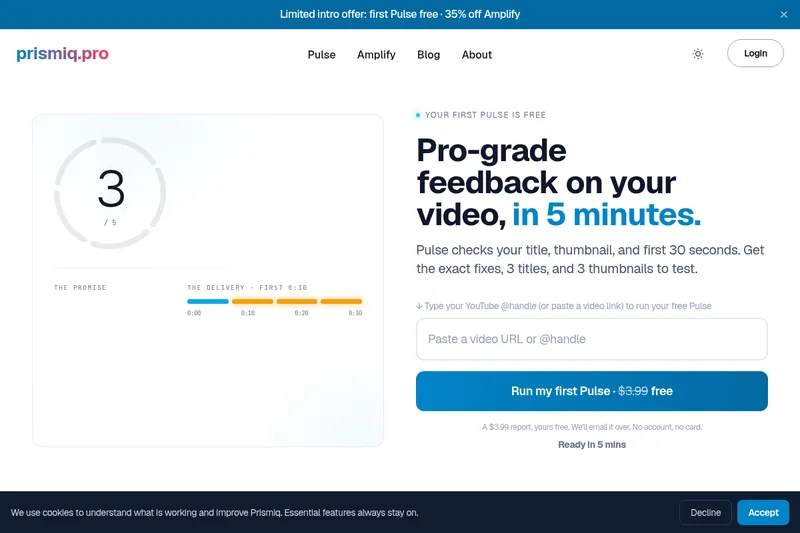
Prismiq Pulse is a post-publish video audit for YouTube that evaluates your title, thumbnail, and first 30 seconds, returns a Pulse score, timestamped friction points, and delivers 3 test-ready title variations plus 3 thumbnail concepts. Reports are ready in about five minutes and can be run by pasting any public YouTube URL.

reccloud-cn
录咖(reccloud)是一款面向创作者与企业的在线AI音视频处理平台,提供语音转文字、字幕生成、文字转语音、视频翻译、视频生成、去水印、人声分离、音视频总结等一键化AI工具与开发者API。