
Metrical
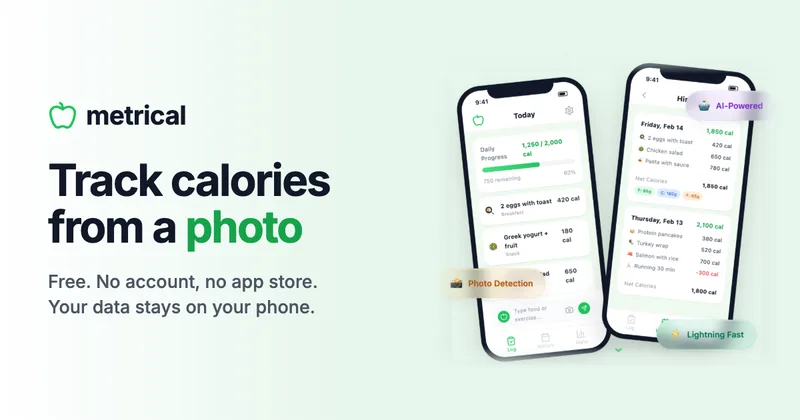
Metrical estimates calories and macros from meal photos or text, then summarizes intake and nutrition trends. It is for people tracking nutrition, including athletes and coaches supporting clients.
Who it's for
- Athletes and runners who want to log meals quickly, including when they are offline.
- Fitness coaches, nutritionists, and personal trainers who recommend lightweight meal tracking to clients.
- People tracking calories or macros who prefer photo or text logging over searching a food database.
How it fits your workflow
Open the PWA in a browser and log a meal with a photo or a written description. Metrical estimates calories and macros, and users can adjust the portion.
Review daily summaries and longer-term insights for intake, macro totals, goals, streaks, and trends. Free-plan data stays on the device, and core tracking works offline.
Optionally purchase Cloud for cross-device sync, automatic backups, saved meal photos across devices, and enhanced AI.
Pricing
Free: Free forever, with AI meal analysis, photo and text logging, macro tracking, insights, and offline use.
Free
$0 forever
- · AI-powered calorie estimation
- · Photo and text meal logging
- · Macro tracking
- · Daily, weekly, and monthly insights
Cloud
$29.99 one-time payment
- · Everything in Free
- · Sync across devices
- · Automatic cloud backup
- · Saved meal photos across devices
Prices checked on Nov 2, 2026 from the vendor's site. They can change; confirm before you buy.
Key features
- AI meal estimation
- Estimate calories and macronutrients by taking a photo of a meal or entering a natural-language description.
- Portion adjustment
- Adjust logged portions, including with plus and minus portion controls.
- Nutrition tracking
- Track calories, protein, carbohydrates, fat, and fiber, and set custom goals for protein, carbohydrates, and fat.
- Insights and trends
- Review daily summaries, weekly and monthly insights, days on target, streaks, calories by meal, and trends over time.
- Local storage and data controls
- The free app stores data on the device and offers data import and export. Users can delete their data in one tap.
- Offline use
- Food logs, history, and stats are stored locally, and the app says both Free and Cloud work offline.
Limitations to know
- AI nutrition values are estimates; the page says results work best with common foods and more detailed meal descriptions.
- The listed language support is English and Spanish; additional languages are described as coming soon.
Alternatives to consider
-
FoodIntake
Choose it if you want AI meal identification and nutrition analysis from a mobile app, rather than Metrical's explicitly described local-first, offline-capable PWA and optional one-time Cloud plan.
Getting started
A device with a browser. The page says Metrical works as a progressive web app on any device with a browser.
- Open Metrical in a browser; the free version requires no account.
- Take a meal photo or type a description to create a log.
- Review the calorie and macro estimate, adjusting the portion if needed.
- On iPhone or iPad, use Safari's Share menu and select Add to Home Screen to get an app-like experience.
Frequently asked questions
Do I need to create an account?
No account is required for the free version. Cloud users sign in with an email magic link and do not need a password.
Where is my data stored?
On the free plan, data stays on the device. With Cloud, data is encrypted and synced, and a local copy remains on the device.
How accurate is the AI?
The page says it works best with common foods and workouts. Including details such as portion sizes or preparation helps improve estimates. Cloud users get an enhanced AI model.
Does Metrical work offline?
Yes. The page says Free and Cloud work offline, with food logs, history, and stats stored locally. Cloud sync happens when the device is back online.
Is Metrical available on iOS and Android?
Metrical is a progressive web app that works on any device with a browser. On iOS, users can add it to the home screen from Safari; no app store download is needed.
Is Cloud a subscription?
No. Cloud is a one-time payment of $29.99 for lifetime access, with no recurring charges.