
Planist
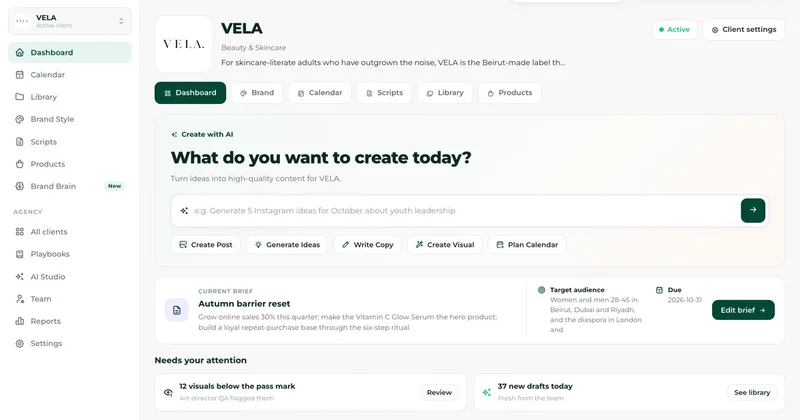
Planist scans a brand’s website or store and creates a social content plan, posts, and designs for agencies, brands, and online stores. Teams can collect client approvals and publish approved content to connected social accounts.
Who it's for
- Social media agencies managing multiple client brands that need separate brand brains, calendars, libraries, and approval links.
- Online store teams using Shopify, WooCommerce, Salla, Zid, Magento, or BigCommerce that want product-catalogue-based social content.
- Brand and marketing teams that need client review links and scheduled publishing as part of their content workflow.
How it fits your workflow
Start a workspace and point Planist at a supported store or a website. It reads the brand identity and available product or website imagery, then prepares a brand brain and content calendar.
Planist creates captions, designs, scripts, and motion videos. The team can review the work and send a private link to clients, who can approve posts or leave notes without an account.
Connect social accounts to publish approved posts on their scheduled dates. The page says the platform’s permissions determine what each connected account can do.
Pricing
Free: A 14-day free trial is offered on every plan. The trial includes a brand scan, brand brain, and up to 20 finished posts; the page says to pick a plan and add a card for the trial, and that cancelling before day 14 means no charge. The FAQ also says no card is needed to create an account or see what Planist makes.
The vendor doesn't publish prices. Check with Planist directly.
Prices checked on Oct 27, 2026 from the vendor's site. They can change; confirm before you buy.
Key features
- Website and store scanning
- Reads a brand website or supported ecommerce store to find brand visuals and product information, including photos and listed prices.
- Brand brain
- Records visual identity, tone of voice, creative direction, and rules learned from client feedback for use in later content.
- Content calendar
- Plans a month of posts with a reason for each slot and supports planning across Instagram, TikTok, and Facebook.
- AI content and design production
- Creates captions, post designs, carousels, banners, stories, offers, and reel scripts using the brand’s content and images. Designs are checked against the brand before being shown.
- Motion videos
- Turns a post’s words into a motion video for Reels, Stories, and TikTok. Each motion video uses three creations.
- Client review and approvals
- Provides a private review link clients can open on a phone without an account. Clients can approve posts or leave notes, which feed back into the brand brain.
Works with
- Shopify
- WooCommerce
- Salla
- Zid
- Magento
- BigCommerce
- TikTok
- X
- YouTube
Limitations to know
- The supplied page does not state plan prices or plan-specific limits; it directs readers to a separate pricing page.
- Motion videos use three creations each.
- Publishing capabilities depend on the platform and permissions granted to each connected account.
Alternatives to consider
-
PlanPost AI
Choose it if you want an AI marketing assistant that also covers ad campaign setup and optimization, bulk generation, SEO-ready content, and a customer-engagement chatbot.
-
SchedPilot
Choose it if you need a social scheduling platform with a REST API and hosted MCP server for AI agents as well as human users.
-
Pressmaster AI
Choose it if your content workflow starts with interviews, saved ideas, and trend research, and you want thought-leadership content planned and analyzed across channels.
Getting started
- Create a workspace; the page says an account can be created and output viewed without a card.
- Enter a website or connect one of the listed supported stores so Planist can scan the brand.
- Review the generated brand brain, calendar, and content.
- Send a private approval link to the client, then connect social accounts to publish approved posts.
Frequently asked questions
Which stores does Planist read?
The page lists Shopify, WooCommerce, Salla, Zid, Magento, and BigCommerce. Other brands can be entered through their website.
Are the designs made from stock images?
The page says store designs use the real product photograph, while other brands’ own photographs are used as reference. Designs pass a brand check before they are shown.
Does a client need an account to approve content?
No. The client opens a private link on a phone and can approve a post or leave a note.
Does Planist publish posts?
Yes. After the brand’s accounts are connected, an approved post is published on the date assigned by the calendar. Publishing is included on every plan.
Does Planist make videos?
Yes. It creates motion videos for Reels, Stories, and TikTok from a post’s words. Each video uses three creations.
Does Planist support Arabic?
Yes. The page says Planist writes Arabic and can typeset Arabic and English together in posters.
Does signup require a card?
The FAQ says no card is needed to create an account or see what Planist makes. The trial description separately says to pick a plan and add a card, and says there is no charge if the trial is cancelled before day 14.
How is Planist priced?
The page says pricing is per brand workspace rather than per seat, and that publishing is included on every plan. It directs readers to the pricing page for prices and limits but does not provide those figures in the supplied content.