
Safina
Safina answers forwarded business calls with AI, follows configured call guides, and sends teams summaries and follow-up details. It is for professionals such as practice staff, tradespeople, and IT service teams who cannot always pick up.
Who it's for
- Medical and dental practice teams that need calls answered while staff are with patients.
- Tradespeople and property managers who need to collect job or maintenance details while away from the phone.
- IT service providers and law firms that want to capture inquiries and identify urgent calls outside their available hours.
How it fits your workflow
A business forwards calls to Safina from its phone, router, or phone system. Safina can answer when the line is busy, unanswered, or unreachable, or take all calls in focus mode.
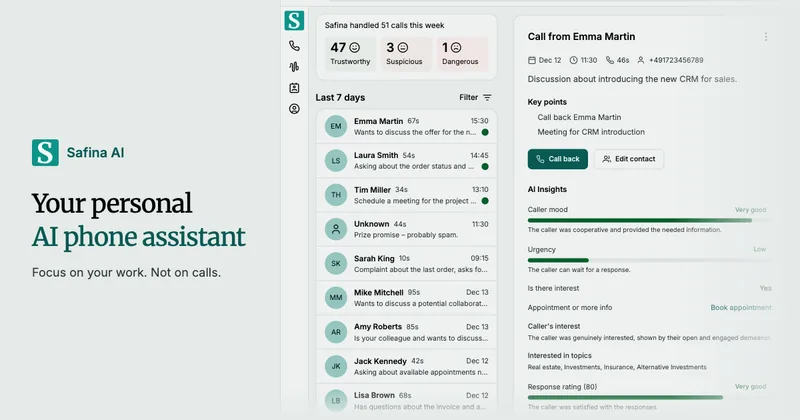
Safina follows a configured conversation guide, asks callers for relevant details, and can book appointments or transfer callers when configured. Afterward, the team can review summaries, action items, caller insights, transcripts, and optional recordings in the app or receive call data through supported delivery channels.
Pricing
Free: A 14-day free trial is available.
Basic
$11.99/month
- · 30 minutes included
- · Answers calls 24/7 in any language
- · Forwards urgent calls
- · Books appointments and sends booking links by SMS
Pro
$29.99/month
- · 100 minutes included
- · Everything in Basic
- · Connects tools through CRM integrations and webhooks
Business
$69.99/month
- · 250 minutes included
- · Everything in Pro
- · Unlimited team members
- · Priority support
Enterprise
Custom pricing
- · Custom limits
- · Enterprise-grade security
- · Dedicated support
Additional usage
$0.23 per minute after included minutes
- · Pay-as-you-go answering can continue until the configured spending limit is reached
Prices checked on Nov 5, 2026 from the vendor's site. They can change; confirm before you buy.
Key features
- AI call answering
- Answers forwarded business calls 24/7 and conducts conversations using follow-up questions rather than a phone-tree flow. The page says Safina supports more than 50 languages.
- Custom conversation guides
- Lets users set greetings, questions, and instructions for different call situations, such as maintenance reports or general inquiries.
- Call summaries and records
- Provides concise summaries, key points, and action items after calls, with transcripts and audio recordings available. Call recordings are active only if the user switches them on.
- AI caller insights
- Shows details such as caller mood, urgency, customer status, and reason for calling in the call view.
- Spam and fraud detection
- Flags suspicious calls and displays risk classifications; the page also describes blocking suspicious callers.
- Appointment booking
- Can check availability and book appointments during a call through Google Calendar or Microsoft Calendar, or send an SMS link to a booking tool.
Works with
- Google Calendar
- Microsoft Calendar
- Calendly and Cal.com
- Webhooks
- HubSpot, Pipedrive, and Salesforce
- Zapier, Make, and n8n
Limitations to know
- Plans include a fixed number of minutes: 30 on Basic, 100 on Pro, and 250 on Business.
- Without pay-as-you-go billing, Safina stops answering calls after included minutes are used.
- The page says webhooks for connecting call data to business software are available from the Pro plan.
- Call recordings are active only if the user switches them on.
- Phone numbers from countries other than Germany, the USA, Canada, and South Africa are available on request.
Alternatives to consider
-
Automaticall
Choose it if you want an AI phone assistant with call summaries and action items that supports 25+ languages and offers a free trial.
-
i3Simple
Choose it if you want a small-business AI receptionist that books appointments in a connected calendar and emails call summaries.
Getting started
- Start the 14-day free trial and open the Safina app.
- Set up call forwarding in the app, router, or phone system.
- Configure the assistant's language, voice, tone, and conversation guide.
- Choose how to receive summaries and connect a calendar or webhook if needed.
Frequently asked questions
How do calls reach Safina?
Calls reach Safina through call forwarding set up in the Safina app, router settings, or phone system. Safina can take over when the line is busy, nobody answers, or the phone is unreachable; focus mode can send all calls to Safina.
Do I need a new phone number for Safina?
No. The page says your existing number stays in use and calls are forwarded to a Safina number included with each plan. Safina numbers from Germany, the USA, Canada, and South Africa are available immediately; other countries are available on request.
Where does Safina store my data?
The page says Safina is hosted in Germany, currently with AWS in Frankfurt am Main, and developed in the EU. It also states that some telephony and AI service providers may be outside the EU and are covered under the EU-US Data Privacy Framework or Standard Contractual Clauses. A data processing agreement under Article 28 GDPR is available.
What happens when my included minutes run out?
Without an add-on, Safina stops answering calls and warns the user by email beforehand. With pay-as-you-go billing enabled, Safina continues answering until the configured spending limit is reached.
Can Safina book appointments for callers?
Yes. The page says current Basic, Pro, and Business plans can connect to Google Calendar or Microsoft Calendar to check availability and book during a call. Alternatively, Safina can send an SMS link to a booking tool such as Calendly or Cal.com.
Can Safina connect to business software?
Yes. From the Pro plan, Safina can send call data through webhooks to a URL, such as a CRM. The page names HubSpot, Pipedrive, and Salesforce as examples, and says Zapier, Make, or n8n can pass data to other tools.
Can Safina transfer callers to a person or team?
Yes. The page says users can add up to 25 phone numbers with names and descriptions. Safina asks the caller's permission before calling the selected destination; if nobody answers, the caller can remain with Safina and leave a message.