
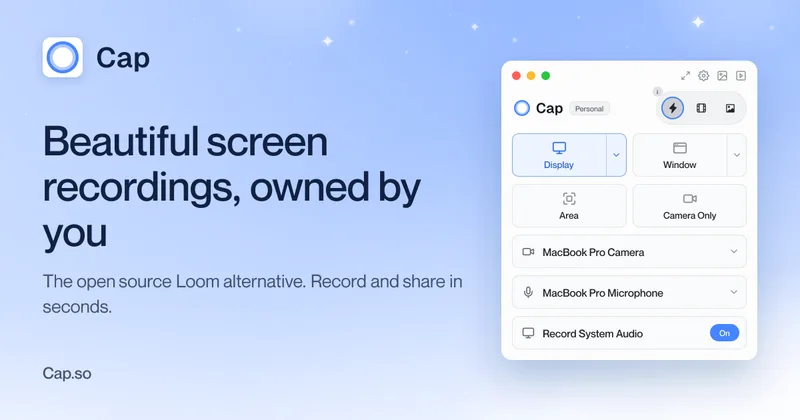
Cap
Cap is an open-source, cross-platform screen recording and sharing app that combines instant shareable links, a studio-quality editor, and screenshot tools with optional cloud hosting, self-hosting, and AI-generated titles, summaries, chapters, and transcriptions.
Cap is video software teams evaluate for video. Use this page to review pricing, integration signals, and the best alternatives before you commit.
Profile facts come from the vendor source. AiMatch labels unknown pricing or API details instead of estimating them.
Review official source →Used in These Packs
Quick Overview
Best for: Video
What it does
Video software for decision-makers comparing workflow fit and alternatives.
Best fit
Video
Pricing snapshot
Freemium from Free
Next step
Compare Cap with similar tools before you shortlist it.
Compare this tool before you shortlist it
Review alternatives, pricing posture, and workflow fit side by side.
Cap is an open-source, cross-platform screen recording application that offers three modes—Instant, Studio, and Screenshot—to cover quick recordings, professional editing, and beautified screenshots. Instant Mode uploads as you record and produces AI-generated titles, summaries, chapters, and transcripts for immediate sharing. Studio Mode records at full quality locally for advanced editing before sharing, and Screenshot Mode captures and enhances images with backgrounds, padding, and annotations. Cap supports self-hosting and connecting your own Google Drive or S3 bucket, and also offers an optional Cap Cloud sharing plan (Cap Pro) for unlimited cloud sharing and team collaboration.
Cap is a lightweight, cross-platform open source screen recorder with instant shareable links and modes for instant recordings, studio-quality edits, and screenshots. Cap is a AI Tool featured on Dang.ai. Learn more about Cap's AI tool.
Own this listing?
Claim this page for a one-time $29 to add pricing, features, screenshots, verified owner details, and a clearly labeled 30-day category position after the profile is live.
Claim this listing for $29Key Features
Instant Mode
Shareable URL immediately after recording; uploads while you record so the link is live as soon as you stop.
AI automation
Auto-generated titles, summaries, clickable chapters, and transcriptions created automatically for recordings (Cap AI).
Studio Mode
High-quality local recording (no compression) with a full editor supporting backgrounds, padding, corners, cursor effects, motion blur, and other customization before export.
Screenshot Mode
One-key screenshots with beautification: backgrounds, padding, rounded corners, annotations, and instant copy/save.
Self-hosting & Custom Storage
Option to self-host Cap on your own infrastructure or connect your own Google Drive or S3 bucket so you control storage.
Cross-platform native apps
Native desktop apps for macOS (Apple Silicon & Intel) and Windows, plus a Chrome extension for browser recording.
Collaboration & Async Workflows
Comments, reactions, transcripts, viewer analytics, and team workspaces to enable asynchronous collaboration and feedback.
Security & Compliance
Cap Pro offers SOC 2 Type II & ISO 27001 compliance, HIPAA support, end-to-end encryption for cloud storage, and signed BAAs for PHI customers.
Open Source
Cap is fully open source and available on GitHub; community contributions and audits are encouraged.
Loom importer
Built-in Loom video importer to migrate existing Loom libraries.
Pricing
Cap is 100% free for personal use; free version records up to 5 minutes per recording.
Free / Personal
Free- Local recording with Studio Mode
- Basic sharing (limited)
- Personal use allowed
Desktop License
$29 / license billed yearly (commercial desktop license)- Commercial usage rights
- Unlimited local recording & editing
- Studio Mode editor
- 20 cloud shareable links / month (up to 5 min each)
Cap Pro
$12 / user / month (billed monthly; annual option available)- Everything in Desktop License
- Unlimited cloud storage & bandwidth
- Auto-generated titles, summaries, chapters, and transcriptions
- SOC 2 Type II & ISO 27001 compliant
Use Cases
Remote team communication
Record walkthroughs, demos, and updates with shareable links, transcripts, and comments to reduce meetings and keep teams aligned.
Employee onboarding
Create step-by-step onboarding videos with chapters and transcripts for consistent training materials.
Education & online classes
Record lessons, add chapters and transcripts, and share links for asynchronous learning.
Agencies and client work
Produce studio-quality recordings, export to any format, and deliver recordings with commercial usage rights under paid plans.
Individual creators and builders
Quickly capture and share code walkthroughs, tutorials, and design reviews with instant links and AI summaries.
Integrations
Google Drive
Connect your Google Drive as storage for recordings so you control where files are stored.
Amazon S3
Connect a custom S3 bucket for storage and compliance with your infrastructure requirements.
Loom importer
Import your Loom library to Cap to migrate recordings.
Chrome extension
Browser-based recording option for quick captures from within Chrome.
Benefits
Limitations
Frequently Asked Questions
What is the difference between Cap Pro and Desktop License?
Is there a free version?
How long can I record for on the free version?
How does Cap AI work?
How is Cap different from Loom?
What happens to my recordings if I cancel?
Do you offer team plans?
Which platforms do you support?
Can I use Cap for commercial purposes?
Getting Started
- 1 Step 1: Download the Cap app for your platform (macOS, Windows, or Linux) or add the Chrome extension.
- 2 Step 2: Sign up or log in to create an account if you want cloud sharing or team features; otherwise use Studio Mode locally.
- 3 Step 3: Choose a mode—Instant to record and share immediately, Studio to record locally and edit, or Screenshot to capture and enhance images.
- 4 Step 4: (Optional) Connect your Google Drive or S3 bucket, or self-host Cap on your infrastructure to control storage.
- 5 Step 5: Upgrade to Cap Pro for unlimited cloud sharing, AI summaries, team workspaces, and enterprise features if needed.
Support
Documentation
Official documentation for using Cap is available on the website.
Discord
Join the Cap community on Discord for help, discussion, and support.
Get help via email (support contact available on site).
Chat / Community
Community support and chat are available; priority support offered for Cap Pro customers.
API
Compare Cap with similar tools
See how it stacks up against alternatives
Related Tools
View all 103 →


Video to Prompt
Video to Prompt analyzes short uploaded videos or supported YouTube Shorts links and turns them into editable, scene-by-scene text prompts. The prompts can be copied into external AI video or image tools; the product does not generate images or videos itself.

Premium Alternatives

Prismiq
Prismiq Pulse is a post-publish video audit for YouTube that evaluates your title, thumbnail, and first 30 seconds, returns a Pulse score, timestamped friction points, and delivers 3 test-ready title variations plus 3 thumbnail concepts. Reports are ready in about five minutes and can be run by pasting any public YouTube URL.

Sendpotion
Potion (Sendpotion) is an AI video personalization platform that generates hyper-realistic videos in your own face, voice, and gestures for sales, marketing, support, and education, enabling scalable personalized outreach and video content creation.

Topaz Video
Topaz Video is Topaz Labs’ AI-powered desktop and cloud video enhancement application for filmmakers and videographers, offering model-based upscaling, denoising, stabilization, SDR→HDR conversion and other production-grade restoration and finishing tools.


Text Remover
Text Remover is an online AI video cleanup tool that detects and removes text, captions, subtitles, and other overlays, reconstructing the background while aiming to preserve video quality. It is designed for creators, editors, and teams preparing videos for reuse or localization.


reccloud-cn
录咖(reccloud)是一款面向创作者与企业的在线AI音视频处理平台,提供语音转文字、字幕生成、文字转语音、视频翻译、视频生成、去水印、人声分离、音视频总结等一键化AI工具与开发者API。
