
zapcap
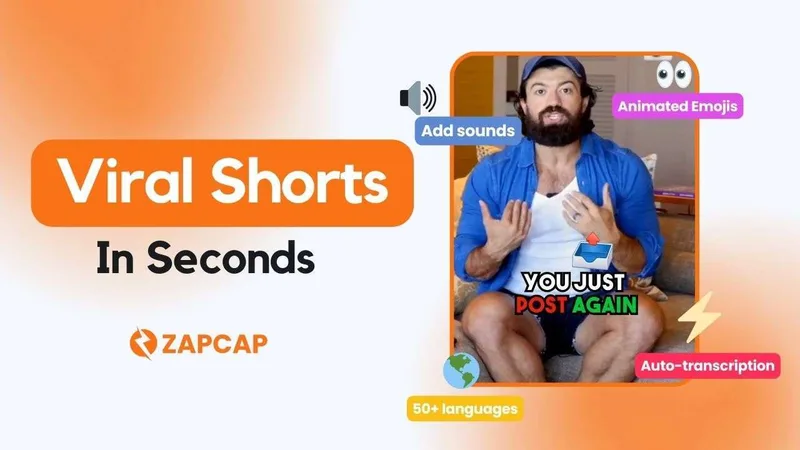
ZapCap is a browser-based AI video caption generator and editor that creates accurate, animated captions and subtitles in 90+ languages, plus tools for trimming, b-roll, music, and auto-descriptions to optimize short-form and social video content.
zapcap is video software teams evaluate for video. Use this page to review pricing, integration signals, and the best alternatives before you commit.
Profile facts come from the vendor source. AiMatch labels unknown pricing or API details instead of estimating them.
Review official source →Used in These Packs
Quick Overview
Best for: Video
What it does
Video software for decision-makers comparing workflow fit and alternatives.
Best fit
Video
Pricing snapshot
Freemium from Free
Next step
Compare zapcap with similar tools before you shortlist it.
Compare this tool before you shortlist it
Review alternatives, pricing posture, and workflow fit side by side.
ZapCap is a web-based AI captioning and video-editing product intended for creators and teams who need fast, accurate subtitles and short-form social edits. The service emphasizes AI-driven, frame-accurate transcription in over 90 languages, animated captions (50+ styles), and multilingual/subtitle rendering capabilities including CJK and Southeast Asian scripts. It runs in any modern browser without installs and supports a wide range of video formats up to 4K.
Beyond automated captions, ZapCap includes features aimed at short-form social workflows: auto B-roll and transitions, auto-descriptions and hashtag generation, sound effects and background music, trimming and viral video clipping, removal of silence and filler words, and options to export captions as burned-in subtitles or as SRT/VTT/TXT files. The product also advertises API capabilities (Subtitle API, webhook video captioning) for programmatic integration.
AI video caption generator with automated editing features for engaging videos.
Own this listing?
Claim this page for a one-time $29 to add pricing, features, screenshots, verified owner details, and a clearly labeled 30-day category position after the profile is live.
Claim this listing for $29Key Features
AI Auto Captions
Automatic, frame-accurate transcription in 90+ (100+) languages with editable captions on a timeline.
Animated Captions & Styles
50+ animated caption styles and options for font, size, color, positioning and transparent overlays or burned-in subtitles.
Export Options
Export final video as MP4 or download subtitle files (SRT, VTT, TXT).
Format & Platform Support
Upload MP4, MOV, MKV and 60+ formats up to 4K; paste YouTube, TikTok, or Instagram links.
Auto B-Roll & Transitions
Automatically add B-roll and transitions to enhance short-form videos.
Auto Tags & Descriptions
Generates descriptions and hashtag suggestions automatically for social posts.
Audio & Edit Tools
Remove silence and filler words, add sound effects and background music, trimming and viral video clipper.
APIs & Webhooks
Subtitle API, animated captions, SRT to burned-in subtitles and webhook-based video captioning for integrations.
Multilingual & CJK Rendering
Specialized rendering for Chinese, Japanese, Thai and Southeast Asian captioning and multilingual localization features.
Pricing
Free version available with basic features; the site explicitly states "Create Free Videos Now — No credit card required."
Free
Free- Basic caption generation and editing
- No credit card required to start
Premium
Paid (price not listed on page)- Advanced features such as multi-language support and longer videos as indicated by the site
- Additional exports and premium templates likely available
Use Cases
Agencies
Scale captioning and short-form edits across client campaigns with templates, automated workflows, and API access.
Content Creators
Quickly generate and style captions to improve engagement and accessibility on platforms like TikTok, Instagram and YouTube.
Marketers & Startups
Localize video content, add auto descriptions and hashtags, and create on-brand short videos to boost reach and discoverability.
Podcasters
Generate subtitles and transcripts to make audio content accessible and repurpose episodes as short videos.
Ecommerce Localization
Create multilingual subtitles and localized assets for product videos and TikTok Shop localization.
AI Video SaaS & Performance Creative
Embed captioning or use the Subtitle API and webhooks to add captioning features into other video products or pipelines.
Integrations
YouTube
Paste YouTube links to import videos for captioning and export SRT/MP4.
TikTok
Paste TikTok links to import videos and create captions and short-form edits.
Paste Instagram links to import videos for captioning and editing.
APIs & Webhooks
Subtitle API and webhook video captioning enable programmatic integration and automation.
Benefits
Limitations
No verified limitations are available.
Frequently Asked Questions
Is ZapCap’s AI Video Caption Generator Free to Use?
Can I Edit the Video Captions After They Are Generated?
How Accurate Are the Video Captions Generated by ZapCap?
Can ZapCap Generate Captions for Videos in Different Formats?
How Does ZapCap Help with Video Editing Beyond Captions?
What is an AI Video Caption Generator?
Getting Started
- 1 Step 1: Upload your video — drag & drop or paste a YouTube, TikTok, or Instagram link (supports MP4, MOV, MKV and 60+ formats up to 4K).
- 2 Step 2: Auto-generate captions — AI transcribes speech with frame-accurate timing in 100+ languages.
- 3 Step 3: Customize and export — choose from 50+ animated caption styles, edit on the timeline, then export as MP4 or download SRT, VTT, or TXT.
Support
Docs / Blog
Guides, tips, tutorials and case studies available on the site (Blog and Resources sections).
Contact
Contact Us page for support or business inquiries (link available in site navigation).
Community
Discord community for additional questions and community support.
API
Compare zapcap with similar tools
See how it stacks up against alternatives
Related Tools
View all 103 →


reccloud-cn
录咖(reccloud)是一款面向创作者与企业的在线AI音视频处理平台,提供语音转文字、字幕生成、文字转语音、视频翻译、视频生成、去水印、人声分离、音视频总结等一键化AI工具与开发者API。


Premium Alternatives
reccloud-cn
录咖(reccloud)是一款面向创作者与企业的在线AI音视频处理平台,提供语音转文字、字幕生成、文字转语音、视频翻译、视频生成、去水印、人声分离、音视频总结等一键化AI工具与开发者API。

Sendpotion
Potion (Sendpotion) is an AI video personalization platform that generates hyper-realistic videos in your own face, voice, and gestures for sales, marketing, support, and education, enabling scalable personalized outreach and video content creation.


Topaz Video
Topaz Video is Topaz Labs’ AI-powered desktop and cloud video enhancement application for filmmakers and videographers, offering model-based upscaling, denoising, stabilization, SDR→HDR conversion and other production-grade restoration and finishing tools.


Prismiq
Prismiq Pulse is a post-publish video audit for YouTube that evaluates your title, thumbnail, and first 30 seconds, returns a Pulse score, timestamped friction points, and delivers 3 test-ready title variations plus 3 thumbnail concepts. Reports are ready in about five minutes and can be run by pasting any public YouTube URL.

Text Remover
Text Remover is an online AI video cleanup tool that detects and removes text, captions, subtitles, and other overlays, reconstructing the background while aiming to preserve video quality. It is designed for creators, editors, and teams preparing videos for reuse or localization.
