
OutfitSwapStudio
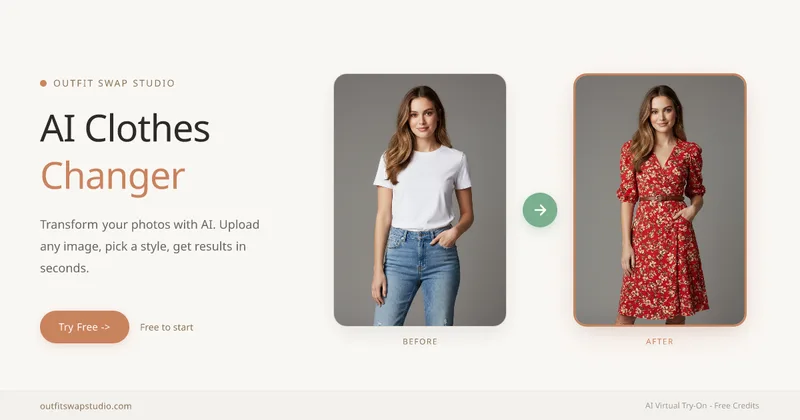
OutfitSwapStudio uses AI to restyle photos, preview garments, transfer reference outfits, and recolor clothing. Shoppers and fashion-content or catalog teams can generate outfit visuals from uploaded photos without a reshoot.
One of 386 tools in Image & Design
Who it's for
- Online shoppers who want to preview a product garment on their own photo before buying.
- People creating outfit or style visuals who want to restyle a photo or transfer a look from a reference image.
- Fashion teams planning catalog variants or color palettes for garments.
How it fits your workflow
Choose a workflow based on what you have: a personal photo for restyling, a personal photo plus a product image for try-on, a personal photo plus an outfit reference for swapping, or a garment image for recoloring.
Upload the relevant image or images and provide a description or select a preset when using AI Clothes Changer. Generate the result and download it; the tools run in a browser on a phone or laptop.
The site says the tools preserve the person's face, pose, hair, skin tone, and background while changing the clothing. Credits are shared across the four tools, and failed generations do not consume credits.
Pricing
Free: Sign-up includes 10 free credits for 2 successful standard results, with no credit card required. Paid pricing details are not provided in the supplied page content.
Free starter credits
Free; sign-up provides 10 credits for 2 successful standard results.
- · No credit card required
- · Credits are shared across all four tools
- · Failed generations do not burn credits
Prices checked on Oct 23, 2026 from the vendor's site. They can change; confirm before you buy.
Key features
- AI Clothes Changer
- Restyles a photo using a text description or a preset. The site says the person's face, pose, hair, and background stay unchanged.
- Virtual Try-On
- Combines a user's photo with a product image to preview the garment on the user's body, including realistic drape and lighting.
- Outfit Swap
- Uses a user's photo and a reference image to transfer the reference outfit's look onto the user's photo.
- AI Clothes Color Changer
- Changes the color of a garment while preserving details such as fabric texture, drape, folds, and lighting.
- Shared account and credits
- One account and shared credit balance work across all four tools; users do not need separate registrations for each tool.
- Browser-based access
- The site says the tools work in a browser on a phone or laptop without installing an app or plugin.
Limitations to know
- The free allowance is 10 credits, which the site describes as enough for 2 successful standard results.
- The supplied page does not state the prices or detailed features of paid plans.
Alternatives to consider
-
AI Clothes Changer
Choose it if you want a free web-based clothes-changing tool focused on uploading a photo, selecting clothing styles, and downloading the transformed image.
-
FASHN Virtual Try-On
Choose it if you are a brand, agency, or developer seeking on-model product imagery or interactive try-on through an app or API.
-
SwapAnything.io
Choose it if you also need to swap faces or clothes in videos and GIFs, or convert common file formats in-browser.
Getting started
A browser on a phone or laptop and the relevant photo or photos for the selected tool. The site says no app or plugin installation is needed.
- Sign up to receive 10 free credits; no credit card is required.
- Select the tool based on the images you have and the clothing change you want.
- Upload your photo or garment/reference images, then enter a description or choose a preset where applicable.
- Generate and download the result.
Frequently asked questions
What is the difference between the four tools?
AI Clothes Changer restyles a photo using text or a preset. Virtual Try-On previews a product garment on the user. Outfit Swap transfers a look from a separate reference image. AI Clothes Color Changer changes only a garment's color while preserving its cut, texture, and other details.
Can all four tools use the same account and credits?
Yes. The site says one account and one shared credit balance work across all four tools, including starter credits.
Do I need different photos for each tool?
The same clear, front-facing, well-lit photo can be used for AI Clothes Changer, Virtual Try-On, and Outfit Swap. AI Clothes Color Changer works on a garment image, including a product photo without a person.
Will my face or body shape change?
The site says the tools preserve the uploaded photo's face, pose, hair, skin tone, and background, changing only the clothing.
Is it free to try?
Yes. Sign-up provides 10 free credits for 2 successful standard results, without a credit card or an auto-charging trial.
How are uploaded photos handled?
The site says uploads are processed to generate results, are not sold or shared with third parties, and are never used to train public AI models. Photos are automatically deleted after a short retention window, and users can manually delete results from their account.