
Parsimony
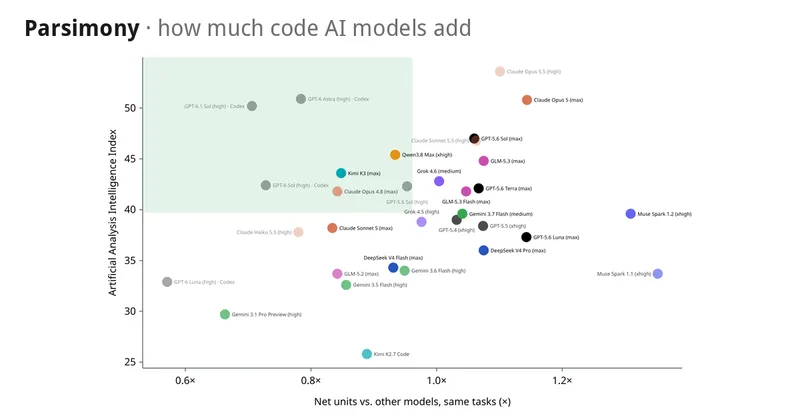
Parsimony measures syntax units added by AI coding models and presents comparisons alongside benchmark solve results. Developers and model evaluators can use its leaderboard or chart their own benchmark data in a browser.
One of 71 tools in Coding
Who it's for
- AI model evaluators comparing coding models’ code footprint on published benchmark tasks.
- Developers reviewing code-size measurements alongside SWE-bench Verified solve results.
- Benchmark maintainers with code-size results who want to create a chart and table from a JSON file.
Not the right fit if…
- Teams comparing code changes in languages other than Python: the page says only Python is measured.
- Teams that need tests rerun as part of the comparison: Parsimony uses published SWE-bench pass/fail results and does not rerun tests.
How it fits your workflow
Review the leaderboard, which ranks models by mean net units added on tasks they solved. The page also shows solved and measured counts and provides chart controls for comparing metrics.
Parsimony applies each patch to the task code and parses both versions of every changed file. It counts syntax units in Python; tests, documentation, and generated files are excluded.
For another benchmark, download the example JSON, enter the results, and open the file in the browser to view a chart and table. The page says the file stays in the browser.
Pricing
The vendor doesn't publish prices. Check with Parsimony directly.
Prices checked on Oct 17, 2026 from the vendor's site. They can change; confirm before you buy.
Key features
- Syntax-unit measurement
- Parsimony parses both versions of each changed file in a patch and measures coding units such as calls, names, and literals. Net units are calculated as units added minus units removed.
- Model leaderboard
- The leaderboard ranks models by mean net units added on tasks they solved and displays solved and measured counts. The page also reports an all-measured mean that includes failed attempts.
- Metric comparison charts
- Users can compare two metrics in a scatter chart or view one metric in a bar chart.
- Custom benchmark charts
- Users can download an example JSON file, fill it with code-size results from another benchmark, and open it to generate a chart and table in the browser.
Limitations to know
- Only Python code is measured.
- Tests are not rerun; pass/fail information comes from SWE-bench’s published results.
- Tests, documentation, and generated files are excluded from parsing.
- The measure captures code size, not readability or design quality.
- The page notes that the agent used can affect how much code is written, even though the benchmark uses the same agent for each model.
Getting started
- Open the leaderboard and choose the task set or metrics to inspect.
- Use the chart controls to compare two metrics or display one metric.
- To chart results from another benchmark, download the example JSON file and fill it in with your results.
- Open the completed benchmark JSON in the browser to display the chart and table.
Frequently asked questions
Are benchmark tests rerun?
No. Pass/fail results come from SWE-bench’s published results; tests are not rerun.
Which programming language is measured?
Only Python is measured.
What does “net units added” mean?
It is the number of coding units added minus the number removed.
Can I add results from another benchmark?
Yes. Download the example file, fill in your results, and open it to get a chart and table. The file stays in your browser.