
ProdMoh
ProdMoh turns customer feedback and business goals into product requirements, coding context, and release-review workflows. Product, engineering, and leadership teams use it to coordinate AI-assisted delivery and assess work before release.
Who it's for
- Product managers who need to turn customer requests into prioritized initiatives, PRDs, and acceptance criteria.
- Engineering leaders and developers using Cursor, Claude Desktop, Windsurf, or other MCP-compatible coding tools who need product requirements and guardrails in their workflow.
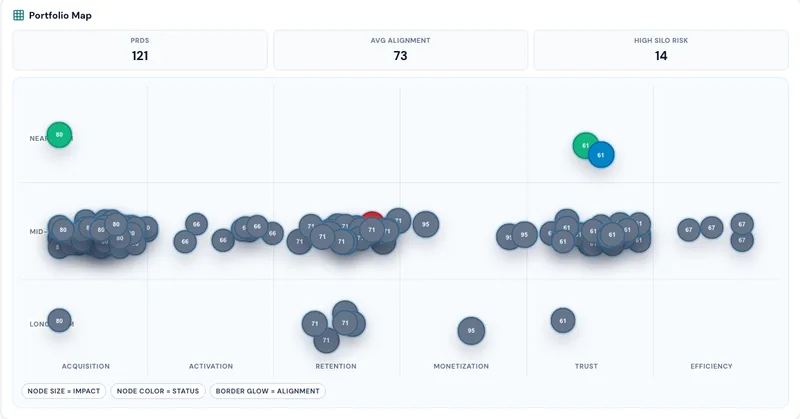
- Product and business leaders who need a shared view of initiative alignment, portfolio concentration, ownership gaps, and release decisions.
Not the right fit if…
- Teams that need full PRD generation without creating an account: the page says a free account is required to generate and save the full PRD.
How it fits your workflow
Paste a feature idea or customer problem into the preview, or use customer feedback as the starting signal. ProdMoh returns a likely decision, why it matters now, evidence needed, and a next move.
With a free account, turn the preview into a saved PRD with user stories, acceptance criteria, constraints, and coding guardrails. Teams review the scope and checks before development.
Developers can load saved context through ProdMoh MCP in compatible coding tools. Release owners review Code X-Ray findings and Release Gate evidence before approving, blocking, or deferring a release.
Pricing
Free: The page describes up to 3 free previews per day without an account. A free account with starter credits and no card required unlocks full PRD generation and saving.
Free preview
Free; up to 3 previews a day without an account.
- · Preview a likely decision, why it matters now, evidence needed, and next move.
- · No account needed.
Free account
Free account with starter credits; no card required.
- · Generate a full PRD from a preview.
- · Include user stories, acceptance criteria, constraints, and AI coding guardrails.
- · Save the PRD to a workspace.
Prices checked on Nov 8, 2026 from the vendor's site. They can change; confirm before you buy.
Key features
- Customer Pulse
- Synthesizes customer feedback and recurring friction into themes, ideas, opportunities, and proposed initiatives for review.
- PRD and requirements generation
- Turns an idea or customer problem into a product requirements document with user stories and acceptance criteria.
- ProdMoh Score
- Assesses strategic, market, and execution signals to inform prioritization and highlight where an idea needs more clarity.
- Coding guardrails and evaluation plans
- Generates implementation constraints and validation checks alongside a PRD so teams can review what an AI coding tool must do and must not break.
- MCP coding-tool context
- Makes saved PRD and user-story context available inside compatible coding tools, including Cursor, Windsurf, and Claude Desktop.
- Code X-Ray and Release Gate
- Code X-Ray flags risky diffs. Release Gate tracks scenario status and attached evidence and provides an approve, block, or defer path.
Works with
- Cursor
- Claude Desktop
- Windsurf
- Other MCP-compatible clients
Limitations to know
- The no-account preview is limited to 3 previews per day.
- A free account is required to turn a preview into a full PRD and save it to a workspace.
Getting started
A free account is required for full PRD generation and saving. Coding-tool context is for MCP-compatible clients, including Cursor, Claude Desktop, and Windsurf.
- Paste a feature idea, customer request, or problem into the free preview; no sign-up is needed for this step.
- Create a free account to generate and save the full PRD with user stories, acceptance criteria, and guardrails.
- Review the generated scope and checks with the team.
- Load the saved context in an MCP-compatible coding tool and review release evidence in Release Gate.
Frequently asked questions
Does ProdMoh replace our AI tools?
No. ProdMoh provides business context, requirements, and review workflows around AI-assisted delivery. Teams can use MCP-compatible coding tools alongside it, while people review evidence and make release decisions.
How does ProdMoh help me decide what to ship, block, or defer?
Product Canvas, Strategic Brief, and Decision Queue show what to approve, block, or defer based on goals, risk, ownership, and evidence.
Can I see if our roadmap is over-indexed on one theme?
Yes. Product Canvas maps PRDs across acquisition, retention, monetization, trust, and efficiency so concentration risk is visible.
How does release approval work in ProdMoh?
Release Gate tracks scenario status, evidence uploads, and risk flags, then provides an approve, block, or defer path before launch.
Can business teams use this without writing code?
Yes. Business teams can run the workflow in the UI, while engineering can use MCP and Code X-Ray for deeper technical review.
Does ProdMoh support engineering workflows too?
Yes. ProdMoh supports MCP integrations for Cursor, Windsurf, and Claude Desktop, plus Code X-Ray for diff risk analysis.
What can we generate after a release is approved?
Launch Generator creates release notes, go-to-market outlines, sales enablement content, and training material from approved shipped scope.
Who is ProdMoh for?
Leaders review priorities and tradeoffs. Operations and customer teams contribute business context, while product and engineering teams turn decisions into requirements, release evidence, and launch plans.
How quickly can a team get value from ProdMoh?
The page says teams can start in minutes by using existing PRDs and stories to generate a Product Canvas view, Strategic Brief, and decision workflow.