
Recast
Recast Studio is an AI-powered, marketing-focused video editor that turns long recordings (webinars, podcasts, interviews, Zoom calls) into social-ready clips, audiograms, and written content, and can publish or schedule those assets directly to major social platforms.
Recast is video software teams evaluate for video. Use this page to review pricing, integration signals, and the best alternatives before you commit.
Profile facts come from the vendor source. AiMatch labels unknown pricing or API details instead of estimating them.
Review official source →Used in These Packs
Quick Overview
Best for: Video
What it does
Video software for decision-makers comparing workflow fit and alternatives.
Best fit
Video
Pricing snapshot
Free from From $20 (production cost estimate shown on the site)
Next step
Compare Recast with similar tools before you shortlist it.
Compare this tool before you shortlist it
Review alternatives, pricing posture, and workflow fit side by side.
Recast Studio is an AI-powered video editor built for marketing teams that repurposes long recordings—webinars, podcasts, interviews, and Zoom recordings—into social-ready clips, audiograms, and written content. The platform uses transcript-driven editing and integrated AI features (transcription, filler-word removal, auto reframe, and AI writing) to streamline clipping, captioning, and content generation.
Recast also includes built-in social publishing and scheduling so teams can post or schedule directly to TikTok, Instagram, YouTube, Facebook, LinkedIn, Twitter, and more, reducing the need to export, download, and re-upload to each platform.
Recast Studio is an AI-powered, marketing-focused video editor that turns long recordings (webinars, podcasts, interviews, Zoom calls) into social-ready clips, audiograms, and written content, and can publish or schedule those assets directly to major social platforms.
Own this listing?
Claim this page for a one-time $29 to add pricing, features, screenshots, verified owner details, and a clearly labeled 30-day category position after the profile is live.
Claim this listing for $29Key Features
Transcript-Based Editing
Edit video by editing text: highlight and delete transcript text to trim video, remove filler words, and keep captions in sync automatically.
AI Writing Inside the Editor
Generate blog drafts, show notes, LinkedIn posts, and email copy directly from your video or podcast using AI-powered writing tools integrated into the editor.
Built-In Social Publishing & Scheduling
Connect accounts and post or schedule clips directly from Recast to TikTok, Instagram, YouTube, Facebook, LinkedIn, Twitter, and more without exporting files.
Auto Reframe
AI analyzes video to detect faces and important scenes, then automatically adjusts framing for different aspect ratios and platforms.
AI Filler Word & Pause Removal
Automatically remove filler words like 'um' and 'uh' and awkward silences to produce cleaner audio quickly.
Team Workspace & Collaboration
Invite teammates, share videos, leave feedback, and manage projects from a single organized workspace.
Accurate Transcription (20+ languages)
High-precision AI transcription supporting more than 20 languages to create captions, subtitles, and editable transcripts.
Pricing
The site advertises 'Start Free' / 'Sign Up Free' indicating a free tier or trial is available.
Production cost estimate
From $20 (production cost estimate shown on the site)- Site references a reduced 'production cost: From $20' in the workflow comparison
Use Cases
Repurpose Long-form Recordings
Turn webinars, podcasts, interviews, and event recordings into multiple short clips, audiograms, and written assets for social and marketing channels.
Social-First Content Production
Find and publish the strongest moments from a recording, add captions and branding, and export channel-ready formats for platforms like TikTok and Instagram.
Content & Copy Generation
Generate show notes, blog drafts, LinkedIn posts, and email copy from transcripts and clips using the editor's AI writing tools.
Centralized Publishing & Scheduling
Schedule and post clips directly to multiple social platforms from within Recast to streamline publishing workflows.
Integrations
TikTok
Connect and post or schedule clips directly to TikTok from Recast.
Publish or schedule Instagram posts and Stories without leaving the Recast editor.
YouTube
Publish YouTube uploads or shorts directly from Recast.
Post or schedule Facebook videos from within the platform.
Share clips and written assets directly to LinkedIn.
Twitter (X)
Publish or schedule clips to Twitter/X from the editor.
Benefits
Limitations
No verified limitations are available.
Frequently Asked Questions
No verified FAQs are available.
Getting Started
- 1 Step 1: Upload your long-form video or audio (podcast, webinar, interview, Zoom recording).
- 2 Step 2: Let Recast's AI analyze the recording and find the best moments automatically.
- 3 Step 3: Review and customize clips using transcript-based editing, add brand styles, captions, or music.
- 4 Step 4: Publish immediately or schedule posts to TikTok, Instagram, YouTube, Facebook, LinkedIn, Twitter directly from the editor.
Support
No verified support channels are available.
API
Compare Recast with similar tools
See how it stacks up against alternatives
Related Tools
View all 103 →


Nexus Clips
Nexus Clips is a web tool that uses AI to automatically find and create short, vertical clips from long videos — adding animated subtitles and optional stickers to produce social-ready content for platforms like TikTok, YouTube Shorts, and Twitch.


Premium Alternatives

Text Remover
Text Remover is an online AI video cleanup tool that detects and removes text, captions, subtitles, and other overlays, reconstructing the background while aiming to preserve video quality. It is designed for creators, editors, and teams preparing videos for reuse or localization.

Prismiq
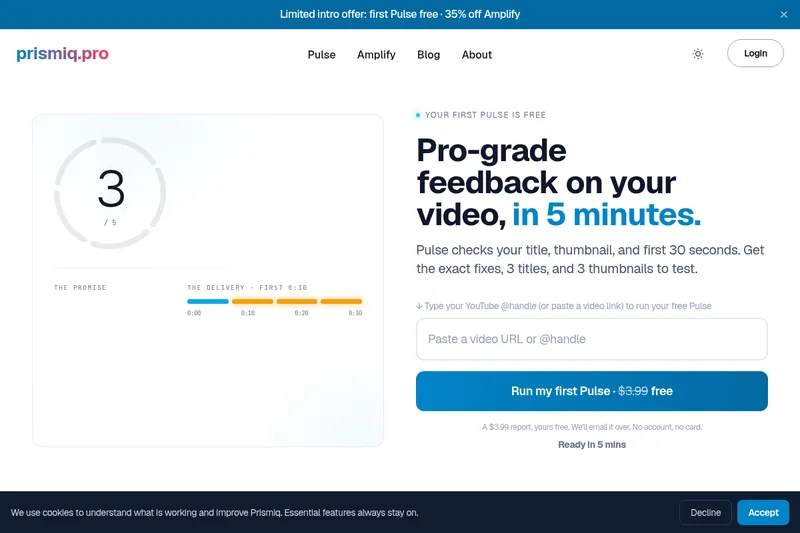
Prismiq Pulse is a post-publish video audit for YouTube that evaluates your title, thumbnail, and first 30 seconds, returns a Pulse score, timestamped friction points, and delivers 3 test-ready title variations plus 3 thumbnail concepts. Reports are ready in about five minutes and can be run by pasting any public YouTube URL.

Topaz Video
Topaz Video is Topaz Labs’ AI-powered desktop and cloud video enhancement application for filmmakers and videographers, offering model-based upscaling, denoising, stabilization, SDR→HDR conversion and other production-grade restoration and finishing tools.

Sendpotion
Potion (Sendpotion) is an AI video personalization platform that generates hyper-realistic videos in your own face, voice, and gestures for sales, marketing, support, and education, enabling scalable personalized outreach and video content creation.

reccloud-cn
录咖(reccloud)是一款面向创作者与企业的在线AI音视频处理平台,提供语音转文字、字幕生成、文字转语音、视频翻译、视频生成、去水印、人声分离、音视频总结等一键化AI工具与开发者API。