
rewritebar
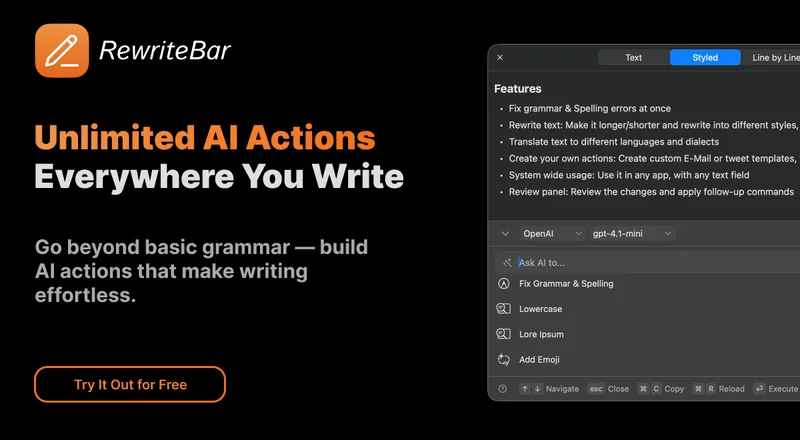
RewriteBar applies AI writing, translation, and text-formatting actions to selections in macOS apps. Writers, product teams, and developers can correct or transform text in place using cloud providers or supported local models.
Who it's for
- Mac users who write emails, documents, or messages across multiple apps and want to edit selected text in place.
- Product managers and support teams who want to turn notes or long text into summaries, action items, or user story titles.
- Developers working with SQL, JSON, or YAML who want formatting and conversion actions on selected text.
How it fits your workflow
Select text in an app that supports text input and open RewriteBar with a keyboard shortcut. The app displays the selection and available actions.
Choose a built-in or customized action, such as correcting grammar, changing tone, translating, summarizing, or formatting text. You can compare the result with the original.
Pricing
Free: The free trial includes 35,000 credits for one active device and requires no credit card.
Trial
Free
- · 1 active device
- · 35,000 credits one-time
- · Third-party providers and BYOK
Standard
$29 USD one-time
- · 1 active device
- · 35,000 credits one-time
- · Unlimited app updates
- · Third-party providers, BYOK, and local AI providers
Pro
$59 USD one-time
- · 3 active devices
- · 3 million credits monthly
- · Unlimited app updates
- · RewriteBar Gateway subscription for 1 year
Extra Device
$19 USD one-time
- · Adds 1 active device to a Standard or Pro license
RewriteBar Gateway
$40 USD annually
- · Access to 70 AI models
- · 3 million credits monthly
- · Premium models included
Prices checked on Nov 9, 2026 from the vendor's site. They can change; confirm before you buy.
Key features
- System-wide text actions
- Select text in an application and invoke RewriteBar with a keyboard shortcut to open the available actions.
- Writing correction and rewriting
- Correct grammar, spelling, punctuation, and sentence structure; rewrite text for clarity, tone, concision, or length.
- Translation
- Translate text in the current app, with the page stating support for more than 500 languages. Language support depends on the selected model.
- Custom actions and workflows
- Customize preset actions and combine multiple actions into a sequence, such as expanding text and then translating it.
- Compare edits
- Review rewritten text alongside the original, with line-by-line or word-by-word comparison.
- Local model support
- Use local AI models through listed providers including Ollama, LM Studio, MLX, Apple Intelligence, and Osaurus.
Works with
- PopClip
- AI providers and local model software
- Writing and productivity applications
- ChatGPT, voice dictation, and Grammarly
Limitations to know
- RewriteBar is macOS-only; the page says there is no Windows version and none is planned.
- The app requires macOS Accessibility permission to read selected text and replace it with the result.
- Translation support depends on the selected model; the page notes that smaller local models may support fewer languages.
- Using cloud AI through BYOK can incur charges from the chosen provider, which are paid directly to that provider.
Alternatives to consider
-
Steer
Choose it if you want a writing assistant for macOS and Windows focused on rewriting emails and messages for tone, concision, and professionalism.
-
LanguageTool
Choose it if you want grammar, spelling, punctuation, and style checking across 30+ languages with browser add-ons, desktop apps, and business integrations.
Getting started
- Select text in an app and trigger RewriteBar with a keyboard shortcut.
Frequently asked questions
How does RewriteBar work?
It captures the currently selected text using the macOS clipboard, sends it to a language model for rewriting, and automatically pastes the corrected version back to replace the original.
Does RewriteBar work in different applications?
The page says it works with almost any application or website that supports text input, including examples such as Chrome, Google Docs, Microsoft Word, Slack, Teams, Notion, and Visual Studio Code.
Is there a free trial?
Yes. The trial includes 35,000 credits, and the page says no credit card is required.
Which languages are supported?
The translation action supports more than 500 languages, but support depends on the selected model. The app interface is translated into 12 languages.
Are there additional costs?
The page says local models and the purchased app do not incur additional costs. With BYOK cloud providers, users pay the chosen provider directly for usage.
Is there a Windows version?
No. The page says there is no Windows version and none is planned.
Why does the app request Accessibility permissions?
The permission allows RewriteBar to read currently selected text and replace it with the improved result.
Can I request a refund?
The page says a refund can be requested within 14 days of purchase by reaching out via email.