

Sora-watermark-remove
Sora Watermark Remove is an AI-powered cloud service that automatically detects and removes Sora watermarks from videos, producing clean, professional-quality output for creators, studios, and businesses.
Sora-watermark-remove is video software teams evaluate for video. Use this page to review pricing, integration signals, and the best alternatives before you commit.
Profile facts come from the vendor source. AiMatch labels unknown pricing or API details instead of estimating them.
Review official source →Used in These Packs
Quick Overview
Best for: Video
What it does
Video software for decision-makers comparing workflow fit and alternatives.
Best fit
Video
Pricing snapshot
Freemium from $5 per video
Next step
Compare Sora-watermark-remove with similar tools before you shortlist it.
Compare this tool before you shortlist it
Review alternatives, pricing posture, and workflow fit side by side.
Sora Watermark Remove is a cloud-based service that uses advanced AI to automatically detect and remove Sora watermarks from video files and links. The service supports uploads and URL inputs, processes files securely on company servers (with automatic deletion after 24 hours), and returns watermark-free videos in original quality—typically within 2–5 minutes. It is positioned for content creators, studios, and businesses that need professional, clean videos without watermarks and offers one-time and subscription pricing tiers, in addition to a free trial for the yearly plan.
Sora Watermark Remove is an AI-powered cloud service that automatically detects and removes Sora watermarks from videos, producing clean, professional-quality output for creators, studios, and businesses.
Own this listing?
Claim this page for a one-time $29 to add pricing, features, screenshots, verified owner details, and a clearly labeled 30-day category position after the profile is live.
Claim this listing for $29Key Features
Automatic watermark detection & removal
Advanced AI analyzes video frame by frame to detect watermarks and intelligently reconstruct the background to remove watermarks automatically.
Secure cloud processing & automatic deletion
Processing is performed on secure servers with HTTPS encryption and videos are deleted automatically after 24 hours.
Wide format and device support
Supports major video formats (MP4, MOV, AVI, MKV, WMV, and more) and works across mobile and desktop browsers.
Multiple pricing and speed/quality options
Offers a one-time per-video option and subscription plans with different monthly video allowances, processing speeds, and priority support.
Secure payments
Payments handled via Stripe, with Apple Pay and Google Pay supported; Stripe Verified and SSL secured.
Developer & white-label options
Site lists an API for developers and a White Label offering (product links shown in footer).
Pricing
Free 3-day trial available for the Yearly plan
One time
$5 per video- Quick one-off watermark removal
- Up to 1080p quality
- Standard processing speed
Monthly
$19/month- 150 videos/month
- Faster processing
- Priority support
- Cancel anytime. Billed monthly.
Yearly
$8.25/month avg- Free 3-day trial
- 200 videos/month
- Faster processing
- Priority support
Use Cases
Content creators
Remove watermarks to produce clean videos for social channels, portfolios, and monetized content.
Studios and production teams
Clean professional footage for editing, client delivery, and distribution without visible watermarks.
Businesses and marketers
Prepare polished marketing and product videos by removing unwanted watermarks prior to publishing.
Integrations
Stripe
Payment processing via Stripe (site states Stripe Verified).
Apple Pay
Supports Apple Pay for secure checkout.
Google Pay
Supports Google Pay for secure checkout.
Benefits
Limitations
Frequently Asked Questions
No verified FAQs are available.
Getting Started
- 1 Paste your video URL or drag and drop a video file (supports major formats, up to 2GB).
- 2 The AI will automatically detect and remove the watermark and reconstruct the background.
- 3 Download the clean, watermark-free video when processing completes (typically within 2–5 minutes).
Support
Contact support at [email protected] (site states support replies in under 24h).
docs
FAQ and product pages available on the site (FAQ link in header/footer).
priority support
Priority support is offered for paid subscription plans.
API
Compare Sora-watermark-remove with similar tools
See how it stacks up against alternatives
Related Tools
View all 103 →



TotalMedia Clean
TotalMedia Clean is an AI-powered online video cleanup tool that removes watermarks and subtitles using advanced AI inpainting to reconstruct backgrounds and produce flicker-free results, aimed at creators, marketers, subtitlers, and filmmakers.




Premium Alternatives

reccloud-cn
录咖(reccloud)是一款面向创作者与企业的在线AI音视频处理平台,提供语音转文字、字幕生成、文字转语音、视频翻译、视频生成、去水印、人声分离、音视频总结等一键化AI工具与开发者API。


Text Remover
Text Remover is an online AI video cleanup tool that detects and removes text, captions, subtitles, and other overlays, reconstructing the background while aiming to preserve video quality. It is designed for creators, editors, and teams preparing videos for reuse or localization.

Topaz Video
Topaz Video is Topaz Labs’ AI-powered desktop and cloud video enhancement application for filmmakers and videographers, offering model-based upscaling, denoising, stabilization, SDR→HDR conversion and other production-grade restoration and finishing tools.

Sendpotion
Potion (Sendpotion) is an AI video personalization platform that generates hyper-realistic videos in your own face, voice, and gestures for sales, marketing, support, and education, enabling scalable personalized outreach and video content creation.
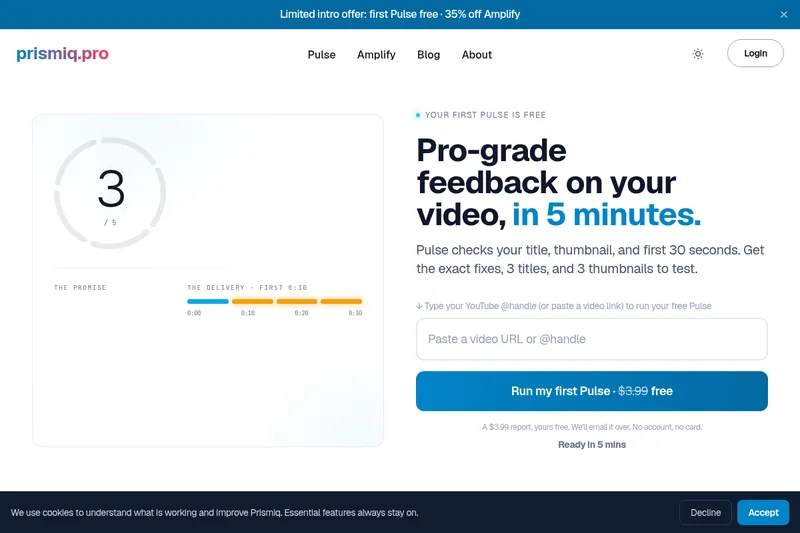
Prismiq
Prismiq Pulse is a post-publish video audit for YouTube that evaluates your title, thumbnail, and first 30 seconds, returns a Pulse score, timestamped friction points, and delivers 3 test-ready title variations plus 3 thumbnail concepts. Reports are ready in about five minutes and can be run by pasting any public YouTube URL.
