
Torii Image Translator
Torii translates manga, comics, visual novels, and documents for readers and scanlators, then lets them edit or download the results. It runs as browser extensions and a web app, with an API endpoint for app integrations.
One of 29 tools in Translation
Who it's for
- Manga and webtoon readers who want to translate image-based pages on websites using a browser extension.
- Scanlators who need to batch-translate chapters from images, ZIPs, or PDFs and edit lettering before downloading files.
- App developers who want to submit images for translation through Torii's API endpoint.
Not the right fit if…
- People who need translations equivalent to a polished official release: Torii describes its output as machine translation and says it does not match a polished official release.
How it fits your workflow
For online reading, install a browser extension, then click the Torii gate on an image or enable auto-translation as pages scroll into view. The extension is listed for Chrome, Edge, Brave, Opera, Firefox, and Safari.
For local files, upload images, a ZIP, or a PDF in the web app. Translate individual pages or a whole chapter, edit lettering and page cleanup in the built-in editor, then download the result as a ZIP, PDF, or layered PSD.
Developers can use the shown API upload endpoint to send an image and target language. Torii also offers visual novel and text translation, plus an option to bring an AI provider API key.
Pricing
Free: Free to install, with free credits provided when you sign up and no card needed to try the product. After those credits, translations use credits bought as you go; the page says there is no subscription, but does not specify pack prices.
The vendor doesn't publish prices. Check with Torii Image Translator directly.
Prices checked on Oct 20, 2026 from the vendor's site. They can change; confirm before you buy.
Key features
- Browser translation
- Translate manga and comic images on websites using the browser extension, either by clicking the Torii gate on an image or enabling auto-translation as pages appear while scrolling.
- Web app file translation
- Upload images, ZIPs, or PDFs and translate files, including entire chapters in bulk. Download the results as ZIP, PDF, or layered PSD files.
- AI lettering cleanup and placement
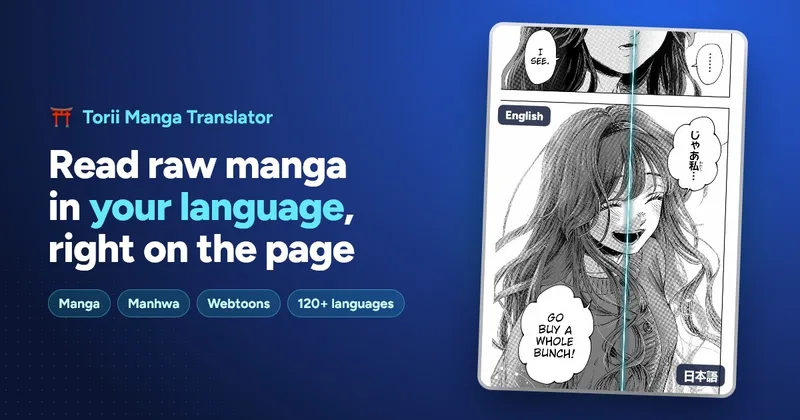
- Torii erases original lettering with AI inpainting and places translated text inside speech bubbles, sized to fit the page.
- Built-in editor
- Move, resize, rotate, restyle, or rewrite text boxes; use brushes, erasers, and inpainting to clean pages; and undo edits. The editor also includes manual OCR, text warping, text effects, and image layers.
- Translation context and prompts
- Carry names, terms, and story context from page to page. Set custom prompts for details such as honorifics, tone, or a glossary, and save prompts for a series.
- 140+ languages and model choice
- Translate between more than 140 languages, with source-language detection. Choose from listed AI models including Claude, Gemini, GPT, DeepSeek, and Grok.
Works with
- Claude, Gemini, GPT, DeepSeek, Grok, and other AI models
- Chrome, Edge, Brave, and Opera
- Firefox
- Safari
Limitations to know
- Torii describes its translations as machine translation and says they do not match a polished official release.
- The page does not state the prices or sizes of credit packs.
Alternatives to consider
-
AI Manga Translator
Choose it if you want a manga-translation option whose description specifically mentions paid plans and API access for higher-volume translation.
-
Mangatranslator
Choose it if a free web service for manga, manhua, and webtoons with stated support for 20+ languages fits your needs.
-
Imagetranslator
Choose it if you need a broader image-translation tool that also describes product-image localization alongside manga and comics translation.
Getting started
- Install the browser extension or open the web app for local files.
- Sign up to receive free credits; the page says no card is needed to try Torii.
- Translate a website image or upload images, a ZIP, or a PDF in the web app.
- Review and edit the result, then download it if needed.
Frequently asked questions
Is Torii free?
Installing Torii is free, and users receive free credits when they sign up to try it without a card. After that, translations use credits bought as needed; the page says there is no subscription.
What is the difference between the extension and the web app?
The extension translates manga on websites, including auto-translation while scrolling. The web app is for personal files such as images, ZIPs, and PDFs, and supports bulk translation, cleanup, colorization, and downloads. Both use the same account, credits, and editor.
Can Torii batch-translate a whole chapter?
Yes. In the web app, upload a chapter as images, a ZIP, or a PDF to translate every page in one go. The extension can auto-translate pages as you scroll through online chapters.
Which websites does Torii work on?
The page says it works on websites that show manga or comics as images, including reader sites, raw scans, webtoon platforms, forums, and social media.
Which languages can Torii translate?
Torii supports more than 140 languages and detects the source language. Japanese, Korean, and Chinese into English are listed as popular language pairs.
Can Torii translate long manhwa and webtoon strips?
Yes. It translates a whole strip as one image at full resolution without requiring it to be split into pages. The page says strips over 60,000 pixels tall are supported.
Does Torii work on phones?
The page lists Firefox on Android, an App Store version for Safari on iPhone and iPad, and the web app in mobile browsers.
How good are the translations?
Torii uses AI models such as Claude, Gemini, GPT, DeepSeek, and Grok, and carries context across pages. The page describes the output as machine translation rather than a polished official release and says users can edit lines in the built-in editor.
Can Torii colorize manga?
Yes. The web app's AI colorizer can colorize one black-and-white manga page or a whole chapter, and the colorized pages can also be translated.
Can I edit and download the results?
Yes. Text boxes can be moved, restyled, or rewritten, and pages can be cleaned up with the brush, eraser, or AI inpainting. Downloads are available as individual pages or as ZIP, PDF, or layered PSD files.