
Webfill
WebFill is a browser extension that uses advanced AI models to automate form filling, surveys, multiple-choice questions, email generation and response, and general data-entry tasks for students and professionals.
Webfill is automation software teams evaluate for automation. Use this page to review pricing, integration signals, and the best alternatives before you commit.
Profile facts come from the vendor source. AiMatch labels unknown pricing or API details instead of estimating them.
Review official source →Used in These Packs
Quick Overview
Best for: Automation
What it does
Automation software for decision-makers comparing workflow fit and alternatives.
Best fit
Automation
Pricing snapshot
Free from Free
Next step
Compare Webfill with similar tools before you shortlist it.
Compare this tool before you shortlist it
Review alternatives, pricing posture, and workflow fit side by side.
WebFill is a browser extension that leverages advanced AI models to automate and accelerate form filling, survey completion, multiple-choice question solving, email generation and responses, and general data entry. It offers a Vision feature to capture parts of the screen and provide instant answers, an integrated AI chatbot for on-demand help, and tools to upload PDFs or paste text for automated processing. The product targets students and professionals and is positioned for business use with mentions of enterprise-level data security and dedicated plans for different usage needs.
WebFill is a browser extension that uses advanced AI models to automate form filling, surveys, multiple-choice questions, email generation and response, and general data-entry tasks for students and professionals.
Own this listing?
Claim this page for a one-time $29 to add pricing, features, screenshots, verified owner details, and a clearly labeled 30-day category position after the profile is live.
Claim this listing for $29Key Features
WebFill Vision (screen capture answers)
Capture any part of your screen and instantly get answers; designed to solve tasks like multiple-choice questions and online assessments with fast responses.
Integrated AI Chatbot
Ask questions and receive immediate AI-powered responses for quick answers or detailed guidance directly within the extension.
Automatic Form Filling
Automates form completion by detecting content on the page or by processing uploaded PDFs and text documents to fill forms accurately.
Email Generation & Response
Generate or respond to emails automatically by pressing the WebFill button in your inbox and using AI assistance.
Smart Task Automation
Automates repetitive tasks including surveys, MCQs, and data entry; learns and improves over time to increase speed and accuracy.
Data Saving and Intelligent Instructions
Saves data per website and supports intelligent instruction setup and manual instructions to tailor automation behavior.
Customizable UI
Certain paid plans offer customizable WebFill icons for personalization (described in plan details).
Enterprise-level data security
Referenced by customer testimonial as providing enterprise-level data security for handling sensitive information.
Pricing
Free plan: 1K words/month, basic support, access to basic AI models, automated form filling, WebFill Vision access (20 uses/month), intelligent instruction setup and data saving.
Free Plan
Free- 1K Words Per Month
- Basic Support
- Access to Basic AI Models
- Automated Form Filling
Standard Plan
$7.99 per month (monthly) — Save 20% with annual billing- 100K Words Per Month
- Priority Support
- Access to Most Powerful AI Models
- Automated Form Filling
Premium Plan
$19.99 per month (monthly) — Save 20% with annual billing- 250K Words Per Month
- Priority Support
- Access to Most Powerful AI Models
- Automated Form Filling
Use Cases
Exam/Study Assistance
Use Vision to capture questions and get answers for multiple-choice questions and online assessments (targeted at students per site content).
Survey and MCQ Completion
Automate the completion of surveys and multiple-choice questionnaires to save time and reduce manual entry.
Business Data Entry & Document Processing
Process PDFs and payroll documents, automate repetitive data entry tasks and save data per website to streamline workflows (cited by HR and project manager testimonials).
Email Automation for Freelancers and Professionals
Generate and respond to emails with AI assistance to speed client communications and support custom instruction setups (testimonial from freelancer).
Integrations
No verified integration details are available.
Benefits
Limitations
No verified limitations are available.
Frequently Asked Questions
No verified FAQs are available.
Getting Started
- 1 Install the free WebFill browser extension from the website
- 2 Sign up for an account and select a plan (Free, Standard, or Premium) if needed
- 3 Use the extension: capture screen sections with Vision, upload PDFs or paste text, or press the WebFill button in your inbox to generate/respond to emails
Support
Contact page
Contact us link available in site navigation for support and inquiries (site Contact us / Feedback pages).
Plan-based support
Free plan includes Basic Support; paid plans list Priority Support in pricing details.
Documentation & Blog
Site includes a Blog and Help/FAQ sections for additional resources (Blog and FAQs listed in navigation).
API
Compare Webfill with similar tools
See how it stacks up against alternatives
Related Tools
View all 136 →

TamedTable, AI ETL in Natural Language
TamedTable is a source-available AI-first ETL tool that lets you load tabular data, issue natural-language commands to clean, enrich, classify, validate, and reshape data, and then replay or export those transformation recipes (browser and CLI).

Browser Tools SDK
Browser Tools SDK is an open-source npm package from Libretto that gives AI agents a small set of Playwright-backed browser tools so agents can open real browsers, read page snapshots, and run Playwright actions programmatically.

Document Automation
DocuQueue automates end-to-end document workflows using AI to detect and fill PDF form fields, generate business-ready documents, enforce templates/branding, and integrate with existing systems via API and webhooks. It's targeted at teams across legal, HR, sales, finance, and regulated industries.


Premium Alternatives


Productify.ai
Productify.ai is an API-first platform that ingests and normalises unstructured product content (images, packaging, text, tables) into structured, compliant, reusable product data for retailers, agencies, and enterprise teams.

ikapture
iKapture is an AI-fueled accounts payable automation platform that uses AI/ML/NLP and human intelligence in a no-code environment to extract document data, automate invoice processing and integrate with ERPs to improve cash flow monitoring and AP efficiency.
Enquirygenie
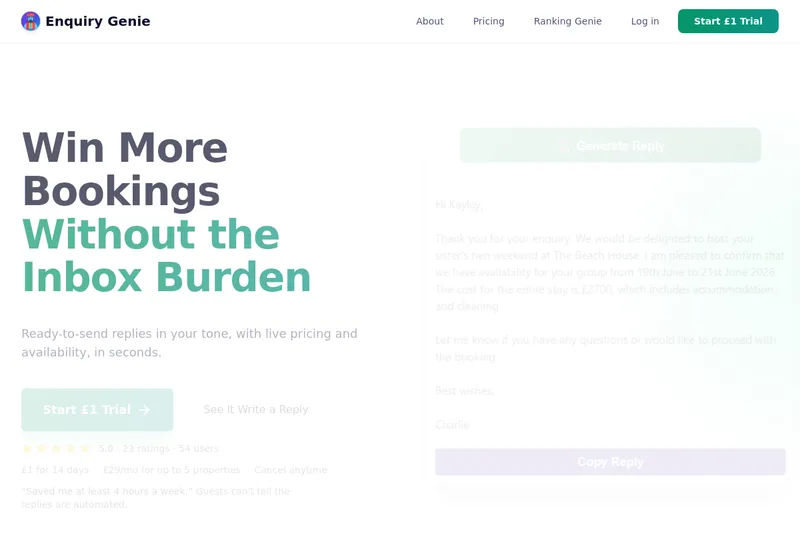
Enquiry Genie is an AI-powered email automation tool for property managers and hosts that drafts replies in your tone with live pricing and availability, integrating with Gmail/Outlook via a Chrome extension to speed up responses and increase bookings.

bewai-idp-documents-in-decision-out
Bewai Intelligent Document Processing (IDP) est une plateforme SaaS française d'automatisation du traitement documentaire pour frontoffice, backoffice et BPO : catégorisation, extraction, contrôles, workflows et intégration via API pour secteurs banque, assurance, immobilier, abonnement, etc.

ModularMind
ModularMind is a workflow automation product that lets users "automate your work by describing it," offered with a Maia Plus plan that unlocks advanced AI-powered features and higher usage limits.