
writemage
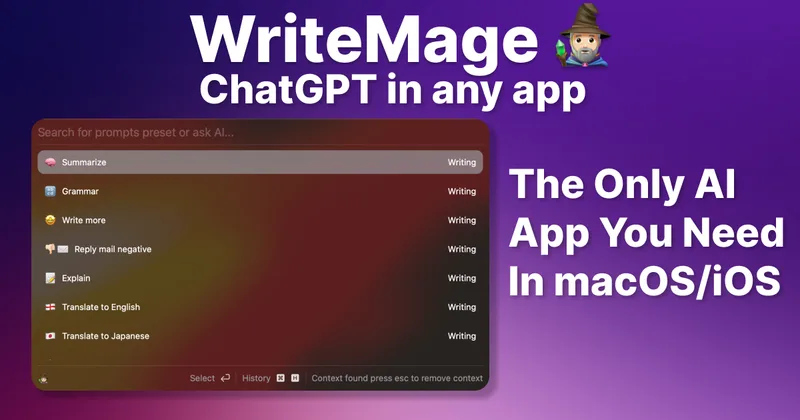
WriteMage puts ChatGPT access inside macOS apps and an iOS keyboard, with session context, saved chats, and custom prompts. It is for Mac and iOS users who want AI writing assistance without switching to a separate chat app.
Who it's for
- Mac users who want to use ChatGPT while working in other macOS apps instead of copying text into a separate chat window.
- iOS users who want AI assistance through a keyboard available across apps.
- Users who want to continue earlier AI conversations or tailor prompts for recurring writing tasks.
Not the right fit if…
- Teams that need a Windows, Linux, or Android app: the supplied page lists macOS and iOS versions, but does not list apps for those platforms.
How it fits your workflow
Install the macOS app or iOS version. On macOS, invoke WriteMage while working in another app; it floats above the app and provides ChatGPT access with session context.
Use the iOS keyboard integration to access WriteMage in iOS apps. Chat history is saved locally with labels, so earlier conversations can be found and continued.
Edit preset prompts or add your own in the prompt editor. Users can provide an OpenAI API key, or select a plan with managed or included usage.
Pricing
Free: WriteMage is free during the beta. The site says the subscription period begins when the app exits beta.
Beta
Free while the app is in beta.
- · The site says the developer covers usage during beta for the lifetime deal.
Basic
$10/month or $119.99 billed annually as displayed; the page also lists a $159.99/year price and a Product Hunt launch sale.
- · Use on 2 macOS devices
- · WriteMage iOS keyboard
- · Bring your own API key with no WriteMage word limit
- · AI usage included
Personal
$11.87/month or $142.49 billed annually as displayed; the page also lists a $189.99/year price and a Product Hunt launch sale.
- · Use on 4 macOS devices
- · WriteMage iOS keyboard
- · Managed API usage, including 750,000 words monthly
- · Option to provide your own API key with no WriteMage word limit
Lifetime Deal
The page displays a $58.99 USD Product Hunt launch sale price for a one-time lifetime deal; the page also displays a $119.99/year figure in the deal section.
- · Includes the macOS and iOS apps
- · License for 2 macOS devices
- · WriteMage iOS keyboard
- · After beta, use your own API key to continue using the app
Prices checked on Oct 31, 2026 from the vendor's site. They can change; confirm before you buy.
Key features
- AI access across macOS apps
- WriteMage floats above macOS apps and provides context-aware ChatGPT access, reducing the need to copy and paste text between applications.
- iOS keyboard integration
- The iOS version integrates with the iOS keyboard so users can access WriteMage while working in other apps.
- Session memory
- WriteMage can remember what the user is discussing during a session and use that context in subsequent responses.
- Locally saved chat history
- Chat history is saved locally and labeled so users can find and continue earlier conversations.
- Prompt editor
- A graphical prompt editor lets users modify preset prompts and add their own.
- Bring your own API key
- Users can supply their own OpenAI API key; the site says this option has no word limit from WriteMage.
Works with
- OpenAI API
Limitations to know
- The listed macOS requirement is macOS 12 or later; the site lists Intel and Apple Silicon support.
- The site describes macOS and iOS versions but does not list versions for Windows, Linux, or Android.
- The lifetime deal requires users to use their own API key after the beta period.
- The Personal plan's managed AI usage is listed as 750,000 words monthly.
Alternatives to consider
-
Macaify
Choose it if you want a free, open-source macOS app that invokes AI on selected text with a shortcut, rather than WriteMage's described macOS and iOS app offering.
Getting started
For macOS, macOS 12 or later; Intel and Apple Silicon are listed.
- Download the macOS app or the iOS version from the WriteMage website.
- Choose an applicable plan or provide your own OpenAI API key.
- Use WriteMage in your apps and customize prompts with the prompt editor.
Frequently asked questions
What does WriteMage do with user data?
The site says that when users provide their own API key, the app connects only to the OpenAI server. It says WriteMage does not include telemetry. At launch, the app checks for version updates, and the site says no data is transferred back to its server during that check.
When does a subscription period begin?
The site says the subscription period begins when the app exits beta, rather than on the date a user subscribes during beta.
Can preset prompts be edited?
Yes. The site says users can edit preset prompts and add their own.
How many devices does a license support?
The Basic plan supports two devices and the Personal plan supports four devices.
Can users avoid a subscription?
The site offers a one-time lifetime deal that includes the macOS and iOS apps. It says that after beta, users must use their own OpenAI API key to continue using the app under that deal.