
Macaify
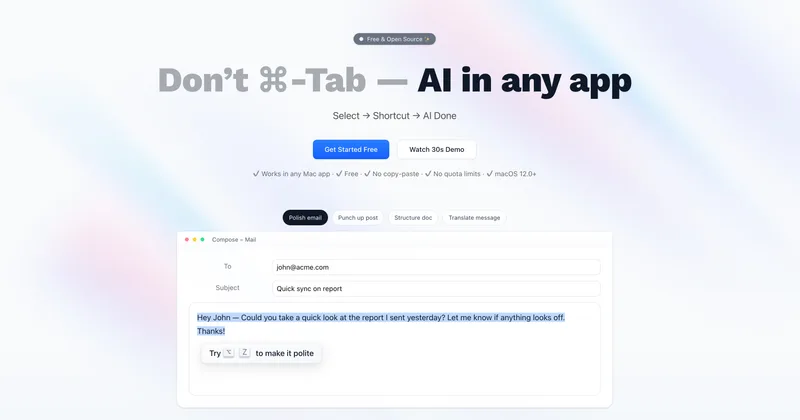
Macaify lets Mac users apply AI to selected text from within their current app, with shortcuts for tasks such as polishing, translation, and outlining. It also offers a chat mode that keeps selected content as discussion context.
One of 81 tools in Chat
Who it's for
- Mac users who regularly polish emails or other writing and want to do so without switching apps.
- People who translate messages or outline documents from within the Mac apps where they work.
- Users who want a Mac AI chat app with custom models via their own API key or paid access to additional model selections.
Not the right fit if…
- People or teams using Windows or Linux: the page offers a Mac download and specifies macOS 12.0 or later.
How it fits your workflow
In a Mac app, select the text to work on and invoke a shortcut. Macaify applies an In-Context Mode task without requiring a switch to a separate AI app or copy-and-paste.
For a conversation, use Chat Mode; the selected content stays pinned at the top as discussion context. Users can use the Free plan's custom models with their own API key or choose a paid plan with additional model options.
Pricing
Free: Free forever at $0/month. Includes unlimited usage, custom models with BYOK, In-Context Mode, and Chat Mode.
Free
$0/month; free forever.
- · Unlimited usage
- · Core features
- · Custom models with BYOK
- · In-Context Mode and Chat Mode
Pro
$8/month, or $4/month billed annually, as stated in the page footer.
- · Everything in Free
- · Macaify AI+ model options, including providers such as OpenAI, Anthropic, Google, and Perplexity
- · Unlimited usage
Pro+
$16/month, or $8/month billed annually, as stated in the page footer.
- · Everything in Pro
- · Advanced AI model options, including models from OpenAI, Anthropic, Google, Perplexity, and xAI
- · Unlimited usage
Prices checked on Oct 23, 2026 from the vendor's site. They can change; confirm before you buy.
Key features
- In-Context Mode
- Select content in a Mac app, use a shortcut, and apply AI without switching apps or copying and pasting.
- Chat Mode
- Use a chat interface; selected content remains pinned at the top as context for the discussion.
- Custom models with BYOK
- The Free plan supports custom models using the user's own API key.
- Access to models from multiple providers
- Plans include different model selections. The page names OpenAI, Anthropic, Meta, Google, Perplexity, and xAI across its plan descriptions.
- Unlimited usage
- The page says all plans include unlimited usage; plans differ by available models.
Works with
- OpenAI
- Anthropic
- Meta
- Perplexity
- xAI
Limitations to know
- The product is offered for Mac and requires macOS 12.0 or later.
- Model availability differs by plan.
Alternatives to consider
-
Beam
Choose it if you want a floating ChatGPT panel with reusable prompt templates and AI profiles alongside shortcut-based selected-text tools.
-
MacCopilot
Choose it if your workflow is based on selecting a screen area and asking AI about its contents rather than applying AI to selected text in any Mac app.
Getting started
macOS 12.0 or later.
- Download Macaify for Mac from the product page.
- Select text in a Mac app and use a shortcut to start an In-Context Mode task.
- Use Chat Mode for a discussion with selected content pinned as context, or choose a plan and model option that fits your needs.