
3D Room Design AI
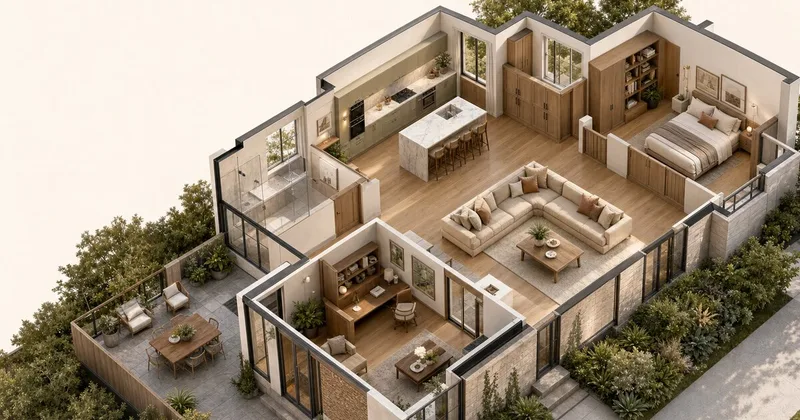
3D Room Design AI converts floor plan images into editable 3D room concepts for interior designers, contractors, homeowners, and real estate agents. Users can refine the design and share it for client review.
One of 168 tools in Design Generators
Who it's for
- Interior designers presenting alternative room directions for client comparison and approval.
- Renovation contractors showing proposed results alongside project quotes.
- Real estate agents helping buyers visualize the potential of an empty listing.
Not the right fit if…
- Teams whose floor plans are only available as PDF or CAD files and cannot export them: those formats cannot be uploaded directly.
- Teams that need published, fixed generation turnaround times: processing time varies with input complexity and selected model.
How it fits your workflow
Upload a clear PNG or JPG floor plan image, keeping walls, openings, labels, and dimensions readable. PDF and CAD files need to be exported to an image format first.
Generate a 3D concept, review its proportions, materials, and lighting, then edit furniture, finishes, colors, or lighting in the 3D room.
Share the design through a link for browser-based client review, or download available design views for discussion.
Pricing
Free: New accounts receive a one-time gift of 10 free credits. The credits do not expire; usage depends on the tool and model.
Starter
Not stated on the supplied page
- · Monthly credits
- · Expanded features
Pro
Not stated on the supplied page
- · Monthly credits
- · Expanded features
Studio
Not stated on the supplied page
- · Monthly credits
- · Expanded features
One-time credit packs
Price not stated on the supplied page
- · Credit packs are available for additional generations.
Prices checked on Oct 21, 2026 from the vendor's site. They can change; confirm before you buy.
Key features
- AI floor plan to 3D conversion
- Generate a 3D room concept from an uploaded floor plan image. PNG and JPG files can be uploaded directly; PDF and CAD plans must first be exported to one of those formats.
- Editable 3D room
- Adjust materials, wall colors, flooring, lighting, and furniture placement in the 3D design.
- Interactive design review
- Rotate and zoom into the 3D room to inspect different angles and details.
- Shareable client link
- Share a single link so clients can view the design in a browser, rotate and zoom, and provide feedback without signing up or downloading anything.
- Design exports
- Download available design views for discussion. The page advises reviewing exported content before sharing.
Limitations to know
- PDF and CAD files cannot be uploaded directly; they must first be exported as PNG or JPG.
- Generation processing time varies with the input complexity and selected model.
- The supplied page does not state prices for the Starter, Pro, or Studio plans or for credit packs.
Alternatives to consider
-
Planner 5D
Choose it if you want a cross-platform floor-plan and interior design tool with AI-driven recognition and layout automation in addition to converting 2D floor plan images into editable 3D projects.
-
AiHouse
Choose it if you need production-ready 3D designs, photorealistic renders, or automated manufacturing outputs for interior design, retail, or cabinet-making workflows.
Getting started
Runs in a browser. Direct uploads must be PNG or JPG; PDF and CAD plans must be exported to PNG or JPG first.
- Create an account to receive 10 one-time welcome credits.
- Upload a clear PNG or JPG floor plan image.
- Generate and refine the 3D room design.
- Share the design link or download available design views.
Frequently asked questions
Is 3D Room Design free to use?
New accounts receive a one-time welcome gift of 10 free credits. They do not expire, and usage depends on the tool and model.
What happens when the free credits run out?
Users can purchase credit packs or choose a monthly subscription plan with higher limits and premium features.
What file formats can I upload?
PNG and JPG images can be uploaded directly. PDF and CAD files cannot be uploaded directly; export the relevant plan as PNG or JPG first. The page recommends keeping walls, openings, labels, and dimensions readable and preserving the original proportions.
Do I need CAD software or design experience?
The page says the product runs entirely in a browser and does not require CAD skills or a software installation.
Can I share a design with clients?
Yes. Each design generates a shareable link. Clients can view the 3D room, zoom into details, and leave feedback without signing up or downloading anything.
What paid plans are available?
The page lists Starter, Pro, and Studio monthly plans with credits and expanded features, as well as one-time credit packs. Prices are not stated in the supplied content.