
capyparse
CapyParse is a web-based bank statement converter that uses built-in OCR and AI to extract transactions from PDF, scanned, or photographed bank statements and export clean, import-ready files (CSV, Excel, QBO, OFX, QFX) for accounting tools like QuickBooks and Xero.
capyparse is finance software teams evaluate for finance. Use this page to review pricing, integration signals, and the best alternatives before you commit.
Profile facts come from the vendor source. AiMatch labels unknown pricing or API details instead of estimating them.
Review official source →Used in These Packs
Quick Overview
Best for: Finance
What it does
Finance software for decision-makers comparing workflow fit and alternatives.
Best fit
Finance
Pricing snapshot
Freemium from $0/month
Next step
Compare capyparse with similar tools before you shortlist it.
Compare this tool before you shortlist it
Review alternatives, pricing posture, and workflow fit side by side.
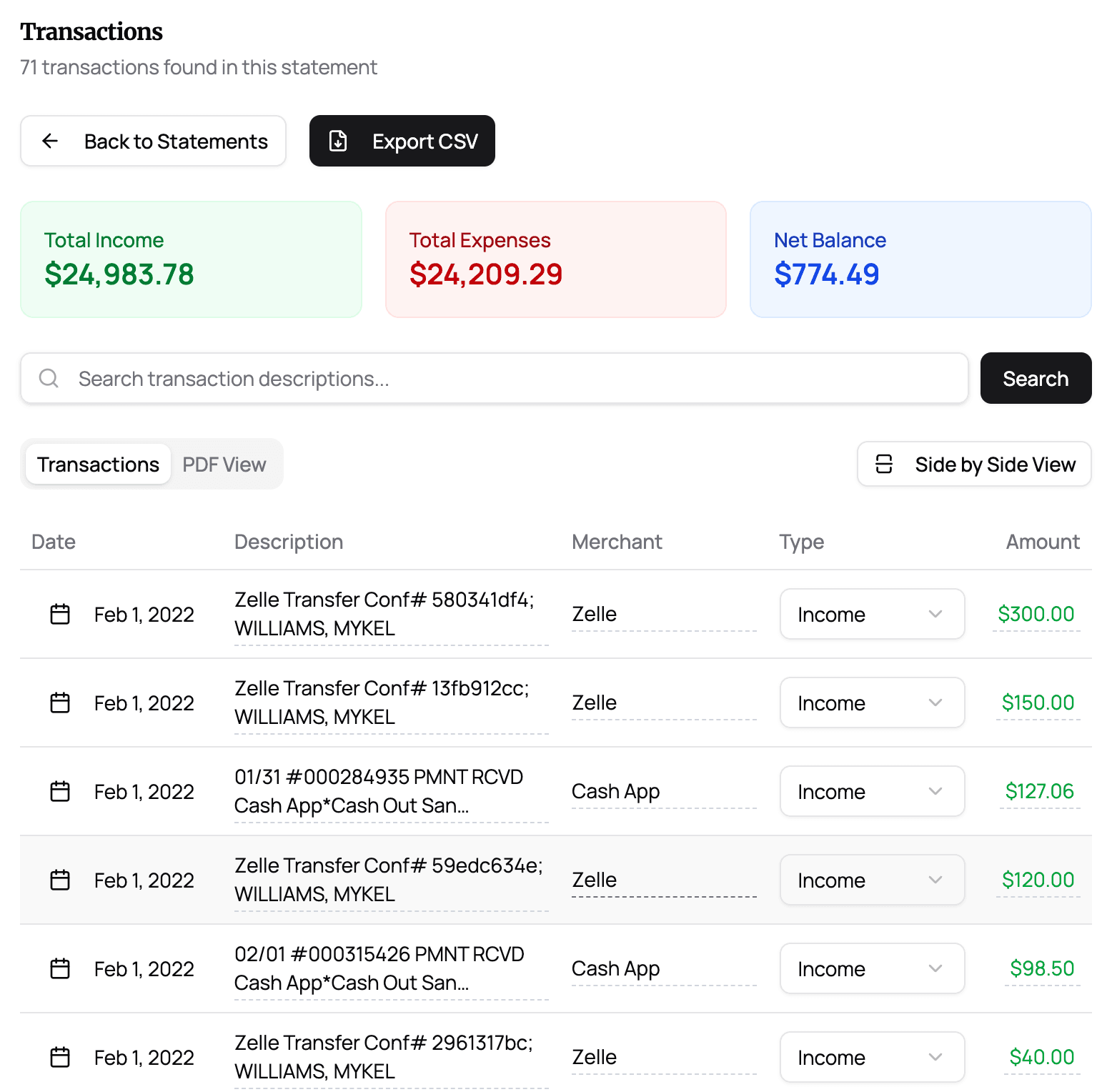
CapyParse converts bank statement PDFs, scanned paper statements, faxes, and phone photos into clean, import-ready transaction data. Users upload a statement (digital or scanned); CapyParse's OCR and AI extract dates, descriptions, and amounts, verify amounts against the original document, and present confidence scores so users can review only uncertain fields. Exports include CSV, Excel (XLSX), QBO, OFX and QFX formatted for QuickBooks, Xero, Wave and spreadsheets.
The service is aimed at accountants, bookkeepers and businesses that need accurate, fast statement conversions; the site offers an on-page demo (6 free pages per day) and a free account with additional free pages, plus paid plans for higher volumes and firm features such as batch processing and priority support.
AI-powered PDF and image to CSV/Excel converter with bank statement processing.
Own this listing?
Claim this page for a one-time $29 to add pricing, features, screenshots, verified owner details, and a clearly labeled 30-day category position after the profile is live.
Claim this listing for $29Key Features
Drag-and-drop PDF upload
Upload a bank statement PDF (digital or scanned) directly on the homepage with no signup for the demo.
Built-in OCR for scans and photos
Reads paper statements, faxes and phone photos with OCR before extraction.
AI transaction extraction
AI extracts dates, descriptions and amounts from every table and verifies values against the original document; every field shows a confidence score.
Multi-account splitting
Consolidated statements with multiple accounts are split automatically into separate tables per account.
Multiple export formats
Exports to CSV, Excel (XLSX), QBO, OFX and QFX, formatted for import into QuickBooks, Xero, Wave and spreadsheets.
Verification & confidence scoring
Extracted fields are scored and amounts/totals are re-verified against the original PDF; flagged items can be reviewed before export.
Export editor
Edit exports before download — categorize transactions, normalize payees, fix dates and flip signs in the export editor.
Privacy & encryption
Uploads are encrypted in transit and documents can be deleted from the user dashboard.
Pricing
Try 10 pages free with a free account (no credit card required).
Free
$0/month- 10 free pages (no credit card required)
- CSV & Excel exports
- Basic support
Starter
$29/month- 150 pages/month
- All export formats including QuickBooks integration
- 3 workspace members
Firm
$79/month- 600 pages/month
- Batch scan & export
- Priority processing & support
- 10 workspace members
Custom
Let's talk (custom pricing)- Custom page limits
- ERP data connectors
- Dedicated support and Service Level Agreement
- 15-minute intro call and annual billing options
Use Cases
Account reconciliation and bookkeeping
Convert bank statements into import-ready files for QuickBooks, Xero or spreadsheets to save time on manual data entry.
Accounting firms and bookkeepers
Batch processing, multiple workspace members, and priority processing features support firm workflows and higher volumes.
Processing scanned or photographed statements
OCR and AI enable extraction from paper statements, faxes and phone photos when digital PDFs are unavailable.
Import preparation for finance software
Produce QBO/OFX/QFX files that are formatted for first-try imports into QuickBooks and other accounting systems.
Integrations
QuickBooks
Exports QBO files and QuickBooks-ready formats; Starter plan lists QuickBooks integration.
Xero
Exports OFX/QFX/CSV/XLSX files formatted for import into Xero.
Wave
Exports formatted files compatible with Wave accounting imports.
Google Sheets
Exports CSV/XLSX for use in Google Sheets and spreadsheets.
Benefits
Limitations
Frequently Asked Questions
How do I convert a PDF bank statement to CSV or Excel?
Is CapyParse free to use?
Which banks and formats are supported?
Can it read scanned or photographed bank statements?
How do I import the converted file into QuickBooks?
Can it handle statements with multiple accounts?
Is my financial data secure?
Getting Started
- 1 Step 1: Upload your bank statement PDF (digital file or scanned/photo) using the homepage uploader.
- 2 Step 2: Let CapyParse's OCR and AI extract transactions and review extracted fields and confidence scores.
- 3 Step 3: Export the cleaned data as CSV, Excel, QBO, OFX or QFX or create a free account for additional free pages and features.
Support
Docs/FAQ
Frequently asked questions and product information available on the site.
Contact form / Sales
Contact via the site for sales inquiries, custom plans, and a 15-minute intro call for custom/enterprise options.
Email / Support (tiered)
Basic support for free users; priority processing and support for Firm plan customers as listed on the pricing page.
API
Compare capyparse with similar tools
See how it stacks up against alternatives
Related Tools
View all 86 →
QuantSignals FST
QuantSignals FST is a supervised AI trading agent that turns QS Research signals into account-aware, risk-governed brokerage execution with order preview, approval, monitored execution, and a reviewable session record.

Tokenomy
Tokenomy is a FinOps platform for AI that meters, budgets, routes and chargebacks LLM and AI agent spend across providers (OpenAI, Anthropic, Google, xAI and open-weight endpoints) while enabling BYOK and deployment of runtime rails such as a metering proxy, smart router and budget guard.
Forvest
Forvest is a crypto portfolio management platform featuring Fortuna, an AI-powered assistant that helps long-term crypto investors monitor risk, track assets across exchanges and wallets, filter relevant news, and receive smart alerts—without trading automation or buy/sell signals.

pwp-leeway
Leeway ist ein KI-gestützter Aktienanalyst für Privatanleger und Institutionen, der LLM‑ und Machine‑Learning‑Analysen kombiniert, um Business‑, Market‑Fit‑ und Cycle‑Ratings sowie einen aggregierten Leeway‑Score für über 25.000 Aktien bereitzustellen.



credit-report-analytics-api
An API-focused offering from Digitap that leverages AI/ML and alternate data (bank statements, device, e‑commerce, social, telecom) plus account-aggregator integrations to produce variables and analytics for credit underwriting, risk scoring and decisioning for banks and fintechs.

VoiceLark
VoiceLark is an AI-powered cryptocurrency news aggregator that collects 1,100–1,400 articles daily from over 110 sources, analyzes sentiment in real time (scale -1 to 1), generates concise summaries and explanations, and provides sentiment-based rankings and dashboards for traders and investors.
Premium Alternatives

Coindecision
Coin Decision is a Chan Theory (Chanlun 缠论)–focused crypto trading workspace that automates Chan structure detection, ranks signals across major crypto pairs, and provides one‑click AI briefs, charts, and webhook/API outputs for traders and desks.
VoiceLark
VoiceLark is an AI-powered cryptocurrency news aggregator that collects 1,100–1,400 articles daily from over 110 sources, analyzes sentiment in real time (scale -1 to 1), generates concise summaries and explanations, and provides sentiment-based rankings and dashboards for traders and investors.

Themis For Crypto
Themis For Crypto is an AI-assisted trading platform for researching crypto, stocks, and forex, backtesting strategies, and creating automated trading bots. It offers a WhatsApp AI assistant, with paid plans adding trading bots and other capabilities.


financeops
FinanceOps is an AI-first A/R automation platform that uses always-on, empathetic AI agents to automate collections, optimize outreach timing and channels, reconcile payments, and improve recovery rates for finance teams without increasing headcount.

invoice-box-发票盒子
发票盒子是一款面向个人与企业的智能发票管理与报销助手,支持一键收集电子发票、AI 自动分类与查重、拍照 OCR、生成报销单与导出对账 Excel,提供 iOS/Android/网页版与云端同步备份。
