
ClipsPal
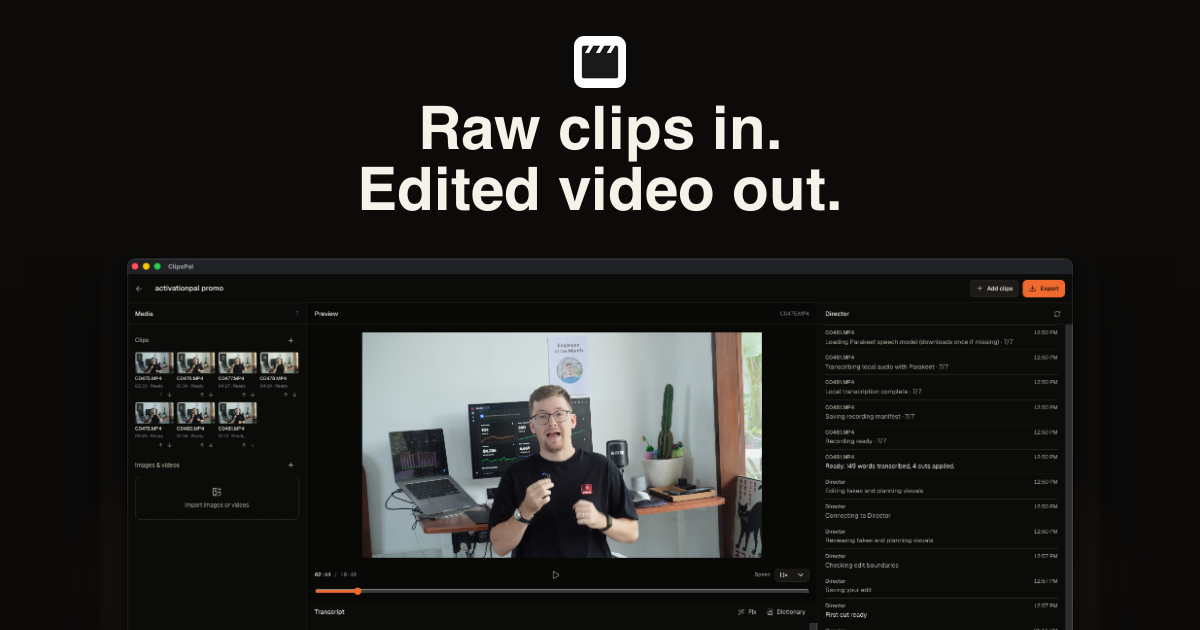
ClipsPal edits talking-head and faceless videos on desktop, removing failed takes and silences and helping creators produce finished videos, shorts, chapters, and articles. It is for video creators who want an editable timeline or AI-agent-assisted editing.
Who it's for
- YouTube creators editing talking-head videos recorded in several takes who want failed takes and silences removed automatically.
- Course creators and founders producing courses, founder updates, or product walkthroughs who want to refine an automatic edit in a desktop timeline.
- Creators already using an MCP-compatible AI client who want an agent to edit videos, generate shorts or chapters, and export the result.
Not the right fit if…
- Windows users who need native screen or camera recording or background removal: the page says these features are Mac-only.
- Teams that require a stable, signed Windows release: the page describes the Windows version as an unsigned beta.
How it fits your workflow
Import video clips, or record voice or screen content where supported. Run the automatic edit to cut failed takes and silences.
Review and refine the edit in the timeline by trimming, splitting, restoring cuts, correcting transcript text, and adding zoom-ins, visuals, motion slides, headings, or sounds. Alternatively, ask Director to make edits in plain language.
Create shorts, chapters, or articles from the video, then export an MP4 with subtitles and an SRT file. The timeline can also be exported to Premiere Pro or DaVinci Resolve; MCP clients can request edits and exports.
Pricing
Free: The app can be downloaded before buying, but editing starts after entering a license. The page does not describe a free editing tier.
Lifetime access
$59 one-time payment; the page says the price increases by $10 every 20 licenses, with $69 shown as the next price.
- · Everything in ClipsPal
- · Updates forever
- · License for 2 computers
- · One-click auto edit, Director, shorts, articles, and MCP server
Prices checked on Nov 9, 2026 from the vendor's site. They can change; confirm before you buy.
Key features
- One-click automatic editing
- Automatically cuts failed takes and silences from imported footage. The page shows an example reducing 15 minutes and 35 seconds of footage to a 5-minute-and-40-second edit.
- Timeline editor
- Lets users drag, trim, split, and restore clips, with edits that can be undone.
- Director
- Accepts plain-language requests to perform edits, such as removing a described passage, adding zoom-ins or sounds, suggesting visuals, or making vertical shorts.
- Subtitles and transcript editing
- Supports subtitles in 40 languages and lets users correct words in the transcript and subtitles.
- Motion slides and visual additions
- Creates animated motion slides for selected words and supports adding visuals, headings, zoom-ins, and sounds.
- Shorts, chapters, and articles
- Can turn a video into vertical shorts, generate YouTube chapters, and create articles from video content.
Works with
- MCP clients and AI agents
- Adobe Premiere Pro
- DaVinci Resolve
Limitations to know
- The app requires macOS 14 or later or Windows 11 on an x64 Intel or AMD computer.
- Windows is described as an unsigned beta and may trigger SmartScreen.
- Native screen and camera recording and background removal are Mac-only.
- Windows transcription uses a local Whisper model, which the page says has lower accuracy than on Mac.
- On Intel Macs, transcription uses the same local Whisper model as Windows and has lower accuracy than on Apple Silicon.
- A license covers two computers.
Alternatives to consider
-
ChatCut
Choose it if you want a browser-based, prompt-driven editor that also generates motion graphics, captions, images, video, and music.
-
OpenChatCut
Choose it if you want a free, open-source desktop editor with conversational agents that place and edit clips on a timeline.
-
Subclip
Choose it if you need a Mac-focused editor that also supports translation or dubbing alongside prompt-based editing and MCP workflows.
Getting started
macOS 14 or later on Apple Silicon or Intel, or Windows 11 on an Intel or AMD x64 computer. The Windows version is an unsigned beta.
- Download the desktop app; the page says it can be downloaded before purchase.
- Enter a license to start editing.
- Import clips or use a supported recording option.
- Run the auto edit, refine it in the timeline or with Director, and export.
Frequently asked questions
Which AI do I need?
The page lists Claude Code with a Claude Pro or Max plan, Codex with a ChatGPT plan, OpenCode with a connected provider, Gemini with a Google account, Cursor with a Cursor account, Grok with SuperGrok or X Premium+, or a free local model. It says ClipsPal does not bill per video.
Does my footage get uploaded?
No. Video, audio, and transcription stay on the computer. Only the transcript goes to the AI selected by the user; with a local model, nothing leaves the computer.
Which languages does it understand?
The page says ClipsPal supports 40 spoken languages, including English, Spanish, Hindi, Portuguese, French, German, Japanese, Chinese, Korean, and Arabic.
What computer do I need?
The listed requirements are macOS 14 or later on a Mac with Apple Silicon or Intel, or Windows 11 on an Intel or AMD x64 computer.
Can I record my screen?
On Mac, users can record the screen with a camera in the corner or record voice. On Windows, the page lists file import and audio recording.
How many computers can I use?
A license can be used on two computers, and the page says it can be moved from Settings.
Is it a subscription?
No. The page describes a one-time payment for lifetime access, with updates included.
Can I finish the edit in another app?
Yes. The timeline can be exported to Premiere Pro or DaVinci Resolve.