
CodeFormer.io
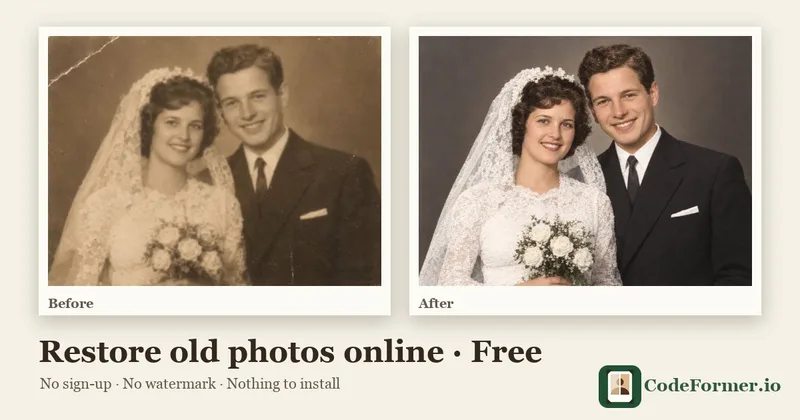
CodeFormer.io restores, sharpens, and optionally colorizes old or blurry photos in a browser. Family historians, people preparing memorial or gift prints, and photo studios can upload images and download repaired copies.
Who it's for
- Family historians restoring portraits for family trees, printed books, or reunion slideshows.
- People preparing a faded photograph for a memorial, gift, or framed print.
- Photo studios restoring images for customers who can use a paid credit pack or plan for commercial work.
Not the right fit if…
- People who need a missing or torn-away face reconstructed: the page says the tool cannot bring back parts of a face that are gone.
- Users who need free 2K or 4K output: those output sizes are paid, while the free daily restoration is standard size.
How it fits your workflow
Choose a JPG, PNG, or WEBP photo up to 30 MB from a phone or computer. Select an output size and restoration settings, and optionally request colorization or add notes.
Run the restoration in the browser, then compare the result with the original using the before-and-after slider. Download the result if it looks right; the page says it is saved in Your photos.
Pricing
Free: One standard-size photo per day can be restored without an account. A free account adds two credits daily, enough for one more standard photo. Free restorations have no watermark.
No-account free use
Free
- · One standard-size photo per day
- · Colorization included
- · No watermark
- · Personal use
Free account
Free
- · Two credits added every day, enough for one additional standard photo
- · One more try today may be available after signing in
Paid credit pack
Price not stated on the supplied page
- · Access to paid 2K and 4K output options
- · Commercial use
- · Pay once for a credit pack
Monthly plan
Price not stated on the supplied page
- · Paid plan for users who restore photos often
- · Commercial use
- · Monthly payment is optional
Prices checked on Nov 25, 2026 from the vendor's site. They can change; confirm before you buy.
Key features
- Photo restoration
- Repairs common photo problems in one pass, including blurry or faded images, yellowed prints, scratches, creases, and small tears.
- Face enhancement
- Sharpens facial details such as eyes, eyebrows, teeth, and hair. The service aims to preserve face shape, expression, glasses, hairstyle, and clothing.
- Color restoration and colorization
- Refreshes faded color prints and can add natural-looking color to black-and-white or sepia photos. The page notes that generated colors are educated guesses.
- Restoration strength options
- Users can choose Closer to the original, Balanced, or More detail to control how much the image is changed.
- Output size choices
- Standard, Large (2K), and Extra large (4K) output options are listed. The 2K and 4K options are paid and use credits.
- Batch restoration
- Paid users can restore up to 20 photos at once and download them as a ZIP file.
Limitations to know
- Uploads must be JPG, PNG, or WEBP files no larger than 30 MB.
- A face that is missing or torn away cannot be restored.
- Heavy motion blur and group photos with many small faces may improve only a little.
- Colorization is an educated guess, so some colors may differ from the original scene.
- 2K and 4K output are paid options; the free daily restoration is standard size.
- The page says restorations without a paid plan are for personal use, not commercial use.
Alternatives to consider
-
ClariText
Choose it if you also need to restore screenshots or scanned documents, not just photos.
-
Unblur Image
Choose it if your main need is one-click photo unblurring and image-quality enhancement.
-
Revivast
Choose it if you want an AI-assisted restoration service with human review or optional framed prints.
Getting started
A web browser and a JPG, PNG, or WEBP image up to 30 MB. No installation is required.
- Open CodeFormer.io and choose a photo or drag it into the upload area.
- Select the output size and restoration options, including colorization if wanted.
- Wait for the restoration to finish; most photos take one to three minutes.
- Compare the result with the original and download it.
Frequently asked questions
Do I need to install anything?
No. The service runs in a normal web browser on a computer or phone; the page says Python, a graphics card, and a download are not required.
What files can I upload?
JPG, PNG, and WEBP files up to 30 MB are supported.
Can it colorize black-and-white photos?
Yes. Choose Bring back color before restoring. The page says colorization is included, but the colors are educated guesses and may differ from the original.
How long does restoration take?
Most photos take one to three minutes, though some take longer. The page advises keeping it open and the screen on until the result appears.
Are photos used to train AI?
The page says uploaded photos are not used to train AI, there is no public gallery, and users can delete their photos.
How long are restored photos kept?
Photos restored without a paid plan are deleted automatically after 30 days. On a paid plan, they remain until the user deletes them.
Can restored photos be used commercially?
Yes, with a paid credit pack or plan. Without one, the page says restorations are for personal use.
Can it restore a face that is missing or torn away?
No. The page says a face that is torn away or missing completely cannot be brought back; AI would have to guess and draw a new one.