Cursor
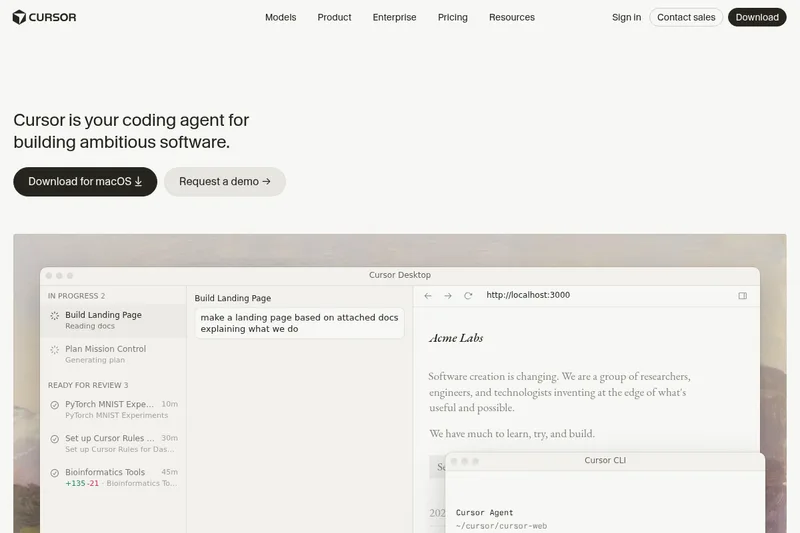
Cursor is an AI coding agent and developer platform that uses autonomous and interactive agents, a desktop IDE, CLI, and integrations (Slack, GitHub) to plan, build, test, and review software at scale for teams and enterprises.
Cursor is code editors software teams evaluate for software & gaming. Use this page to review pricing, integration signals, and the best alternatives before you commit.
Used in These Packs
Quick Overview
Best for: Software & Gaming
What it does
Code editors software for decision-makers comparing workflow fit and alternatives.
Best fit
Software & Gaming
Pricing snapshot
Contact for pricing
Next step
Compare Cursor with similar tools before you shortlist it.
Compare this tool before you shortlist it
Review alternatives, pricing posture, and workflow fit side by side.
Cursor
Cursor is an AI-first developer product that combines an IDE-like desktop app, a CLI, cloud/always-on agents, and team integrations to help engineers plan, build, test, and review software. It supports fully autonomous agents that can run in parallel on their own machines or in the cloud, interactive coding assistance inside a desktop editor, and command-line and chat integrations for team workflows.
Designed for teams and enterprises, Cursor emphasizes complete codebase understanding (indexing and semantic search), model choice across major providers, and automation features such as scheduled agents and triggers to maintain and fix software continuously.
Cursor is an AI-powered code editor designed to make coding more productive by integrating AI assistants that can write code, answer complex questions, and scaffold work both in IDEs and on web and mobile platforms.
Own this listing?
Claim this page to add pricing, features, screenshots, and verified owner details.
Claim this listingKey Features
Autonomous agents (Cloud & Local)
Agents can work autonomously and in parallel, using their own computers or cloud agents to build, test, and demo features end to end for review.
Desktop IDE with AI-powered coding assistance
A desktop interface offering AI-powered completions, targeted edits (Cmd+K), and interactive coding workflows demonstrated in the product UI.
Command-line interface (CLI)
A CLI experience that runs in the terminal; installation example provided via curl https://cursor.com/install -fsS | bash.
Automations and triggers
Always-on agents, schedules, and triggers to automate repetitive work such as fixing CI failures or running maintenance tasks.
Team integrations (Slack, GitHub)
Integrates with Slack for collaboration and connects to GitHub for PR reviews; Cursor runs in your terminal, collaborates in Slack, and reviews PRs in GitHub.
Composer (agent composer) and Mission Control
Composer 2.5 and Mission Control interfaces to compose agent tasks, view active missions, and manage multiple ongoing windows/workflows.
Complete codebase understanding
Features for secure codebase indexing and semantic search to let the product learn how a codebase works at scale.
Model choice / bring-your-own-model
Ability to choose between leading models (OpenAI, Anthropic, Gemini, SpaceXAI, Cursor) for different tasks.
Mobile and review tooling
Mobile app for iOS and product features for reviewing work such as PR walkthroughs and recorded demonstrations.
Pricing
Claim this listing to add current pricing tiers.
Use Cases
Accelerate feature development
Hand off tasks to agents to build UIs, wire up data, and implement features while engineers focus on decisions and reviews.
Automate maintenance and CI fixes
Set up automations and triggers so agents can detect and fix CI failures, rotate tokens, or perform routine maintenance.
Codebase exploration and discovery
Use codebase indexing and semantic search to locate definitions, understand large repositories, and answer code questions.
Team collaboration and reviews
Collaborate via Slack integrations, perform PR reviews assisted by Cursor, and share walkthroughs of completed work.
Enterprise deployment and workflows
Deploy outputs to staging (example: Vercel) and integrate with enterprise data sources for reproducible research dashboards and internal tooling.
Integrations
Slack
Team collaboration and real-time messages from Cursor inside Slack channels.
GitHub
PR review assistance and integration with repository workflows for automated reviews and edits.
Vercel
Example deployment target for staging (mentioned as a deployment example in product walkthrough).
Snowflake
Example data source used in a demo to build interactive dashboards with research data.
Model providers (OpenAI, Anthropic, Gemini, SpaceXAI, Cursor)
Choose between multiple model providers to run agent and completion tasks.
Benefits
Limitations
Claim this listing to add transparent limitations.
Frequently Asked Questions
Claim this listing to publish FAQs.
Getting Started
- 1 Download the desktop app (Download for macOS) or visit the Get started page on cursor.com.
- 2 Install the CLI (example: curl https://cursor.com/install -fsS | bash) to run Cursor in your terminal.
- 3 Connect your workspace, invite teammates, and configure agents, integrations (GitHub/Slack), and model preferences.
Support
Contact sales
Contact sales link available on the site for enterprise inquiries.
Docs
Documentation linked from the Resources/Docs navigation.
Forum / Community
Forum and community resources are available from site navigation.
Changelog / Blog
Product changelog and blog posts for release notes and product updates.
API
Compare Cursor with similar tools
See how it stacks up against alternatives
Related Tools
View all 33 →
FixBugs
FixBugs is an AI debugging agent for SREs and on-call engineers that auto-triages alerts, performs AI-powered root cause analysis, reproduces issues, and generates validated code fixes with reproduction tests. Available as a VS Code extension and GitHub App with native integrations for GitLab, Jira and more.
please do not escape
A curated dataset of sandbox environments for AI coding agents, published with a raw YAML data file and hosted on GitHub; intended as a discoverable, contributor-driven collection of examples and primary-source references.
CodeTrain
CodeTrain is a local‑first, hands-on AI coding tutor that teaches developers by guiding them to write code in their own codebase step by step. It runs an agent on your machine, offers sandbox or repo modes, and provides team features (dashboards, onboarding journeys, SSO/SCIM, self‑host) for companies.
AI Code Reviews
CodeRabbit AI Code Reviews is an AI-powered code review platform that automates pre-merge checks, finds hard-to-spot defects, and integrates into PRs, IDEs, and CLIs to speed reviews and reduce bugs for engineering teams.
Timecomplexity
TimeComplexity.ai is a web-based runtime calculator that analyzes pasted code snippets and returns instant Big O complexity and accompanying reasoning.
leetcode-wizard
Leetcode Wizard is an AI-powered invisible desktop application that provides real-time solutions, code, tests, and complexity analysis for LeetCode-style problems during coding interviews, controllable via undetectable global hotkeys and an optional web view for a secondary device.
Ito
Ito is an AI-driven, execution-based code review and automated QA platform that builds and runs your application from source in isolated sandboxes to perform scriptless, pre-merge end-to-end tests and surface evidence-rich failure reports (video, logs, repro steps) directly in pull requests.
Premium Alternatives
OTP Inspired actor supervisor based full stack templates
ShipStacks provides production-grade, OTP-inspired full-stack SaaS templates that include supervisors/actor patterns, auth, payments, uploads, AI chat and agent playbooks, and Docker-ready deployment in multiple languages and frameworks.
ClaudeThings
ClaudeThings provides a packaged, continuously-updating set of 89 specialized agents, 103 pre-built skills, and 181 slash commands that act as an AI engineering and marketing team for Claude Code — delivered as a private GitHub repo and installed with a single npx command. It adapts to any stack via a CLAUDE.md project manifest and is sold as a one-time purchase with lifetime updates.
Uncensored
Uncensored AI is a chat and developer platform that provides access to a broad catalog of powerful, minimally filtered AI models for chat, voice, vision, code, and API access, with privacy features like auto-redaction and developer tooling.
Createacaricatureofme
Create a Caricature of Me is a web-based AI image tool that turns user photos into personalized caricatures in seconds. Users can upload images, provide a prompt, choose AI models and output formats, then generate and download stylized caricatures for social, personal, or light professional use.
Revmaxx
RevMaxx provides AI-powered healthcare operations software including an ambient AI medical scribe with deep EHR integration, agentic RCM automation, and a telehealth peptide therapy platform to streamline documentation, billing, and telehealth workflows for medical practices and billing organizations.
Usesaaskit
useSAASkit is a Next.js and React Native SaaS boilerplate that bundles AI-ready code (Vercel AI SDK), authentication, multi-organization support, admin tools, billing, marketing pages, analytics and i18n to help founders launch AI-powered SaaS and mobile apps quickly.