
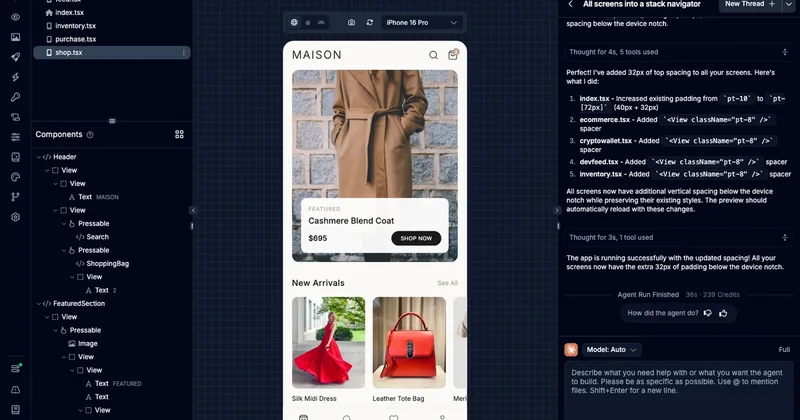
Draftbit
Draftbit is a visual app builder for web, iOS, and Android that combines AI agents, full visual (drag-and-drop) editing, and access to human experts to help create, preview, and publish apps — with code import/export and broad integrations.
Draftbit is nocode / lowcode software teams evaluate for software & gaming. Use this page to review pricing, integration signals, and the best alternatives before you commit.
Profile facts come from the vendor source. AiMatch labels unknown pricing or API details instead of estimating them.
Review official source →Used in These Packs
Quick Overview
Best for: Software & Gaming
What it does
NoCode / LowCode software for decision-makers comparing workflow fit and alternatives.
Best fit
Software & Gaming
Pricing snapshot
Free
Next step
Compare Draftbit with similar tools before you shortlist it.
Compare this tool before you shortlist it
Review alternatives, pricing posture, and workflow fit side by side.
Draftbit is a visual platform for building web and mobile applications (web, iOS & Android) that combines drag-and-drop visual editing with AI agents and optional human expert assistance. It offers live preview while building, the ability to import, edit, and export full code, support for any backend or creating one, and publishing to web and app stores. The product is aimed at builders who want full visual control over app creation while optionally leveraging AI and expert help.
Draftbit is a visual app builder for web, iOS, and Android that combines AI agents, full visual (drag-and-drop) editing, and access to human experts to help create, preview, and publish apps — with code import/export and broad integrations.
Own this listing?
Claim this page for a one-time $29 to add pricing, features, screenshots, verified owner details, and a clearly labeled 30-day category position after the profile is live.
Claim this listing for $29Key Features
Cross-platform app building
Build apps for web, iOS, and Android from the same visual environment.
AI agents & integrations
Use AI agents as part of the build process and connect your own Claude & OpenAI accounts.
Full visual editing
Drag-and-drop interface with full visual control and live preview as you build.
Publish & deployment
One-click publish to web and app stores.
Code import/export
Import, edit, and export full code for your projects.
Extensive integrations
Access to 100+ integrations and MCPs and compatibility with any backend.
Human expert support
Hire human experts to help build your app or get assistance when needed.
Pricing
Start building for free (the site advertises a free way to get started).
Use Cases
Rapid cross-platform app development
Visually design and build apps for web, iOS, and Android with live previews and one-click publishing.
AI-assisted app creation
Leverage AI agents and your own OpenAI/Claude accounts to assist with building app components or workflows.
Teams needing production-ready code
Import, edit, and export full code to integrate with existing development workflows or hand off to engineering teams.
Hire expert builders
Engage Draftbit's human experts to build or accelerate app development when additional help is required.
Integrations
OpenAI & Claude
Allow users to connect their own Claude and OpenAI accounts for AI-assisted features.
100+ integrations & MCPs
Platform advertises more than 100 integrations and marketplace connectors (MCPs) to connect services.
Any backend
Works with any backend or lets you create a backend for your app.
Benefits
Limitations
No verified limitations are available.
Frequently Asked Questions
No verified FAQs are available.
Getting Started
- 1 Step 1: Create a free Draftbit account and start a new project (Start building for free).
- 2 Step 2: Connect optional AI accounts (Claude or OpenAI) if you want AI-assisted features.
- 3 Step 3: Use the drag-and-drop visual editor and live preview to build screens and flows.
- 4 Step 4: Import or export code as needed and connect any backend or integrations.
- 5 Step 5: Publish with one click to the web or app stores, or hire an expert if you need help.
Support
Human experts
Hire an expert to build your app or get help from Draftbit's human experts (human experts standing by / Hire an expert to build your app).
API
Compare Draftbit with similar tools
See how it stacks up against alternatives
Related Tools
View all 78 →
Thunkable
Thunkable is a no-code/low-code platform for building and publishing native iOS and Android apps, featuring an AI Builder for generating projects from simple prompts, visual design tools, direct app store publishing, and collaborative workflows for founders, designers, teams, and educators.

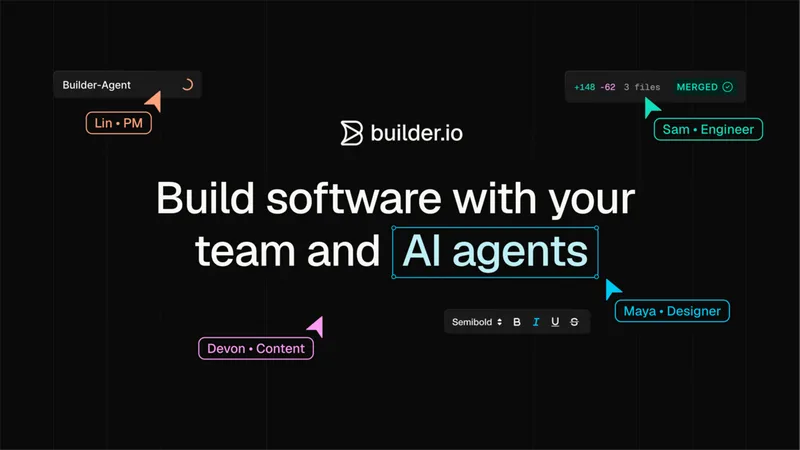
Builder.io
Builder.io is a collaborative low-code/no-code platform and headless CMS that enables teams to build, preview, and publish production-ready web apps and content with support for AI agents, visual editing, and integrations into existing codebases and workflows.

Collect
Collectchat (Collect) is a no-code interactive form and chat widget platform for websites that helps businesses collect leads, book appointments, and engage visitors with conversational forms. It offers an AI form builder, drag-and-drop editor, multiple deployment modes (widget, link, embed), integrations, and a free plan.


Docparser
Docparser is a cloud-based document parsing and smart data-extraction platform that converts PDFs, Word documents, images and other file types into structured data for Excel, Google Sheets, JSON, XML and many integrations. It provides visual/no-code rule creation, zonal OCR and an AI engine (DocparserAI) to automate extraction for business workflows.

Liner
Liner is a free, no-code desktop tool for training and exporting machine learning models locally on Windows and macOS. It lets users import datasets, train models (image, text, audio, video, detection, segmentation, pose), and export models for integration or edge deployment without requiring ML expertise or a GPU.
Premium Alternatives

softgen
Softgen is an AI-powered web app builder that turns plain-English app descriptions into deployed, production-ready Next.js apps with managed Supabase, GitHub export, one-click Vercel deploy, and selectable AI models—designed for founders, makers, and teams to build MVPs and SaaS fast.
Appy Pie
Appy Pie is an AI-powered no-code app builder that converts plain-English prompts into working native Android and iOS apps with backend, hosting, and store-publishing support. It targets founders and businesses who want to ship production mobile apps quickly without writing code.

SunSed
SunSed is an AI app builder for creating and running business applications from descriptions, using tested building blocks and a built-in programming language. Hosting, databases, logins, email, file storage, payments, and other app services are included in its paid plans.

Kivicube
Kivicube is a web-based, no-code AR creation and publishing platform that lets individuals and enterprises build, preview and publish interactive AR experiences (WebAR, WeChat Mini Program, Vision Pro, etc.) using visual editing and AI-powered tools such as 3D model and video generation.


-Bh91Hz9I.png)