
Getbutton
GetButton provides a website chat widget and AI chatbots (ChatGPT-based) to deliver 24/7 customer support, automate requests, capture leads, and increase sales. It offers a free tier plus paid plans for floating chat widgets and production AI chatbots.
Getbutton is chatbots & assistants software teams evaluate for business operations. Use this page to review pricing, integration signals, and the best alternatives before you commit.
Profile facts come from the vendor source. AiMatch labels unknown pricing or API details instead of estimating them.
Review official source →Quick Overview
Best for: Business Operations
What it does
Chatbots & Assistants software for decision-makers comparing workflow fit and alternatives.
Best fit
Business Operations
Pricing snapshot
Freemium from $4.99/month (Billed Annually) — 1-Year License; $149 — Lifetime License (one-time)
Next step
Compare Getbutton with similar tools before you shortlist it.
Compare this tool before you shortlist it
Review alternatives, pricing posture, and workflow fit side by side.
GetButton is a SaaS product that combines a customizable floating chat button with AI chatbots trained on a website's content and uploaded documents. It is designed to automate customer support (the page claims upto 90% of requests), increase sales, capture leads, and provide 24/7 assistance for website visitors. The offering includes a free tier for AI chatbots and paid plans for both the chat widget and AI chatbot service, an admin panel for management, quick installation via a single code snippet, and built-in customization for branding, languages, and greeting messages. Typical users include website owners, e-commerce stores (Shopify/WordPress are listed), and agencies seeking multi-site deployments or white-label options.
GetButton provides a website chat widget and AI chatbots (ChatGPT-based) to deliver 24/7 customer support, automate requests, capture leads, and increase sales. It offers a free tier plus paid plans for floating chat widgets and production AI chatbots.
Own this listing?
Claim this page for a one-time $29 to add pricing, features, screenshots, verified owner details, and a clearly labeled 30-day category position after the profile is live.
Claim this listing for $29Key Features
AI chatbot trained on site content
Create ChatGPT-powered bots that are trained on website links and uploaded files (PDFs) to answer visitor questions using site content.
Multilingual support
The chatbot automatically replies in the language used by the visitor; site lists supported languages such as English, Deutsch, Español, Русский, العربية, 한국어, ไทย, and more.
Lead collection
Lead Collection feature can gather visitor details (name, email, phone, custom fields) during conversations and email leads or store them in the dashboard.
AI Search modes
Website Search (uses Google/Bing, costs 5 message credits) and Live Website Search (fetches real-time info from your site, costs 10 credits) to pull answers from site content.
Customizable floating chat button
Extensive customization of button color, icon, position, animation, text, greeting message, avatar/logo and which messengers are displayed; PRO features unlock additional customization.
Multi-messenger integrations
Supports multiple messaging channels (WhatsApp, Messenger, and other messengers) so visitors can contact via preferred apps; first four displayed in some layouts.
Admin panel and one-time install
Manage all buttons and licenses from a single admin panel; install the widget code once and update buttons from the panel.
Branding control
Remove 'Powered by GetButton' branding by purchasing PRO license or upgrading to Standard Chatbot Plan or higher.
Pricing
Free plan: 2 bots, GPT-4o mini, 100 messages per month.
Floating Chat Widget (single-site)
$4.99/month (Billed Annually) — 1-Year License; $149 — Lifetime License (one-time)- 1-site license
- Admin panel management
- Button customization
Multi-Button Plans (floating widget)
3 buttons – $7.99/mo; 5 buttons – $11.99/mo; 15 buttons – $19/mo; 50 buttons – $49/mo- Multiple site/button support
- Annual plans get 2 months free
AI Chatbots — Free
Free- 2 bots
- GPT-4o mini
- 100 messages/month
AI Chatbots — Starter
$19/mo- 3 bots
- GPT-4o
- 3,000 messages/month
AI Chatbots — Standard
$49/mo- 5 bots
- 10,000 messages/month
- branding removal
AI Chatbots — Business
$99/mo- 10 bots
- 20,000 messages/month
- priority support
Use Cases
24/7 customer support automation
Automate common customer requests and FAQs with an AI agent trained on website content to provide round-the-clock responses and reduce human workload.
Lead capture and qualification
Use built-in lead collection forms triggered during chats to capture visitor contact info for follow-up and sales.
Increase sales and conversions
Provide instant product or support answers, guiding users to purchase and improving conversion rates as promoted on the page.
Multi-channel customer contact
Offer multiple messaging channels (WhatsApp, Messenger, etc.) through one floating button to match customer preferences across countries.
On-site AI search and knowledge retrieval
Configure Website Search or Live Search modes to retrieve real-time answers from site content for customer queries.
Integrations
Shopify
Listed as a supported platform for embedding the chat button on Shopify stores.
WordPress
Listed as a supported platform for embedding the chat button on WordPress sites.
WhatsApp / Messenger / other messengers
Supports multiple messaging apps so visitors can initiate chats via WhatsApp, Facebook Messenger and other channels.
Google Analytics
Track clicks on the chat button with Google Analytics.
Discord (and other external links)
Supports linking to external chat systems such as Discord (example provided in UI).
Benefits
Limitations
Frequently Asked Questions
How do I create an AI chatbot with GetButton.io?
How do I customize the ChatGPT button on my website?
How much does the ChatGPT chatbot for websites cost?
Does the AI chatbot support multiple languages?
How can I capture leads with the AI chatbot?
How can I add AI search to my website?
Getting Started
- 1 Sign up and log in to the GetButton Admin (admin.getbutton.io).
- 2 Create a chatbot in the Dashboard and choose data sources (add website URL or upload files).
- 3 Click Create Chatbot and wait for the bot to train on provided content.
- 4 Test the bot using the preview, customize button and greeting settings in the admin panel.
- 5 Copy the provided installation code and paste it before the </body> tag on every page of your website.
Support
Primary support email: [email protected] (listed multiple times on the page).
docs
Knowledge base and setup guides referenced on the site for installation and chatbot setup.
admin panel
In-product admin panel for managing buttons, chatbots, licenses and settings.
API
Compare Getbutton with similar tools
See how it stacks up against alternatives
Related Tools
View all 161 →

raggenie
RAGgenie is a low-code platform for building retrieval-augmented generation (RAG) conversational AI 'copilots' from your existing data, enabling teams and individuals to create, run locally, and integrate custom GenAI assistants without advanced technical skills.
Chatsistant
Chatsistant is a multi-agent conversational AI SaaS platform and RAG framework that enables businesses to build, train, deploy, and automate AI chat assistants using a wide ecosystem of LLMs, integrations, APIs, and no-code workflow tooling.
guestguru-ai
Guest Guru AI automates guest messaging and answers common questions for short-term rental hosts and property managers. It connects with property management systems and major booking channels; the site says it is joining Zeevou and invites users to join a waitlist.
Chatgptbuddy
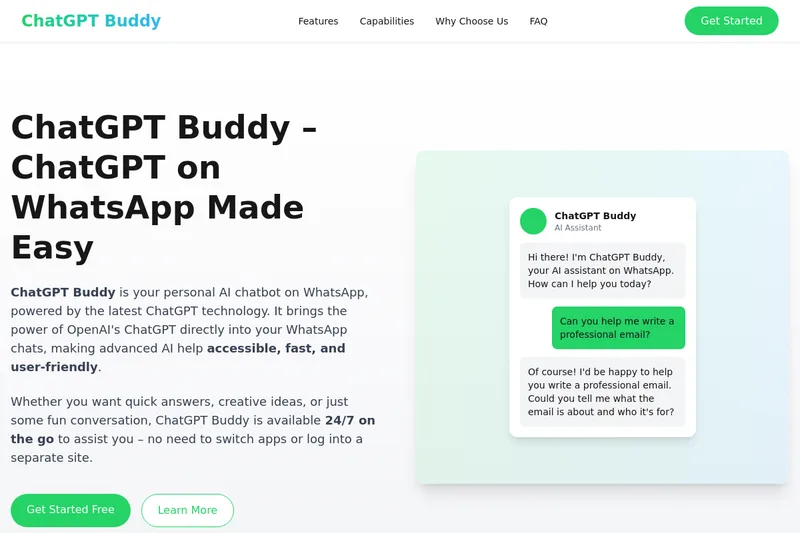
ChatGPT Buddy is a WhatsApp-based AI chatbot that brings OpenAI's ChatGPT directly into WhatsApp chats for individuals and businesses, offering 24/7 conversational assistance, content generation, and automation via the WhatsApp Business API.
Premium Alternatives

trainmy-ai
TrainMyAI builds custom, on-premise or cloud-hosted AI chatbots using retrieval-augmented generation (RAG) for private content, with access via WhatsApp, the web, and a private API while keeping all data on your own server.

innerai-com
Inner AI é uma plataforma brasileira que reúne mais de 50 modelos de IA pagos (como GPT-5, Claude 4.6, Gemini 3.1 e Grok) oferecendo acesso centralizado, bibliotecas de prompts, templates de documentos, assistentes personalizados, cursos com certificado e aplicativos web/móvel — tudo com foco em equipes e uso profissional.