Passed
Passed.AI is an educator-focused platform for detecting AI-generated text and plagiarism, providing document audits, replay/history reports, and Chrome extension integration to help teachers evaluate student work and uphold academic integrity.
Passed is education software teams evaluate for education & research. Use this page to review pricing, integration signals, and the best alternatives before you commit.
Profile facts come from the vendor source. AiMatch labels unknown pricing or API details instead of estimating them.
Review official source →Used in These Packs
Quick Overview
Best for: Education & Research
What it does
Education software for decision-makers comparing workflow fit and alternatives.
Best fit
Education & Research
Pricing snapshot
Free
Next step
Compare Passed with similar tools before you shortlist it.
Compare this tool before you shortlist it
Review alternatives, pricing posture, and workflow fit side by side.
Passed.AI is an academic-use platform designed to help educators detect AI-generated content and plagiarism while understanding student writing processes. The product bundle includes Document Audit, Replay Tool, History Report, AI Detection and Plagiarism Check, and Academic Honesty Reports intended to guide teachers in evaluating originality and student effort.
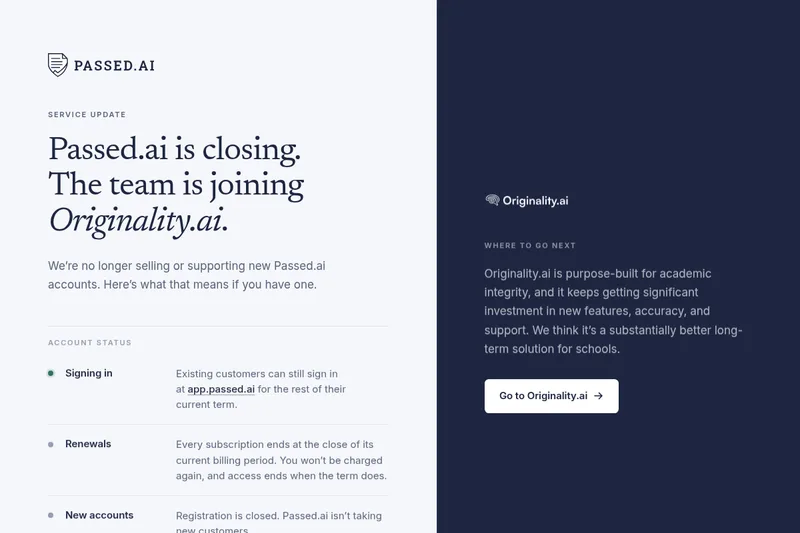
Passed.AI emphasizes contextual and process-based secondary checks (time spent, paste-ins, revision history, flow score, contribution analysis) in addition to AI-detection scores, and it partners with Originality.ai for best-in-class AI and plagiarism detection. The platform is accessible via an in-app scanner and a Google Chrome extension that integrates with Google Docs.
Passed.AI is an educator-focused platform for detecting AI-generated text and plagiarism, providing document audits, replay/history reports, and Chrome extension integration to help teachers evaluate student work and uphold academic integrity.
Own this listing?
Claim this page for a one-time $29 to add pricing, features, screenshots, verified owner details, and a clearly labeled 30-day category position after the profile is live.
Claim this listing for $29Key Features
Document Audit
In-app and Chrome-extension based analysis that provides an AI Reliance Assessment (AI Detection Score), Plagiarism Scores, paste-ins analysis, revision tracking and a Flow Score for text fluidity.
Replay Tool
A replay of the document creation process allowing educators to watch the student write the document, with adjustable playback speed.
History Report / Revision Tracking
Detailed overview of changes and timestamps to understand revisions, contribution timing, and time invested in the document.
Academic Honesty Reports
Comprehensive reports that combine AI-detection and plagiarism checks to support students wrongfully accused of using AI and to validate originality.
Originality.ai Partnership
Integration with Originality.ai for AI detection and plagiarism checks, described as a best-in-class provider for those checks.
Contribution & Time Analysis
Contribution Analysis and Time Investment Assessment to identify individual contributions, extent, timing, and duration spent on documents.
Chrome Extension for Google Docs
A Google Chrome extension that integrates with Google Docs for in-depth document analysis directly within the editor.
Pricing
Offers free trials (page mentions both a 5-day and a 14-day free trial); no specific paid plan prices are listed on the page.
Use Cases
Verifying originality of student work
Teachers can use AI Detection and Plagiarism Scores alongside document history to determine whether submitted work is original or AI-assisted.
Investigating suspected misconduct
Academic Honesty Reports and replay/history tools provide evidence and context to support decisions and defend students who claim wrongful accusation.
Evaluating student effort and collaboration
Time Investment Assessment and Contribution Analysis help educators understand individual inputs, collaboration dynamics, and the level of effort.
Providing formative feedback
Document Audit insights (flow score, paste-ins, revision patterns) help identify areas for student improvement and guide instruction on appropriate AI use.
Integrations
Originality.ai
Partner used to provide AI detection and plagiarism checking capabilities.
Google Docs (via Chrome extension)
Chrome extension integrates with Google Docs for in-depth, in-editor document analysis and reporting.
Benefits
Limitations
Frequently Asked Questions
What’s AI content detection?
Why is AI content detection important?
How does Passed.AI’s plagiarism detection and document analysis work?
How can I install the Chrome extension?
How was Originality.AI trained?
What are false positives?
What are false negatives?
How can you avoid false positives and negatives?
Does Passed.AI work in different languages?
Getting Started
- 1 Step 1: Sign up for a free trial or book a demo via the Passed.AI site.
- 2 Step 2: Install the Google Chrome extension to enable in-document analysis within Google Docs (step-by-step guide referenced).
- 3 Step 3: Use the in-app tool or extension to paste text or open a document and run Document Audit, Replay, and History reports.
Support
Contact via the site-provided email address for questions and support (mailto:[email protected]).
docs
Step-by-step installation guide for the Chrome extension referenced on the site.
blog
Blog with articles and product updates linked from the site for guidance and best practices.
API
Compare Passed with similar tools
See how it stacks up against alternatives
Related Tools
View all 116 →
Academa Studio
Academa Studio is an AI-native web editor for authoring Manim (mathematical animation) content, providing an integrated Python runtime, renderer preview, and AI-assisted chat prompts to generate and refine animations.

Language Model Builder
Language Model Builder is a free macOS app and interactive textbook that teaches how language models are built and lets you train small GPT-style models locally on Apple Silicon Macs.
Teacher Planner
Teacher Planner is an online planning tool for teachers to organize lessons by day, week, month, unit, or outline, import a timetable from a photo or PDF, and prepare classroom materials with AI tools. It includes free and paid plans with different planbook and printing features.


Codecademy
Codecademy is an interactive online learning platform for coding, data, AI, cybersecurity and related tech skills, offering self-paced lessons, hands-on projects, career and certification paths, live bootcamps, and team training.

Studyx
StudyX is an all-in-one AI study platform that lets students upload homework, lectures, PDFs, and videos to get instant step-by-step solutions, organized notes, flashcards, quizzes, and AI writing/originality tools. It offers free access to many tools and paid subscription options for extended features.
Learnplace
Learn Place (Learn Place AI) is an AI-powered personalized learning platform that creates dynamic, goal-aligned syllabi and delivers hyper-personalized explanations and study guidance for students, professionals, and teams.
Premium Alternatives