
Scriber-Pro 2.0
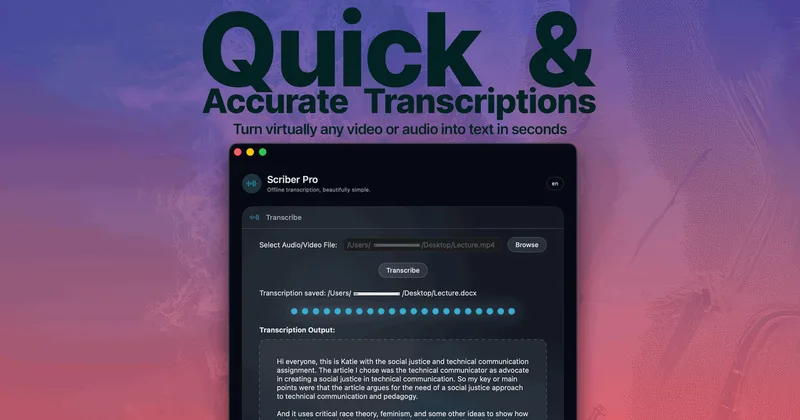
Scriber Pro 2.0 transcribes local audio and video files, YouTube links, and supported web video streams on a Mac. It gives professionals searchable transcripts they can organize and export without uploading audio for transcription.
One of 50 tools in Transcription
Who it's for
- Researchers and students transcribing lecture recordings or online course videos on a Mac.
- Webinar and video teams that need transcripts from browser-played M3U8/HLS streams.
- Editors or researchers processing batches of supported audio and video files and organizing transcripts in a searchable library.
Not the right fit if…
- People who need a Windows or Linux app: the page describes Scriber Pro as a Mac app.
How it fits your workflow
Drop a supported audio or video file into the app and select Transcribe, or batch transcribe a stack of files. The page lists MP3, WAV, MP4, MOV, M4A, and FLAC.
For browser video, paste a page link into Web Fetch, select the video, and transcribe it on the Mac. For YouTube, paste the video link. Transcripts go into a searchable library with categories and favorites, sync through iCloud, and can be exported as DOCX, TXT, Markdown, or RTF.
Pricing
Free: A limited promotion offers free codes to the first 10 HN readers; the page says 10 remain. No standard plan pricing is stated.
HN reader promotion
The page offers free codes to the first 10 HN readers and states that 10 remain.
- · Free code offer for HN readers
Prices checked on Oct 17, 2026 from the vendor's site. They can change; confirm before you buy.
Key features
- On-device transcription
- Transcribes audio on the Mac, with the page stating that audio is not uploaded and transcription can be used offline.
- M3U8/HLS Web Fetch
- Paste a page link containing a video, choose the video, and transcribe it on the Mac. The page says sign-in pages and direct .m3u8 links work too.
- YouTube transcription
- Paste a YouTube link to get a transcript.
- Batch transcription
- Transcribe a batch of files in one go.
- File format support
- The page lists MP3, WAV, MP4, MOV, M4A, and FLAC as common supported formats.
- Searchable transcript library
- Stores transcripts in a searchable library with categories and favorites, synced through iCloud.
Works with
- iCloud
- YouTube
Limitations to know
- The page describes Scriber Pro as an app for Mac; it does not specify support for other operating systems.
- The listed common file formats are MP3, WAV, MP4, MOV, M4A, and FLAC; the page does not identify additional formats.
Alternatives to consider
-
Whisper Notes
Choose it if you want an offline iPhone and macOS transcription app for meetings, lectures, interviews, or dictation.
-
TrueScribe
Choose it if you need a desktop transcription app for Windows or Linux, or want optional cloud models for selected features.
Getting started
A Mac; the page does not state a macOS version requirement.
- Install Scriber Pro from the Mac App Store.
- Drop a supported file into the app and select Transcribe, or paste a YouTube link.
- For a web video, paste its page link into Web Fetch and select the video to transcribe.
- Locate the transcript in the library and export it if needed.