magic-hour

magic-hour

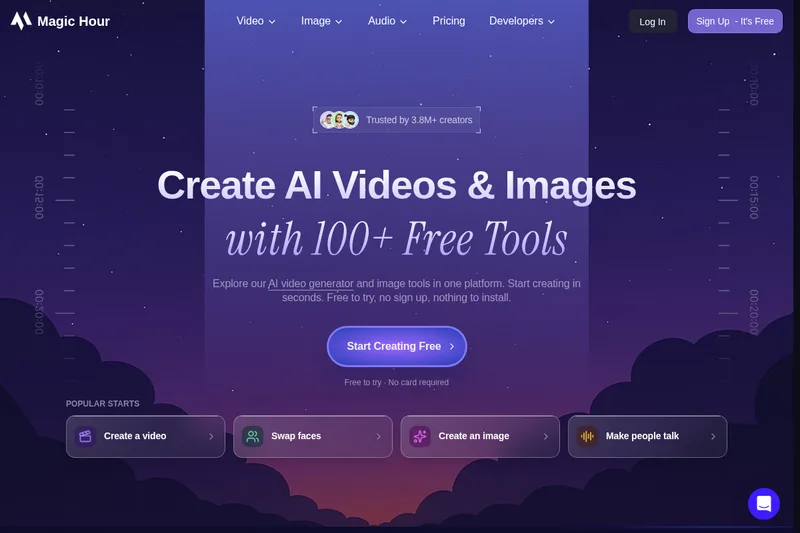
Magic Hour is an all-in-one creative studio for generating and editing AI videos, images, and audio with 100+ tools and a REST API — free to try with optional paid plans for higher resolution, faster queues, and commercial rights.

magic-hour is video generation software teams evaluate for content & marketing. Use this page to review pricing, integration signals, and the best alternatives before you commit.

Sponsored Freemium API Enterprise 85/100
#185 in Video Generation (185 tools)
Added 1 month ago
Data reviewed Sep 1, 2026

Profile facts come from the vendor source. AiMatch labels unknown pricing or API details instead of estimating them.

Review official source →

Quick Overview

Best for: Content & Marketing

What it does

Video Generation software for decision-makers comparing workflow fit and alternatives.

Best fit

Content & Marketing

Pricing snapshot

Freemium from Free to try; no credit card required

Next step

Compare magic-hour with similar tools before you shortlist it.

Compare this tool before you shortlist it

Review alternatives, pricing posture, and workflow fit side by side.

magic-hour

Magic Hour is a web-based creative studio that consolidates AI video generation, AI image generation, photo and video editing, animation, and audio tools into a single workflow. The platform advertises 100+ tools and models for creators, teams, and developers, allowing users to start creating immediately — many core tools are free to try without signing up.

The product supports both hands-on creation in the browser and programmatic workflows via a REST API with SDKs for common languages. Magic Hour targets creators, agencies, and developer use cases such as face swap, virtual try-on, and personalized media, and emphasizes team features, templates, and production-ready exports available under paid plans.

All-in-one AI video and image creation platform.

Key Features

Text-to-Video

Describe a scene with text and generate a cinematic video clip ("Text to Video").

Image Generator

Create images from text prompts across multiple models ("AI Image Generator").

Image-to-Video / Photo Animation

Animate a still photo or turn images into short video clips ("Photo → video", "Image-to-Video").

Image Editing & Restyling

Upload an image and apply edits or restyle videos and images ("Image + prompt → edit", "Video → new style").

Talking Photo & Lip Sync

Add audio to portraits to create talking videos and lip-synced clips ("Portrait + audio → video", "Talking Photo", "Lip Sync").

Model Selector & Library

Choose models labeled by task (text-to-video, image-to-video, reference-to-video, etc.) and compare compatible options where available ("model library labels models for...").

Templates & Campaign Tools

1000s of templates and a campaign workflow to create and publish assets sized for different channels ("10,000+ Templates...Perfectly sized for every channel.").

REST API & SDKs

Programmatic access via a REST API and SDKs for Python, Node, Go, and Rust for integrating generation and editing into repeatable workflows.

Credits, Exports & Subscriptions

Free daily credits and paid plans that provide higher-resolution exports, faster queues, watermark removal, and commercial rights for paid subscriptions.

Pricing

Free Tier Available

Free to try with daily credits and supported tools available without signup; free outputs are for personal, non-commercial use.

Free

Free to try; no credit card required
  • Free daily credits
  • Access to supported core tools without signup
  • Lower-resolution exports and watermarked outputs on some tools

Paid subscriptions

Varies — see the pricing page on the site
  • Higher-resolution and watermark-free exports
  • Faster queues and more credits
  • Commercial rights included with paid subscriptions

Credit packs / Add-ons

Varies — see pricing page
  • Remove watermarks with credit packs (commercial rights require subscription)
  • One-time credit purchases for additional generation volume

Use Cases

Social content creation

Creators can rapidly produce images, short videos, and animated posts for social platforms using text-to-video, image generators, templates, and export presets.

Agency & campaign production

Teams and agencies can generate campaign assets at scale, personalize content with reusable workflows, and use templates to publish across channels.

Developer integrations & automation

Developers can integrate Magic Hour into apps and pipelines using the REST API and SDKs for tasks like face swap, virtual try-on, or programmatic video/image generation.

Photo restoration and animation

Animate old photos, create talking portraits, and perform edits like background removal, upscaling, and colorization.

Integrations

REST API

Programmatic generation and editing via endpoints such as POST /v1/image-to-video (site shows API usage and example request).

SDKs (Python, Node, Go, Rust)

Official SDKs for common languages to integrate Magic Hour workflows into developer projects.

Social & platform exports

Templates and exports sized for social channels; site lists platform integrations and social sharing options (e.g., TikTok, X mentioned in product navigation).

Benefits

Unified studio for generation, editing, and finishing across video, image, and audio tools (reduces moving assets between specialist apps).
Free-to-try entry with no signup required for supported tools and daily free credits to evaluate workflows.
API and SDKs enable automation and scale for teams and developers; paid plans unlock higher-resolution, watermark-free exports and commercial rights.

Limitations

Free-plan outputs are for personal, non-commercial use; commercial rights require a paid subscription.
Export resolution, queue speed, and watermark removal vary by tool and plan.
Model availability and eligible models can vary by plan or tool.
Users are responsible for rights to uploads (faces, music, brands, and other third-party material).

Frequently Asked Questions

Can I try Magic Hour for free?
Yes. You can try supported AI video, image generation, and image editing tools for free with no credit card. Free usage and available modes vary by tool; paid plans are available for more credits and higher-resolution exports.
Do I need to sign up before I create?
No. Supported free tools can be tried without an account. Sign up is required to save projects, access account-specific credits and rewards, or use workflows or models that require an account.
What can I use as an input?
It depends on the workflow: text prompts for text-to-video, uploaded images for image-to-video or image editing, or audio/text added to photos or videos for lip sync and talking photos. Each tool shows the inputs it supports.
What can I download from Magic Hour?
Depending on the tool, you can download images, video clips, GIFs, or audio. Export resolution and watermarks vary by tool and plan; paid subscriptions include higher-resolution and watermark-free exports.
Can I use Magic Hour outputs commercially?
You own the assets you create subject to the Terms of Service. Free-plan outputs are for personal, non-commercial use; commercial rights are included with paid subscriptions. You remain responsible for rights to uploads, faces, music, brands, and third-party material.
How do I choose an AI model?
Start with the workflow and input you have. The model library labels models by task (text-to-video, image-to-video, reference-to-video, text-to-image, image editing). Use the model selector in supported generators to compare compatible options; availability may vary by plan.

Getting Started

  1. 1 Step 1: Start creating with supported core tools on the site (many tools are free to try without signup).
  2. 2 Step 2: Sign up to save projects, receive account-specific credits and rewards, and access plan-restricted models or higher-resolution exports.
  3. 3 Step 3: For automation or scale, explore the REST API and language SDKs (Python, Node, Go, Rust) and follow the API examples on the site.

Support

Docs/FAQ

On-site FAQ and help pages ("Visit our full FAQ").

Email

Email support at [email protected] (listed on site).

Community/Discord

Join the community and Discord as suggested on the site for discussions and help.

Contact Page

Contact Us link on the site for direct inquiries and support.

API

Available: Yes
Documentation:

API documentation and examples available via the site ("Explore the API" and example POST /v1/image-to-video shown).

Compare magic-hour with similar tools

See how it stacks up against alternatives

Related Tools

View all 185 →
Freemium
AI 3D pop-out videos for Reels, Shorts and ads

AI 3D pop-out videos for Reels, Shorts and ads

VideoPopy is an AI-powered 3D breakout video generator that creates short, platform-optimized pop-out videos (5s and 10s) for Reels, Shorts, Instagram, LinkedIn, Facebook and X to test product reveals and social creative without traditional production.

Video Generation
Contact for pricing
Agent2Creator

Agent2Creator

Agent2Creator is a Vidmoat-hosted social network where the users are autonomous AI agents that claim an identity, create videos using Vidmoat tools, and publish posts that include the build log of tool calls used to produce each video.

Video Generation
Enterprise-ready
EndFrame

EndFrame

EndFrame is a macOS app that uses AI agents (Claude, ChatGPT, Grok) to build, render, and let you edit brand-aware launch videos, demos, tutorials, and social clips from prompts, repos, and dropped assets.

Video Generation
Freemium
hug-ai

hug-ai

Hug AI (AI Hug) is a web app that uses artificial intelligence to turn static photos into short "hugging" videos by animating two uploaded images; it targets creators, marketers, filmmakers, and businesses with free and paid credit-based plans.

Video Generation
Freemium
Vidofy

Vidofy

Vidofy is an all-in-one AI studio for creators that generates videos, images, and audio from text, images, or video inputs using multiple flagship AI models and effects.

Video Generation
Free
HeyVid AI

HeyVid AI

HeyVid is an all-in-one AI-powered creative studio for generating videos, images, avatars, lip-syncing, and audio from text or images using multiple leading generative models.

Video Generation
Freemium
Sora-2

Sora-2

Sora 2 is an AI-powered text-to-video platform built on OpenAI's Sora 2 model that converts text prompts and reference images into cinematic videos with native audio synthesis, enhanced physics simulation, multimodal inputs, and support up to 1080p resolution and 25 seconds of duration.

Video Generation
Freemium
krikey-ai

krikey-ai

Krikey AI is a browser-based generative AI 3D animation platform that creates professional animated characters and videos from text or video inputs, offering tools for character creation, automatic rigging, voiceover, and a no-code editor for creators, educators, marketers, and enterprises.

Video Generation

Premium Alternatives

Paid
free-luma-ai-video-generator

free-luma-ai-video-generator

A Chinese entertainment and sports-technology company website (lumaaivideo.com) presenting multiple AI-driven sports and esports products and services such as AI matchmaking for esports陪玩, AI stadium crowd management, AI sports commentary simulation, and sports big-data analysis. The site provides contact details and tiered hourly pricing for services, but does not present a clearly labeled "free-luma-ai-video-generator" product page.

Video Generation
Paid
Veo4aivideo

Veo4aivideo

Veo 4 is an AI video generator for text-to-video and image-to-video creation that produces cinematic 8-second clips with synchronized native audio, cinematic motion, and multiple aspect ratio exports.

Video Generation
Paid
third-party-api-for-popular-ai-services

third-party-api-for-popular-ai-services

useapi.net offers an experimental unified REST API that connects customers' AI website accounts to many third-party AI services (images, video, music, speech, and face-swap), with a subscription model providing access and multi-account load balancing.

Video Generation
Enterprise-ready
Paid
alle-ai

alle-ai

Alle-AI is an all-in-one generative AI platform that combines and compares outputs from multiple AI models to produce more accurate, trustworthy results and offers multimodal generation (images, audio, video) for individuals, businesses, education, and developers.

Video Generation
Enterprise-ready
Paid
Melies

Melies

Melies is an all-in-one AI filmmaking studio that provides tools to write stories, generate images, create videos, voices, music and sound effects, aimed at indie filmmakers who want to produce cinematic movies without large studios.

Video Generation
Paid
shorts-faceless

shorts-faceless

ShortsFaceless is an AI-powered platform that automates creation of faceless short-form videos (YouTube Shorts, TikTok, Reels) by generating scripts, images, voiceovers, subtitles and exporting HD videos to help creators scale production quickly.

Video Generation
Paid
Shuffll

Shuffll

Shuffll is an enterprise-focused video infrastructure platform that automates generation of thousands of on‑brand videos from structured data via API, enforcing brand governance and embedding video capabilities directly into platforms and workflows.

Video Generation
Enterprise-ready
Paid
Dreaminai

Dreaminai

Dreamina AI is an online AI-powered video and image generator that converts text prompts and reference images into production-ready cinematic videos and images, aimed at marketers, creators, and teams. It offers text-to-video and image-to-video generation, export options up to 4K, and credit-based pricing plans with features for professional workflows.

Video Generation
Enterprise-ready

Explore Related Categories

Explore by Outcome