
Magicflow
Magicflow tracks time and distractions, runs focus sessions, and recommends actions to help founders and makers improve their focus and do deep work.
One of 132 tools in Productivity
Who it's for
- Founders who want to track distractions and examine what affects their focus during deep work.
- Makers who want focus sessions, timers, and productivity metrics to review their work habits.
- Professionals seeking automatic time tracking and weekly or monthly reports, as offered in the Pro plan.
How it fits your workflow
Download Magicflow and start a focus session with a live flow timer or Pomodoro timer. The product can warn about distractions while you work.
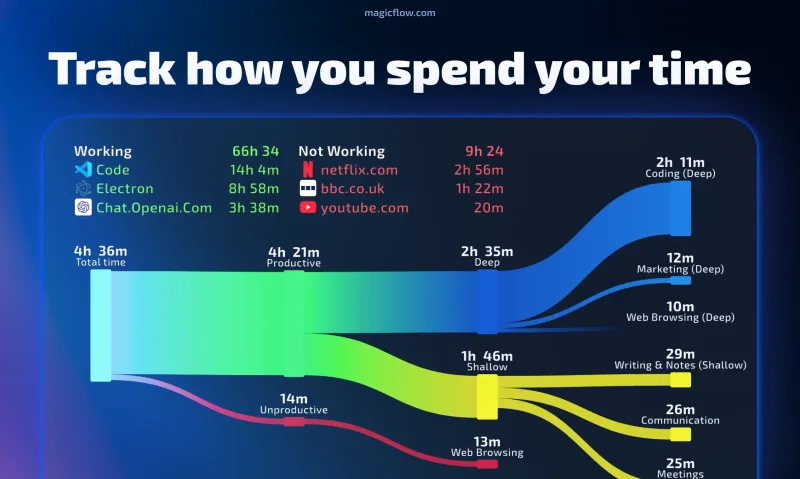
Review tracked time and real-time productivity metrics, then use recommended focus actions to consider changes to your work routine. Pro adds automatic time tracking, reports, and full history.
Pricing
Free: A 30-day free trial is offered. The page also mentions pre-seed founder, student, and hardship discounts.
Free trial
$0 for 30 days
- · Time tracking
- · Real-time productivity metrics
- · Recommended focus actions
Pro
$8 per month billed annually, or $15 billed monthly
- · Automatic time tracking
- · Weekly and monthly reports
- · Real-time productivity metrics
- · Full history
Prices checked on Oct 14, 2026 from the vendor's site. They can change; confirm before you buy.
Key features
- Focus sessions and live flow timers
- Start a focus session and use a live timer to stay focused on a task.
- Pomodoro timers and distraction warnings
- Use Pomodoro timers and receive warnings about distractions during focus work.
- Productivity metrics and recommended focus actions
- Review real-time productivity metrics and recommendations intended to help improve focus.
- Automatic time tracking
- The Pro plan includes automatic tracking of time spent working.
- Weekly and monthly reports
- The Pro plan includes reports for reviewing work over weekly and monthly periods.
- Flow meter
- A visual flow meter provides a view of progress during focus work.
Getting started
- Download Magicflow from the product page.
- Start a focus session using a live flow timer or Pomodoro timer.
- Track distractions and review productivity metrics and recommended focus actions.