
DevBoard
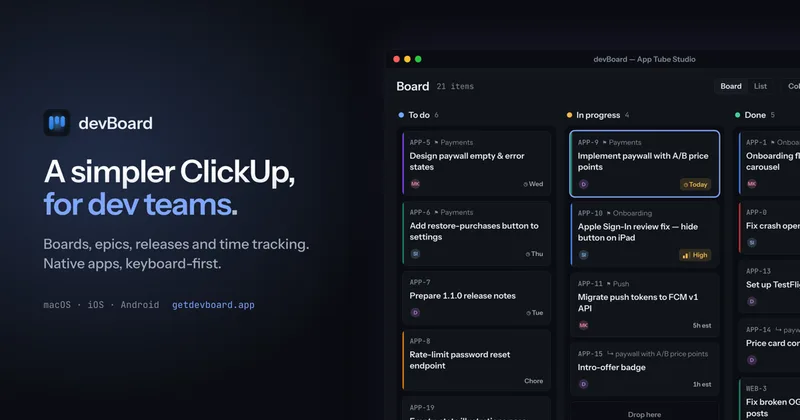
devBoard gives freelancers and small development teams native boards, releases and time tracking, with an MCP server for supported AI assistants to read and update work. It helps teams track current work and time without a web-based tracker.
One of 132 tools in Productivity
Who it's for
- Freelancers managing project work across separate client workspaces who want tasks and time tracking together.
- Small development teams that need shared boards, releases, saved views and realtime updates without portfolios or custom-field configuration.
- Developers using Claude Code, Cursor, VS Code or Claude Desktop who want an assistant to read and update devBoard work items through MCP.
Not the right fit if…
- Teams that require a web-based tracker: devBoard explicitly has no web version.
- Teams that need a Windows or Linux app today: those platforms are listed as coming soon.
How it fits your workflow
Use the native app to organize work on boards as epics, tasks and subtasks, with releases, labels, comments and saved views. My Work groups your assigned items by timing, and you can start or stop a timer on an item.
For assistant-driven work, create a token in Settings → Developer and add api.getdevboard.app/mcp to a supported assistant. The assistant can then read and change items, comment, move cards and log time as you.
Pricing
The vendor doesn't publish prices. Check with DevBoard directly.
Prices checked on Oct 6, 2026 from the vendor's site. They can change; confirm before you buy.
Key features
- Boards and work hierarchy
- Track tasks and subtasks within epics, with releases and project-scoped labels. The epic associated with a card is visible on the board.
- Time tracking and activity
- Start and stop a timer on a work item. Comments and an automatically logged activity feed are available alongside it.
- My Work and personal to-dos
- View assigned work grouped into Overdue, Today, This week, Later and No date, and keep a separate private scratch to-do list with reminders.
- Saved views and filters
- Build and save a filter, share it with the team, and use the same view for board and list layouts.
- Realtime updates and network recovery
- Board collaborators see each other’s changes without refreshing. The app catches up after a network interruption.
- Keyboard-first desktop app
- The desktop app includes a command palette, keyboard shortcuts and a shortcut reference. Window size and position persist across restarts; macOS includes a menu bar.
Works with
- Claude Code
- Cursor
- Visual Studio Code
- Claude Desktop
Limitations to know
- There is no web version; devBoard is offered as a native app.
- Windows and Linux are not yet available; the page says they are still being packaged.
- Pricing has not been set yet.
Alternatives to consider
-
Pinrom
Choose it if you want project management with built-in real-time chat and a client portal alongside time tracking, rather than devBoard’s native, keyboard-first tracker for development work.
Getting started
- Download the app from the App Store or Google Play; macOS is also available on the App Store.
- For an AI assistant connection, create a token in Settings → Developer.
- Add api.getdevboard.app/mcp to Claude Code, Cursor, VS Code or Claude Desktop.
- Ask the connected assistant about your work or have it perform an item action.
Frequently asked questions
Can I use devBoard yet?
Yes. The page says it is available on the App Store and Google Play, and that macOS is available on the App Store. Windows and Linux are still being packaged.
Is there a web version?
No. devBoard is a native app, and the page says there will not be a web version.
How is devBoard different from ClickUp, Jira or Linear?
The page describes devBoard as intentionally smaller, without portfolios, an automation builder or a custom field designer. It includes boards, three levels of work item, releases, labels, saved views, comments, attachments and time tracking.
Can a team use it, or is it just for one person?
Both. The page says workspaces, teams, members and invites are supported. Freelancers can use a workspace per client, while a small team can share one.
Does it work with AI coding assistants?
Yes. Its MCP server supports Claude Code, Cursor, VS Code and Claude Desktop. Assistants can search and read items, create and edit them, comment, move cards and log time, acting as the connected user.
What does devBoard cost?
Pricing has not been set. The page says pricing will be posted before paid plans begin and will be a plain number rather than a grid of seat tiers.
Who makes devBoard?
The page identifies App Tube, a small studio, as the maker.