
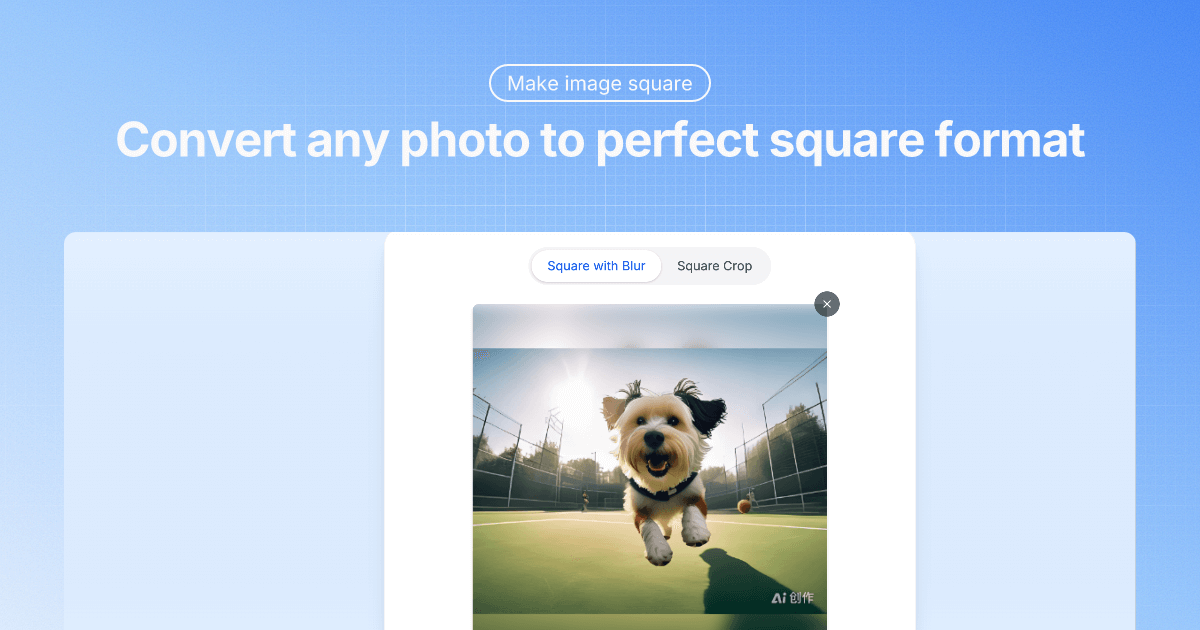
Squareimage
SquareImage is a free, in-browser tool that converts photos into perfect 1:1 square images using either precise crop controls or a blurred-fill method — all processing happens locally in your browser so images never leave your device.
Squareimage is image & design software teams evaluate for image & design. Use this page to review pricing, integration signals, and the best alternatives before you commit.
Used in These Packs
Quick Overview
Best for: Image & Design
What it does
Image & Design software for decision-makers comparing workflow fit and alternatives.
Best fit
Image & Design
Pricing snapshot
Free from Free
Next step
Compare Squareimage with similar tools before you shortlist it.
Compare this tool before you shortlist it
Review alternatives, pricing posture, and workflow fit side by side.
Squareimage
SquareImage is a browser-based utility for creating professional 1:1 (square) images without uploads or accounts. It provides two primary methods — Square Crop for precise framing and Square with Blur to preserve the entire image by filling the square canvas with a blurred background. The tool targets social profiles, avatars, headshots and any project requiring square images, and supports JPG, PNG, WebP and GIF formats.
Processing is done entirely locally in the user’s browser (no uploading to servers), providing instant previews and privacy. The site advertises no sign-up, no watermarks, unlimited free usage, and compatibility across desktop, tablet and mobile devices.
SquareImage is a free, in-browser tool that converts photos into perfect 1:1 square images using either precise crop controls or a blurred-fill method — all processing happens locally in your browser so images never leave your device.
Own this listing?
Claim this page to add pricing, features, screenshots, and verified owner details.
Claim this listingKey Features
Square Crop
Drag-to-position and zoom controls for precise 1:1 cropping to preserve important parts of the image when you want to focus on a subject.
Square with Blur (Blurred Background)
Convert any image to a square while preserving the full original image by filling the extra space with an adjustable blurred version of the photo (blur intensity and zoom controls available).
Local, Privacy-first Processing
All image processing happens in the browser; images never leave the device, are not uploaded or stored on servers, and no data transmission occurs.
Instant Preview and Real-time Controls
Live preview updates as you adjust position, zoom and blur intensity so you can see the final result immediately.
High-quality Output
Preserves original image resolution and color depth according to the site’s description, producing crisp results suitable for web and print.
Wide Format Support
Supports JPG, JPEG, PNG, WebP and GIF, including preserving PNG transparency and GIF animation where applicable.
No Installation Required
Runs fully in the browser and is compatible with desktop, tablet and mobile without downloads or extensions.
Pricing
Completely free and unlimited: create as many square images as you want with no accounts, no watermarks, and no feature restrictions.
Free
Free- Unlimited usage
- No sign-up required
- No watermarks
- All features available
Use Cases
Social profile photos
Create optimized 1:1 images for LinkedIn, WhatsApp, Instagram profile pictures, Facebook avatars, Twitter and Discord profiles.
Professional headshots
Produce clean, centered square headshots for resumes, company directories, and portfolio thumbnails without losing facial details (use crop or blur as needed).
Avatar and icon creation
Convert existing photos into square avatars suitable for apps and services that prefer or require a 1:1 format.
Preserving full composition
Use the blur method to keep entire photo content visible (ideal for group photos or images where cropping would remove important parts).
Quick one-off conversions
Fast, on-device conversion for users who need to create individual square images without batch-processing requirements.
Integrations
Claim this listing to add integrations.
Benefits
Limitations
Frequently Asked Questions
Will my image quality be reduced or compressed?
Will important parts of my photo be cut off?
What file sizes and formats are supported?
How fast is the processing?
Are my images safe and private?
Can I control position and preview results?
Which social media platforms work best with square images?
Can I process multiple images at once?
Is this tool completely free?
What's the difference between square crop and blur?
Getting Started
- 1 Step 1: Upload Your Image — Drag & drop or click to select a photo (JPG, PNG, WebP and GIF supported).
- 2 Step 2: Adjust and Choose Method — Drag to reposition, use zoom for composition, then pick Square Crop or Square with Blur and adjust blur intensity if using blur.
- 3 Step 3: Download Image — Preview instantly and save the final high-quality square image to your device.
Support
Feedback form
The site offers a feedback prompt and submission option ("Share Your Feedback") for user comments and suggestions.
Contact page
A 'Contact Us' link is listed on the site for general inquiries; specific contact details are not provided in the provided content.
Docs / FAQ
An on-site Frequently Asked Questions section answers common questions about formats, privacy, speed and methods.
API
Compare Squareimage with similar tools
See how it stacks up against alternatives
Related Tools
View all 400 →
%22%2F%3E%20%3Ctext%20x%3D%2250%25%22%20y%3D%2250%25%22%20dominant-baseline%3D%22central%22%20text-anchor%3D%22middle%22%20font-family%3D%22system-ui%2C-apple-system%2Csans-serif%22%20font-weight%3D%22700%22%20font-size%3D%2250%22%20fill%3D%22white%22%3EF%3C%2Ftext%3E%20%3C%2Fsvg%3E)

Imagedescriber
Image Describer is an AI-powered web tool that generates detailed textual descriptions, tags, prompts, alt text, and chart/data interpretations from uploaded images. It’s designed for creators, researchers, marketers, educators, and anyone who needs fast visual analysis and metadata generation.

Flux2klein
Flux2 Klein AI is a hosted image generator that produces photorealistic images in under 0.5 seconds using the Flux2 Klein 9B model, supporting both generation and editing workflows with text-to-image and image-to-image functionality.
Aiimageupscale
Adima (AIImageUpscale) is a Windows desktop AI image upscaler (Adima Pro V1.2.0) that enlarges and enhances photos up to 16× and true 16K (and advertised up to 64K) resolutions using offline AI models, optimized for both CPU and GPU.

Kontextflux
FLUX Kontext is a context-aware AI image generation and editing suite that combines text prompts and image inputs to enable precise, consistent, and professional-grade image modifications suitable for creative projects, storytelling, and game development.
Premium Alternatives

Livepatrol
Live Patrol provides 24/7 remote live video monitoring, AI-powered analytics, remote concierge and access control management, plus time-lapse and solar-powered monitoring solutions for construction sites, residential and commercial properties, and other remote assets.
Bunnystudio
Bunny Studio is a platform for professional voice-over, audio, and video production that connects businesses with 13,000+ human creatives for fast, scalable content delivered with transparent pricing and full buyout rights.


GLM-4.6
GLM-4.6 is an advanced large language model featuring an extended 200K token context window, superior coding and reasoning capabilities, and enhanced agentic performance. It is designed for developers and researchers seeking powerful AI for coding, reasoning, and agent-based applications.

Writingmate
WritingMate.ai appears to be an AI-powered writing product sold through Lemon Squeezy. The public page provides pricing information but includes minimal product detail.

Smart AI Offer Builder
Smart AI Offer Builder is an AI-powered platform designed to help businesses create compelling offers that increase sales by up to 10x without changing the product. It enables users to design offers, optimize pricing, and leverage urgency and bonuses to boost conversions.