
Translate
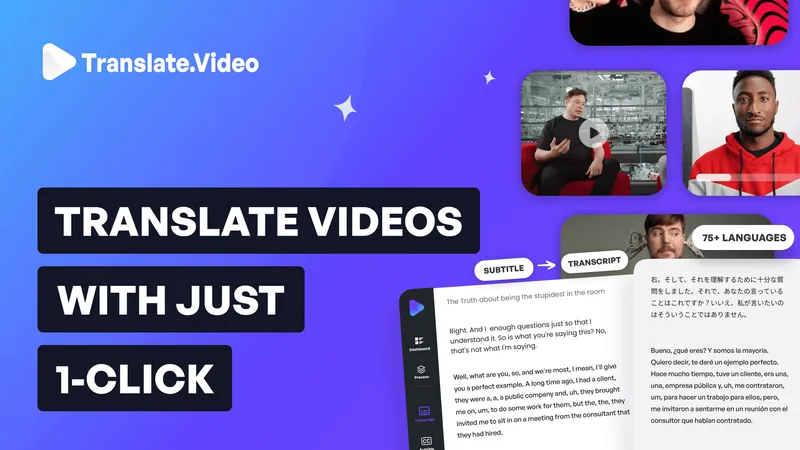
Translate.Video (a product of Vitra.ai) is an all-in-one video localization platform that provides automated captions, subtitle translation, and human-like dubbing/AI voice cloning to translate and localize videos into 75+ languages.
Translate is video software teams evaluate for video. Use this page to review pricing, integration signals, and the best alternatives before you commit.
Profile facts come from the vendor source. AiMatch labels unknown pricing or API details instead of estimating them.
Review official source →Used in These Packs
Quick Overview
Best for: Video
What it does
Video software for decision-makers comparing workflow fit and alternatives.
Best fit
Video
Pricing snapshot
Free
Next step
Compare Translate with similar tools before you shortlist it.
Compare this tool before you shortlist it
Review alternatives, pricing posture, and workflow fit side by side.
Translate.Video is an all-in-one platform for video localization that automates captioning, subtitling, translation and dubbing to help creators and enterprises scale multilingual content. The service highlights support for 75+ languages, instant voice cloning from short samples ("With just 50 sec of audio"), and human-like voiceover/dubbing. It targets creators, influencers and enterprise customers with tools to generate transcripts, closed captions, translated subtitles and dubbed videos from a single app.
Translate.Video (a product of Vitra.ai) is an all-in-one video localization platform that provides automated captions, subtitle translation, and human-like dubbing/AI voice cloning to translate and localize videos into 75+ languages.
Own this listing?
Claim this page for a one-time $29 to add pricing, features, screenshots, verified owner details, and a clearly labeled 30-day category position after the profile is live.
Claim this listing for $29Key Features
Multilingual Translation
Translate and subtitle videos into 75+ languages with one-click localization.
Instant Voice Cloning
Clone a voice from short audio (as little as 50 seconds) and synthesize speech in 75+ languages.
Automated Captions & Transcripts
Generate automated transcripts and closed captions to make content accessible across platforms.
Instant Subtitle Generation & Translation
Automatically generate subtitles and translate them into multiple languages.
Video Dubbing / AI Voice-over
Human-like dubbing and AI voice-over options, with the ability to record or upload voice samples.
Export & Formats
Export outputs including SRT, VTT and MP4 (listed among available output types).
Plugins (Translate.photo)
Plugins to accelerate creatives translation available for Photoshop, Illustrator and Figma.
All-in-one Video App
App comprises caption generation, subtitle translation, dubbing, voice recording, transcripts and common export formats in a single workflow.
Pricing
Free signup available (page includes 'Signup free!' and 'Try it for free')
Use Cases
Creator social content localization
Creators can generate captions, translated subtitles and dubbed versions of videos to reach global audiences.
Course and training localization
Translate and dub educational courses into multiple languages using voice cloning and subtitle translation to scale training globally.
Enterprise and marketing localization
Enterprises can localize marketing and product videos for international markets with automated workflows for captions, subtitles and dubbing.
Integrations
Translate.photo - Photoshop Plugin
Plugin to accelerate creatives translation within Photoshop (listed among plugins).
Translate.photo - Illustrator Plugin
Plugin to accelerate creatives translation within Illustrator.
Translate.photo - Figma Plugin
Plugin to accelerate creatives translation within Figma.
Benefits
Limitations
No verified limitations are available.
Frequently Asked Questions
No verified FAQs are available.
Getting Started
- 1 Step 1: Sign up for a free account (page includes calls to action: Get Started / Signup free!).
- 2 Step 2: Use the app to generate captions, subtitles, transcripts or AI voice-over for your video content.
- 3 Step 3: Export results in common formats such as SRT, VTT or MP4 and deploy to platforms.
Support
Contact via [email protected] (provided on the site footer).
call
Schedule a FREE call (site includes 'Schedule a FREE Call').
docs
Product pages and blog links on the site (Get Started, Blog, Pricing links available).
API
Compare Translate with similar tools
See how it stacks up against alternatives
Related Tools
View all 103 →


Sora-watermark-remove
Sora Watermark Remove is an AI-powered cloud service that automatically detects and removes Sora watermarks from videos, producing clean, professional-quality output for creators, studios, and businesses.


Clipwing
Clipwing is a SaaS tool for turning long talking videos into short, shareable clips by using AI-driven transcription and clip generation, plus subtitle, crop and customization tools for social formats. It targets creators, teams and businesses who want to produce and publish many short-form videos faster.
Videocaption
Videocaption is an AI-powered web tool that automatically generates and burns captions into videos for social platforms (TikTok, YouTube Shorts, Reels) with customizable styles, batch processing, and MP4 export.

reccloud-cn
录咖(reccloud)是一款面向创作者与企业的在线AI音视频处理平台,提供语音转文字、字幕生成、文字转语音、视频翻译、视频生成、去水印、人声分离、音视频总结等一键化AI工具与开发者API。

Premium Alternatives
reccloud-cn
录咖(reccloud)是一款面向创作者与企业的在线AI音视频处理平台,提供语音转文字、字幕生成、文字转语音、视频翻译、视频生成、去水印、人声分离、音视频总结等一键化AI工具与开发者API。

Text Remover
Text Remover is an online AI video cleanup tool that detects and removes text, captions, subtitles, and other overlays, reconstructing the background while aiming to preserve video quality. It is designed for creators, editors, and teams preparing videos for reuse or localization.

Prismiq
Prismiq Pulse is a post-publish video audit for YouTube that evaluates your title, thumbnail, and first 30 seconds, returns a Pulse score, timestamped friction points, and delivers 3 test-ready title variations plus 3 thumbnail concepts. Reports are ready in about five minutes and can be run by pasting any public YouTube URL.


Sendpotion
Potion (Sendpotion) is an AI video personalization platform that generates hyper-realistic videos in your own face, voice, and gestures for sales, marketing, support, and education, enabling scalable personalized outreach and video content creation.

Topaz Video
Topaz Video is Topaz Labs’ AI-powered desktop and cloud video enhancement application for filmmakers and videographers, offering model-based upscaling, denoising, stabilization, SDR→HDR conversion and other production-grade restoration and finishing tools.

