
Vocal Remover Online
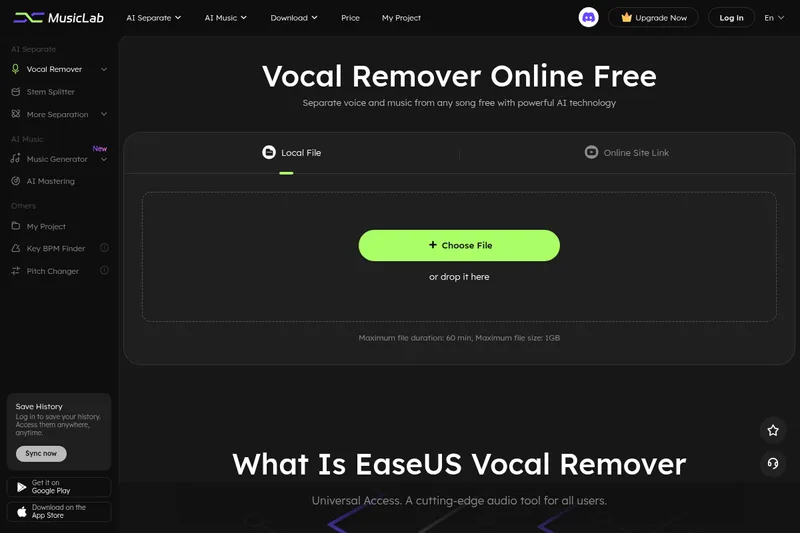
EaseUS Vocal Remover uses AI to separate vocals, instrumentals, and listed music stems from uploaded media or supported online links. Musicians, song creators, and content creators can preview and download audio for karaoke, remixing, and editing.
One of 12 tools in Audio
Who it's for
- Musicians creating karaoke or cover tracks who need vocals separated from instrumental audio.
- Music creators and remixers who want to extract vocals or use the listed stem-splitting tools.
- Content creators working with audio or video who need to separate music and vocals in a browser.
Not the right fit if…
- People who need exported audio in a format other than MP3: the FAQ says MP3 is currently the only supported export format.
- Free Trial users who need a stated daily processing allowance: the plan table lists 0 files and 0 uploads per day.
How it fits your workflow
Choose a local audio or video file, or paste a YouTube or SoundCloud URL. The page lists support for common formats such as MP3, WAV, M4A, FLAC, MP4, and MOV.
The AI analyzes the media and separates vocals from music. Users can audition the extracted audio, then download the result; the FAQ states audio exports are currently MP3.
Pricing
Free: A Free Trial is listed, but the plan table shows 0 files per day and 0 uploads per day. The page also promotes free use, so the precise free allowance is unclear.
Free Trial
Price not stated on the page.
- · AI audio processing is listed.
- · The plan table lists 0 files per day and 0 uploads per day.
- · The table lists a 6-minute limit for large files.
Pro
Price not stated on the page.
- · The plan table lists unlimited file processing and uploads.
- · The table lists a 60-minute limit for large files.
- · The plan listing includes 24/7 technical support.
Prices checked on Oct 4, 2026 from the vendor's site. They can change; confirm before you buy.
Key features
- AI vocal removal and extraction
- Automatically detects and separates vocals from music, producing instrumental or karaoke audio; users can also extract the vocal track.
- Audio and video file processing
- Accepts audio and video uploads. The page lists formats including MP4, MOV, MP3, WAV, M4A, and FLAC, and says it supports more than 1,000 audio and video formats.
- Online-link processing
- Allows users to paste YouTube or SoundCloud URLs to process media from those sites.
- Stem and track separation
- The product menu lists stem splitting for drums, bass, guitar, and piano, as well as separation of lead and backing music.
- Additional audio tools
- The product menu lists echo removal, reverb removal, noise reduction, AI mastering, a lyric studio, a music generator, and a voice studio.
- Preview and download
- Users can audition the extracted audio before downloading it.
Works with
- YouTube
- SoundCloud
Limitations to know
- The FAQ says audio exports are currently available only in MP3 format.
- The upload interface lists a maximum file duration of 60 minutes and a maximum file size of 1 GB; the plan table lists a 6-minute large-file limit for the Free Trial and 60 minutes for Pro.
- The plan table lists 0 files per day and 0 uploads per day for the Free Trial, despite other page text promoting free use.
Alternatives to consider
-
PhonicMind
Choose it if you want an interactive browser player for previewing, mixing, and exporting separated stems.
-
TuneStems
Choose it if your main need is separating songs into vocals, drums, bass, guitar, piano, and other instrument stems.
-
LALAL.AI
Choose it if you want a broader audio-processing suite that also lists voice changing, voice cloning, desktop and mobile apps, a VST plugin, and an API.
Getting started
An audio or video file or a supported YouTube or SoundCloud URL. The upload interface lists a maximum duration of 60 minutes and a maximum file size of 1 GB.
- Open the Vocal Remover page and upload a local media file or provide a supported online link.
- Wait for the AI to analyze and separate the audio.
- Preview the extracted audio and download the result.
Frequently asked questions
How do I remove vocals from a song?
Choose an audio file on the Vocal Remover page, let the AI analyze it, and export the music accompaniment.
Can I remove vocals from a YouTube video?
The page says users can provide a YouTube link for vocal extraction or removal.
What audio formats can I export?
The FAQ says exported audio files are currently available only in MP3 format.
How are purchased minutes calculated?
The length of each uploaded audio or video file is deducted from the purchased minutes when it is uploaded. Re-uploading the same file counts again.