
Worklicant
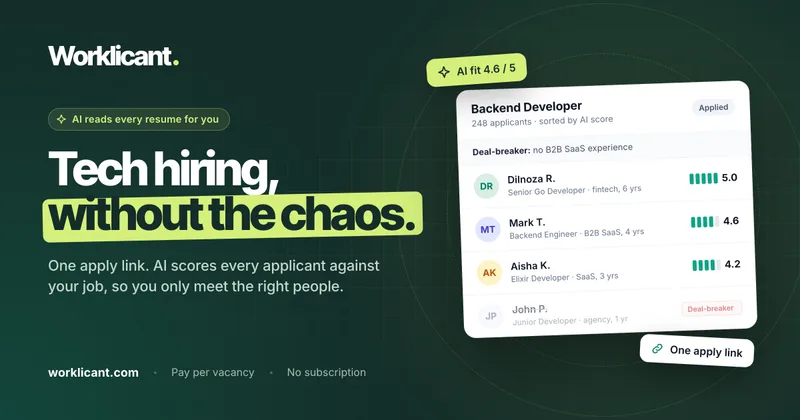
Worklicant helps tech recruiters post vacancies, screen applicants with AI, manage hiring stages, and schedule interviews. It gives hiring teams a shared applicant pipeline and scores to help prioritize resumes.
One of 146 tools in Recruitment & HR
Who it's for
- Tech recruiters handling applications from job boards who want AI summaries, fit scores, and deal-breaker screening.
- Small hiring teams that need a shared pipeline with notes, custom stages, and applicant history.
- Recruitment agencies hiring across multiple vacancies that want one-time credit packages instead of monthly subscription pricing.
Not the right fit if…
- Teams that need a vacancy to stay open longer than 60 days: each vacancy closes automatically after 60 days.
How it fits your workflow
Post a vacancy, define any deal-breaker criteria, and share its application link on LinkedIn, job boards, or a careers page. Applicants use the link to upload a PDF resume and answer the employer's questions without creating an account.
Worklicant reads resumes as they arrive and provides a short profile and fit score. Recruiters review applicants in the pipeline, where they can move candidates between stages, add notes, and view vacancy analytics.
For interviews, send a booking link from an applicant card. Candidates select an available time, and the page describes Google Calendar and Google Meet support for the resulting invitation.
Pricing
Single
$79 one-time
- · 1 vacancy credit
- · Credit valid for 365 days
- · Each vacancy is open for 60 days
Team
$299 one-time ($59.80 per vacancy)
- · 5 vacancy credits
- · Credits valid for 365 days
- · Each vacancy is open for 60 days
- · Listed as the most popular plan
Agency
$799 one-time ($39.95 per vacancy)
- · 20 vacancy credits
- · Credits valid for 365 days
- · Each vacancy is open for 60 days
Prices checked on Oct 21, 2026 from the vendor's site. They can change; confirm before you buy.
Key features
- AI resume screening
- Creates a short applicant profile and fit score from each resume, including scanned PDFs. The score is based on the job description and ideal candidate.
- Deal-breaker filtering
- Recruiters can write a deal-breaker rule in one sentence. Applicants who fail it are hidden, and can be shown again with one click.
- Spam and fake resume filtering
- Checks uploads for real resumes and keeps empty PDFs and unrelated files out of the hiring pipeline.
- Applicant pipeline and team board
- Lets teams move applicants between customizable vacancy stages, add private notes and tags, review stage-change history, and move one or multiple applicants.
- Candidate interview booking
- Recruiters can send a booking link from an applicant card. Candidates select an available time based on the team's weekly hours and their timezone.
- Vacancy analytics
- Shows page views and applications over time, applicant counts by stage, applicant skills and seniority, and time to fill.
Works with
- Google Calendar
- Google Meet
Limitations to know
- Each vacancy closes automatically after 60 days.
- Purchased credits are valid for 365 days.
Alternatives to consider
-
Applicant AI
Choose it if you want applicant screening that can pre-filter candidates before they reach an existing ATS.
-
Resumes Ranker
Choose it if your main need is screening and ranking bulk resume uploads against job-specific criteria.
-
Runway
Choose it if you are hiring for early-career roles and want match scores, red flag detection, and tailored interview questions.
Getting started
- Purchase a vacancy credit package.
- Post a vacancy and enter any deal-breaker rule.
- Share the apply link on LinkedIn, job boards, or your careers page.
- Review applicants in the pipeline and send booking links to candidates you want to interview.
Frequently asked questions
What is a credit?
One credit publishes one vacancy for 60 days. The vacancy closes automatically after that period.
Can I get my money back?
The page says to contact Worklicant within 14 days of purchase for a full refund if you do not like the product.
Can the AI reject a good candidate?
The page says AI auto-rejects only when confident that a deal-breaker applies. Auto-rejected applicants are hidden rather than deleted, and can be shown again with one click.
Where do the applicants come from?
Applicants come through the employer's own job posts. Employers can share the apply link on LinkedIn, job boards, and their careers page.
Do applicants need an account?
No. Applicants open the link, upload a PDF resume, and answer the employer's questions without signing up.
Can candidates book an interview themselves?
Yes. The recruiter sends a booking link from the applicant card, and the candidate chooses an available time from the team's weekly hours.
Does it work with Google Calendar and Google Meet?
The page says that after a candidate books, a link opens Google Calendar with the time and candidate filled in; Google adds a Meet link and sends the invitation.
Why does Worklicant not have a subscription?
Worklicant charges for vacancy credits that teams can use when hiring, rather than billing monthly when they are not hiring.