
Youtube To Transcript.ai
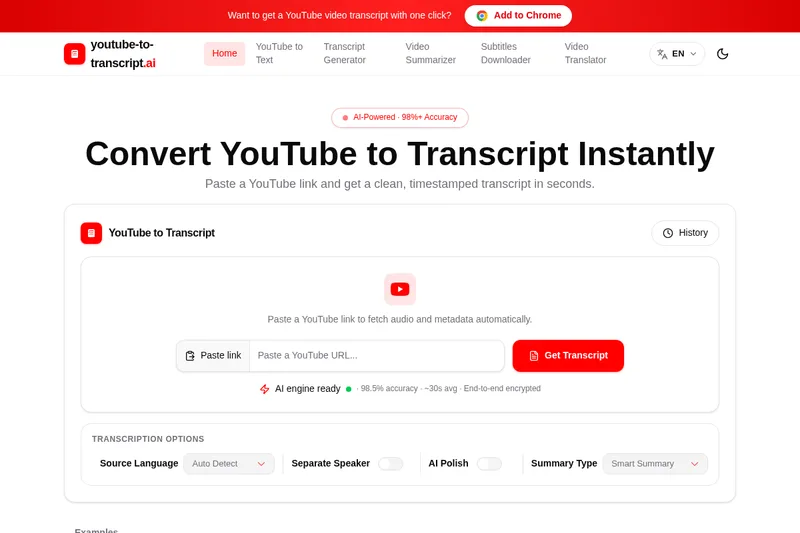
YouTube-to-Transcript.ai turns YouTube links into timestamped transcripts, summaries, and exportable subtitle files. Journalists, researchers, educators, and video teams can search and reuse video content without manually transcribing it.
One of 51 tools in Transcription
Who it's for
- Journalists and reporters who need searchable transcripts to check quotes from press conferences and interviews.
- Researchers and educators reviewing recorded interviews, lectures, or other video material as text.
- Editors, marketers, and creators who repurpose YouTube videos into captions, notes, clips, or written content.
Not the right fit if…
- Teams processing large volumes that need expanded quota packages now: the site describes those packages as planned for a future launch.
How it fits your workflow
Paste a YouTube watch, Shorts, or supported embed URL into the website. The tool retrieves available subtitles first and uses speech recognition on the audio if subtitles are unavailable.
Review the timestamped transcript, optionally enable speaker labels or summaries, then search, copy, or export it as TXT, DOCX, SRT, VTT, or CSV. The Chrome extension offers an in-page workflow from a YouTube video.
Pricing
Free: Everyday transcription, translation, and summarization are offered free with no upfront payment. Expanded quota packages for higher usage are described as forthcoming.
Free
Free for everyday use; the page says expanded quota packages for higher-volume processing are planned for launch within one month.
- · Transcription, translation, and summarization for everyday use
- · No upfront payment required
- · The site says no sign-up is required
Prices checked on Oct 7, 2026 from the vendor's site. They can change; confirm before you buy.
Key features
- YouTube link transcription
- Paste a YouTube watch, Shorts, or supported embedded-video link to retrieve available subtitles or generate a transcript from the audio when subtitles are unavailable.
- Timestamps and chapters
- Transcript lines are time-coded and clickable, with chapter markers to help users navigate to specific moments.
- AI speech recognition
- When a video has no available captions, the tool uses speech recognition to generate a transcript from its audio.
- Speaker labels
- For videos with multiple speakers, users can enable speaker names and rename speakers.
- AI summaries and key points
- The page describes AI-generated summaries, key points, and summary options for reviewing video content.
- Multilingual support and translation
- The site advertises automatic language detection, transcription in 100+ languages, and translation features for captions.
Limitations to know
- The site says transcription quality depends on the video's audio quality.
- Expanded quota packages for users processing large volumes are described as forthcoming rather than currently available.
Alternatives to consider
-
transcript.im
Choose it if you need to transcribe videos from TikTok, Instagram, and other sources in addition to YouTube, or want bulk processing tools.
-
Transcriptly
Choose it if you also need to transcribe uploaded audio or video media, rather than working primarily from YouTube links.
Getting started
- Copy a YouTube video URL and paste it into the tool.
- Submit the link to retrieve available subtitles or generate a transcript from the audio.
- Review the transcript and optionally use summaries or speaker labels.
- Copy or download the transcript in a supported format.
Frequently asked questions
Is the YouTube-to-transcript converter free?
Yes. The site says transcription, translation, and summarization are free for everyday use with no upfront payment. Expanded quota packages for users processing large volumes are planned.
What formats can I download?
The site lists TXT, DOCX, SRT, VTT, and CSV export formats.
Can I use timestamps?
Yes. Transcripts can include timestamps aligned with the video timeline, helping users find and verify specific moments.
Can I show speaker names?
Yes. Speaker names can be shown for multi-speaker videos, and the page says users can rename speakers.
What if a video has no captions?
The tool uses AI speech recognition on the audio to generate a transcript when captions are unavailable. The site notes that transcription quality depends on audio quality.
What languages can I translate captions into?
The page says translation is supported for over 100 widely spoken languages.