
Cardscanner
Cardscanner is an online business card scanner and OCR suite that extracts contact information from physical business cards and exports it as vCard (.vcf), CSV or Excel formats, available as a web tool and mobile apps.
Cardscanner is business intelligence software teams evaluate for content & marketing. Use this page to review pricing, integration signals, and the best alternatives before you commit.
Profile facts come from the vendor source. AiMatch labels unknown pricing or API details instead of estimating them.
Review official source →Used in These Packs
Quick Overview
Best for: Content & Marketing
What it does
Business Intelligence software for decision-makers comparing workflow fit and alternatives.
Best fit
Content & Marketing
Pricing snapshot
Freemium from $4.99 / month (listed for premium features in multiple places)
Next step
Compare Cardscanner with similar tools before you shortlist it.
Compare this tool before you shortlist it
Review alternatives, pricing posture, and workflow fit side by side.
Cardscanner provides an online business card scanner and OCR toolkit that digitizes physical business cards into structured contact data. The tool uses AI-based OCR to automatically extract fields such as name, email, phone number, job title, company and address, and can export results as vCard (.vcf), CSV or Excel for easy import into contact management systems. The service is available via a web interface (drag-and-drop, URL upload, Dropbox, QR upload from mobile) and dedicated Android/iOS apps, supports batch conversion and multiple languages, and states that uploaded files are deleted from servers after conversion.
Cardscanner is an online business card scanner and OCR suite that extracts contact information from physical business cards and exports it as vCard (.vcf), CSV or Excel formats, available as a web tool and mobile apps.
Own this listing?
Claim this page for a one-time $29 to add pricing, features, screenshots, verified owner details, and a clearly labeled 30-day category position after the profile is live.
Claim this listing for $29Key Features
AI-powered OCR
Uses AI-based Optical Character Recognition to extract contact fields from business cards, including support for complex designs and multiple languages.
Export to VCF/CSV/Excel
Export scanned contacts directly into vCard (.vcf), CSV or Excel formats for import into contact managers such as Google Contacts.
Multiple upload methods
Upload images from local storage, provide an image URL, import from Dropbox, scan a QR code to upload from mobile, or paste images.
Batch conversion
Supports uploading and converting multiple business cards at once to speed up digitization workflows.
Multilingual recognition
Claims recognition of text in many languages (examples listed include Urdu, Korean, Turkish and more).
Privacy / auto-deletion
States that uploaded or converted files are not stored and are deleted from servers immediately after conversion.
Simple UI & mobile-friendly
Provides an easy-to-navigate interface optimized for desktop, mobile and tablet use, plus a QR-code option for mobile uploads.
Pricing
Free tier available with limited features: plain text (txt) extraction is available for free, and small free credit allotments (examples: 2 free credits for tabular extraction). Sign-up allows limited simultaneous uploads (example: upload 5 files at once for free).
Monthly
$4.99 / month (listed for premium features in multiple places)- Premium features such as increased credits and uploads
- Ad-free experience
- Support for larger monthly image allowances
Yearly
$24.99 / year (listed as an annual premium plan)- Lower effective monthly cost
- Higher monthly image allowances
- Ad-free and faster processing
Lifetime
$49.99 (one-time, listed for lifetime access)- One-time payment unlocks premium features
- Ad-free and elevated usage limits
Use Cases
Sales professionals
Automate capture of leads and buyer contact information collected at meetings or events to avoid manual entry and reduce errors.
Marketing professionals
Quickly digitize contacts collected at seminars, expos or client meetings to integrate into marketing outreach and CRM systems.
Entrepreneurs & small business owners
Manage contacts for partners, investors and clients efficiently while building networks on the go.
Event planners
Collect and organize vendor and client contact information for follow-ups and future events.
HR professionals
Digitize contact details of partners, potential clients and recruits to maintain an organized database.
Real estate agents
Capture contact details of buyers, sellers and other agents quickly during property viewings and networking.
Integrations
Dropbox
Allows importing card images directly from Dropbox during upload.
Google Contacts
Exported vCard files can be uploaded into Google Contacts to save scanned contact details.
Android & iOS apps
Native mobile apps are available to scan and upload cards directly from smartphones.
Benefits
Limitations
Frequently Asked Questions
Is this business card digitizer mobile-friendly?
Can I upload images directly from my mobile to the desktop?
How long does it take to process a business card?
What happens if the uploaded card is blurry?
How can I scan cards on my mobile?
How do I save scanned business cards to Google Contacts?
Can I convert my business card into Excel?
Getting Started
- 1 Step 1: Upload one or more business card images from your device, provide an image URL, import from Dropbox, or use the QR-code option to upload from mobile.
- 2 Step 2: Click the 'Scan' button to let the AI-based OCR extract contact details from the card image(s).
- 3 Step 3: Use the provided 'copy' or 'download' buttons to export the extracted contact information as VCF, CSV, or Excel, or import the vCard into Google Contacts.
Support
Contact page
Site lists a 'Contact Us' resource for direct inquiries (link available on the site).
Docs / Blog
Resources and a blog are listed in the site navigation for guidance and articles.
Feedback / Reviews
Feedback options and Trustpilot review prompts are present for user feedback.
API
Compare Cardscanner with similar tools
See how it stacks up against alternatives
Related Tools
View all 186 →
DeepSQL
DeepSQL is a self‑hosted, 24/7 automated DBA and data engineering assistant that monitors database workloads, optimizes slow queries, and ships BI dashboards. It provides a built-in agent, CLI/MCP server, and Slack integration to let teams query, analyze, and put databases on autopilot while keeping data inside their VPC.
Strata
Strata is a business intelligence platform combining governed semantic modeling, self-service dashboards, AI analytics agents, and federated OLAP routing. It helps data teams and business users explore warehouse data while keeping queries grounded in a governed model.

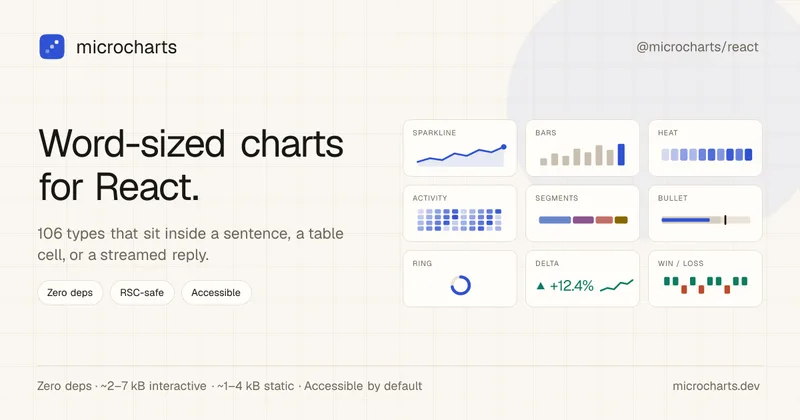
Tiny React charts that fit in a line of text, zero deps
microcharts is a zero-dependency React library of word-sized charts and sparklines (106 chart types) designed to fit inside a sentence, table cell, or streamed assistant reply. It emphasizes tiny bundle size, accessibility, theming, and AI-friendly machine-readable surfaces.


Data Storytelling Platform
Datastory is an AI-assisted data visualization and storytelling platform for turning uploaded, linked, or catalog data into annotated charts and publishable narratives. Users can share work as standalone links, website embeds, or high-quality images.
Premium Alternatives
Jeda.ai
Jeda.ai is a patented Visual AI Workspace that combines multi-LLM reasoning, 300+ analytical frameworks, and an infinite collaborative canvas to transform prompts, documents, and datasets into framework-grounded visual outputs (matrices, mind maps, flowcharts, infographics) for teams and enterprises.

Predict Expert AI
Predict Expert AI is a B2B-focused AI company that builds tailored AI models, web/mobile apps, chatbots, automation workflows, forecast models and API integrations to deliver generative and predictive intelligence and real-time operational insights for businesses.
Usesaaskit
useSAASkit is a Next.js and React Native SaaS boilerplate that bundles AI-ready code (Vercel AI SDK), authentication, multi-organization support, admin tools, billing, marketing pages, analytics and i18n to help founders launch AI-powered SaaS and mobile apps quickly.


Prisync
Prisync is an AI-powered competitor price tracking, monitoring, and dynamic pricing SaaS that helps ecommerce sellers, brands and suppliers monitor competitor prices across channels (Shopify, Amazon, Google Shopping, marketplaces), enforce MAP, and automate price adjustments to optimize profitability.

Documentpro
DocumentPro is an API-first document intelligence platform that extracts structured data from invoices, purchase orders, tax forms and other documents for embedding into software platforms; it emphasizes fast integration, AI-powered extraction, and maintenance-free production operation.

