
formulashq
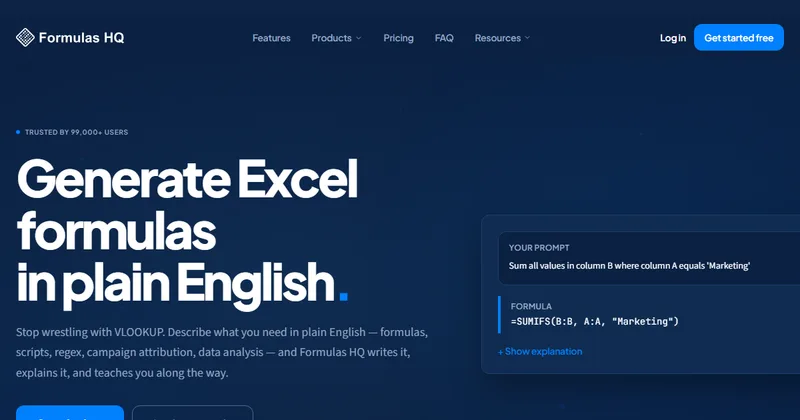
Formulas HQ turns plain-English requests into spreadsheet formulas, scripts, code, and data analyses. Analysts, accountants, marketers, and Salesforce admins can use it to produce formulas, inspect uploaded data, or review campaign attribution.
One of 198 tools in Business Intelligence
Who it's for
- Excel and Google Sheets users who need to generate or understand formulas without writing them from scratch.
- Salesforce admins and marketers who want to analyze Salesforce report exports for campaign attribution and data quality.
- Analysts who work with CSV or XLSX files and want to transform data or ask questions through AI analysis.
Not the right fit if…
- People who need more than 5 free generations per month without upgrading: the Free plan includes 5 generations monthly.
How it fits your workflow
Choose a tool and describe the task in plain English. For formulas and code, Formulas HQ generates an output with explanations; the site also offers tools to explain existing formulas, code, and regex.
For data workflows, upload CSV or XLSX files where supported. The Data Wizard supports filters, joins, and pivots before plain-English questions; AI Chat with Data Analysis provides answers, charts, tables, and follow-up recommendations.
For campaign attribution, upload Salesforce report exports for official and inferred attribution analysis, data quality checks, and recommendations. The site says this analysis runs in-browser and the data never leaves the machine.
Pricing
Free: The free plan costs $0 per month and includes 5 generations per month, along with access to the listed formula, code, regex, Salesforce formula, How-To guide, and generation history features.
Free
$0.00 per month
- · 5 generations per month
- · Excel and Google Sheets formulas
- · VBA and Apps Script
- · Regex generation
Pro
$4.33 per month, billed yearly
- · Unlimited generations across all tools
- · AI Chat with file upload
- · Data Wizard for CSV analysis
- · Python code generation
Analyzer
$21.24 per month, billed yearly
- · Everything in Pro
- · Content Analyzer for 10 sites and 200 pages
- · Scaled content analysis with AI scoring
- · Sitemap crawling and entity extraction
Prices checked on Oct 2, 2026 from the vendor's site. They can change; confirm before you buy.
Key features
- Excel and Google Sheets formulas
- Generate or explain formulas from plain-English descriptions, with a formula, summary, steps, examples, and warnings. The page lists support for Excel 2021 and Google Sheets.
- Salesforce campaign attribution
- Upload Salesforce report exports for official and inferred attribution analysis, data quality checks, gap analysis, and AI-generated campaign recommendations. The tool accepts up to seven Salesforce object types.
- Data Wizard
- Upload CSV files, transform data with filters, joins, and pivots, then ask questions in plain English. It generates SQL and provides AI-powered insights and charts.
- AI Chat with Data Analysis
- Have multi-turn conversations using uploaded CSV or XLSX files, with generated analysis, charts, tables, visualizations, and suggested follow-up analyses.
- VBA and Apps Script generator
- Generate or explain VBA macros and Google Apps Script from plain-English descriptions, with error handling and step-by-step explanations.
- Python code generator
- Generate, debug, or explain Python code, with support for 20-plus listed libraries including pandas, NumPy, scikit-learn, matplotlib, PyTorch, and TensorFlow.
Works with
- Excel
- Google Sheets
- Salesforce
Limitations to know
- The Free plan is limited to 5 generations per month.
- The Analyzer plan lists a limit of 10 sites and 200 pages for the Content Analyzer.
- Salesforce campaign attribution accepts uploads of up to 7 Salesforce object types.
Alternatives to consider
-
GPTExcel
Choose it if you want spreadsheet assistance that also generates pivot tables, charts, SQL queries, and automation scripts for Excel, Google Sheets, LibreOffice Calc, and Airtable.
-
GPT for Work
Choose it if you want an AI agent that works directly in Excel and Google Sheets for bulk row-by-row processing, data cleanup, charts, and pivots.
Getting started
- Start with the free plan; the page says no credit card is required.
- Select the tool that matches the task, such as formulas, Data Wizard, or AI Chat with Data Analysis.
- Describe the request in plain English and upload a CSV, XLSX, or Salesforce export when the selected tool calls for it.
- Review and use the generated formula, code, analysis, or visualization.