

Humata
Humata is an AI-powered document assistant that lets teams upload files (PDFs and other documents) and ask questions, summarize, compare, and retrieve cited answers from their knowledge base. It targets individual researchers and teams with tiered plans and enterprise-grade security.
Humata is research software teams evaluate for education & research. Use this page to review pricing, integration signals, and the best alternatives before you commit.
Profile facts come from the vendor source. AiMatch labels unknown pricing or API details instead of estimating them.
Review official source →Quick Overview
Best for: Education & Research
What it does
Research software for decision-makers comparing workflow fit and alternatives.
Best fit
Education & Research
Pricing snapshot
Freemium from $0
Next step
Compare Humata with similar tools before you shortlist it.
Compare this tool before you shortlist it
Review alternatives, pricing posture, and workflow fit side by side.
Humata is an AI document assistant designed to let users upload unlimited files and ask natural-language questions about their content. The service reads uploaded documents (PDFs and other files), summarizes findings, compares documents, and returns answers with citations to the source content. It is positioned for both individual experts and teams, offering tiered plans (Free, Expert, Team) and enterprise-focused security and access controls.
AI tool for fast file understanding and data extraction.
Own this listing?
Claim this page for a one-time $29 to add pricing, features, screenshots, verified owner details, and a clearly labeled 30-day category position after the profile is live.
Claim this listing for $29Key Features
Document Q&A and Summarization
Ask questions across all uploaded files; Humata summarizes technical papers, compares documents, and searches for answers so you don't have to ('Skip through long technical papers','Tell our PDF AI to summarize findings, compare documents, and search for answers').
Unlimited files
Upload as many documents as you want; the product advertises unlimited file uploads and fast answers ('Unlimited files','Upload as many documents as you want').
Cited answers
Answers include citations linking back into the source files to help trace the origin of insights ('Highlights citations','Each answer Humata generates will cite relevant sections from your uploaded documents').
Unlimited questions and iterative refinement
Users can ask unlimited questions, request shorter summaries, and ask the system to rewrite or refine answers until satisfied ('Unlimited questions','Ask again and again until you're happy').
Embeddable document assistant
Include Humata's PDF AI in any webpage with a single click to let customers query documents on-site ('Embeds in any webpage','Include our PDF AI in your webpage with a single click').
Team and enterprise security
Enterprise-grade data rooms, secured private cloud storage, 256-bit SHA encryption at rest, role-based permissions, and upcoming SSO support for Okta, Google, or SAML ('Our enterprise-grade data rooms','Encrypted at rest','Role-based security','SSO functionality ... is coming soon').
Pricing
Access to basic features, up to 60 pages and up to 10 answers.
Free
$0- Access to basic features
- Up to 60 pages
- Up to 10 answers
Expert
$9.99 per month- Access to basic features
- Up to 500 free pages
- $0.02 per additional page
- 3 users included
Team
$49 per user per month- Access to basic features
- Up to 5,000 free pages
- $0.01 per additional page
- 10 users included
Enterprise
Contact sales- Custom scaling past 10 users
- Sales-assisted onboarding and custom pricing
Use Cases
Research paper analysis
Researchers and analysts can speed reading and comprehension of academic and technical papers by asking Humata to summarize findings and extract key points ('Humata AI makes reading papers easier and faster').
Team knowledge base Q&A
Teams can centralize documents and allow members to query private documents for quick answers, with role-based permissions and department/folder controls to restrict access ('Shared team files keep everyone on the same page','Department & folder level permissions').
Customer-facing document search
Embed Humata's PDF AI in webpages to let customers or users query documentation or help files directly ('Include our PDF AI in your webpage with a single click').
Education and student projects
Classroom and student use cases where students build and train AI workflows or extract insights from course materials ('Humata is set to revolutionize how we teach students','students are realizing they can build and train their own AI tools').
Integrations
Web embeds
Embed Humata's PDF AI into any webpage with a single click to provide document Q&A to visitors ('Embeds in any webpage').
Identity providers (SSO)
Single sign-on functionality with Okta, Google, or SAML is mentioned as coming soon (not yet generally available) ('Humata SSO functionality with Okta, Google, or SAML is coming soon').
Stripe (billing)
Stripe is used for invoicing and billing, allowing additional invoice information on request ('We partner with Stripe to ensure that invoicing is as straightforward as possible').
Benefits
Limitations
Frequently Asked Questions
What are the benefits of using Humata over ChatGPT?
Does Humata offer a free trial?
Can I modify my Humata subscription after I've started using it?
What is Humata's cancellation policy?
Can additional information be included in Humata's invoice?
How does billing work for Humata?
Getting Started
- 1 Step 1: Visit humata.ai and click 'Get started' or 'Sign up' to create an account
- 2 Step 2: Upload documents (PDFs or other supported files) to your workspace
- 3 Step 3: Ask questions, request summaries or comparisons, and iterate on responses; invite team members or embed the assistant in a webpage as needed
Support
chat
Premium chat support available on paid plans; 'Get in touch' and 'Chat with Sales' options are presented on the site.
sales
Sales contact for enterprise and scaling past 10 users ('Chat with Sales','Ask our Sales team about Enterprise pricing').
docs/pricing
Pricing and product details are published on the pricing page (https://www.humata.ai/pricing).
API
Compare Humata with similar tools
See how it stacks up against alternatives
Related Tools
View all 143 →
ThoughtDAG
ThoughtDAG is an open-source, desktop-first application that makes LLM context visible, editable, and reproducible by representing context as an editable directed acyclic graph (wires = context) and letting users preview and control exactly what the model receives.

LLM Attention Visualization
A browser-based interactive visualization that shows how transformer LLMs allocate attention to past tokens during generation by aggregating attention weights and value magnitudes across heads and layers.

PilotCite
PilotCite is a SaaS platform that helps brands monitor and improve their visibility in AI-generated answers (ChatGPT, Perplexity, Google AI, Gemini, Claude, Copilot, Grok) by tracking citations, auditing site citability, benchmarking competitors, and generating source-backed content.

Knowledge graph skill for Claude/Kimi Code
SysEdge is an ontological knowledge graph and CLI for multi-agent Claude Code and Kimi Code teams that models requirements, tests, and architecture standards to surface specification, test, and standards gaps before code ships and to reduce agent orientation tokens.
HieraticBench
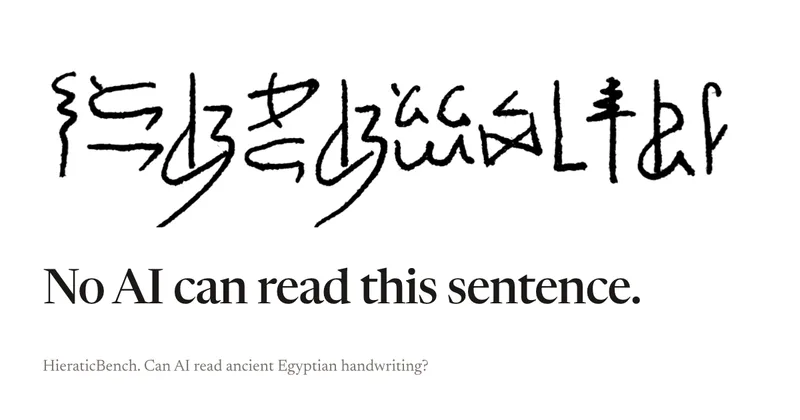
HieraticBench is an open benchmark for testing whether AI models can identify and read hieratic, the cursive handwriting of ancient Egypt. It includes a public leaderboard, evaluation harness, and dataset of documents and individual signs.
Redactle LLM Leaderboard
A public benchmark dashboard that evaluates how well large language models (LLMs) solve Redactle puzzles by running standardized evaluations and publishing ranked results, costs, and performance metrics.
Premium Alternatives

CiteRank
CiteRank is a weekly SaaS monitoring tool that re-asks buyer questions of major AI answer engines (ChatGPT, Perplexity, Google AI Overviews, Gemini and Claude) to record whether they cite your site, name your brand, or leave you absent, and delivers board-style reports and competitor/source lists.





grantboost
Grantboost is an AI grant discovery and proposal-writing platform for nonprofits, agencies, universities, and other mission-driven organizations. It matches funding opportunities to an organization’s programs and helps draft proposals using its past content and brand voice.

SermonAI
SermonAI is a web-based sermon preparation platform for pastors, combining AI-assisted research and writing with planning, sermon organization, preaching tools, and content repurposing. Its AI research can be tailored to a pastor’s denomination, Bible translation, and trusted voices.