
Pdfpeer
PDFPeer is a web tool that lets users upload PDFs and 'chat' with them—asking questions, getting summaries, and quickly finding information across many document types. It targets students and professionals and is offered for free.
Pdfpeer is chat software teams evaluate for chat. Use this page to review pricing, integration signals, and the best alternatives before you commit.
Profile facts come from the vendor source. AiMatch labels unknown pricing or API details instead of estimating them.
Review official source →Quick Overview
Best for: Chat
What it does
Chat software for decision-makers comparing workflow fit and alternatives.
Best fit
Chat
Pricing snapshot
Free from Free
Next step
Compare Pdfpeer with similar tools before you shortlist it.
Compare this tool before you shortlist it
Review alternatives, pricing posture, and workflow fit side by side.
PDFPeer is a browser-based tool that allows users to upload PDF documents and interact with them conversationally—asking questions, requesting summaries, and searching content quickly. The product presents itself as suitable for a wide range of document types (bank statements, contracts, resumes, research papers, manuals, receipts, etc.) and markets use to both students and professionals. The site emphasizes speed, ease of use, and security, and repeatedly states that the service can be used for free.
PDFPeer is a web tool that lets users upload PDFs and 'chat' with them—asking questions, getting summaries, and quickly finding information across many document types. It targets students and professionals and is offered for free.
Own this listing?
Claim this page for a one-time $29 to add pricing, features, screenshots, verified owner details, and a clearly labeled 30-day category position after the profile is live.
Claim this listing for $29Key Features
Chat with PDFs
Interact with uploaded PDF documents conversationally to ask questions and get answers directly from the document content ("Chat with any PDF in seconds!").
Summarization
Request summaries of documents and sections to quickly extract key points ("Ask questions, get summary").
Search & Find
Locate information quickly inside PDFs ("find things quickly").
Support for many document types
Accepts a wide variety of PDFs including bank statements, invoices, resumes, contracts, tax forms, medical records, manuals, research papers, receipts, study materials and more (explicitly listed on the site).
Fast, easy and secure uploads
Described as built with secure and fast technology so users can upload PDFs "without any worries".
Pricing
All features are advertised as available at no cost; the site repeatedly states the product is free to use.
Free
Free- Chat with PDFs
- Summaries and Q&A
- Support for many document types
Use Cases
Studying and homework
Students can upload study materials, ask questions, and use summaries to make homework and studying easier ("Just upload your study materials and ask questions to it.").
Contract and financial document review
Professionals can chat with contracts and financial reports to extract information and streamline workflows ("Chat with your contracts, financial reports and more!").
Resume and recruitment screening
Combine resumes into a single PDF and ask the PDFPeer bot to summarize and find the most relevant candidates (testimonial mentions this workflow).
Job searching
Job seekers can chat directly with job descriptions and related PDFs to simplify the search process (testimonial on the page).
Real estate and other document-heavy professions
Agents and other professionals can manage and interact with property documents and related PDFs to improve operations (testimonial from a real estate agent).
Integrations
No verified integration details are available.
Benefits
Limitations
No verified limitations are available.
Frequently Asked Questions
No verified FAQs are available.
Getting Started
- 1 Step 1: Visit the site and click Upload now (the site prompts users to upload PDFs).
- 2 Step 2: Upload your PDF document (supported types are listed on the site).
- 3 Step 3: Start chatting—ask questions, request summaries, or search within the document.
Support
support page
Site includes a 'Support' link in the footer (no additional contact details listed on the provided content).
API
Compare Pdfpeer with similar tools
See how it stacks up against alternatives
Related Tools
View all 70 →





Premium Alternatives
Promptbuilder
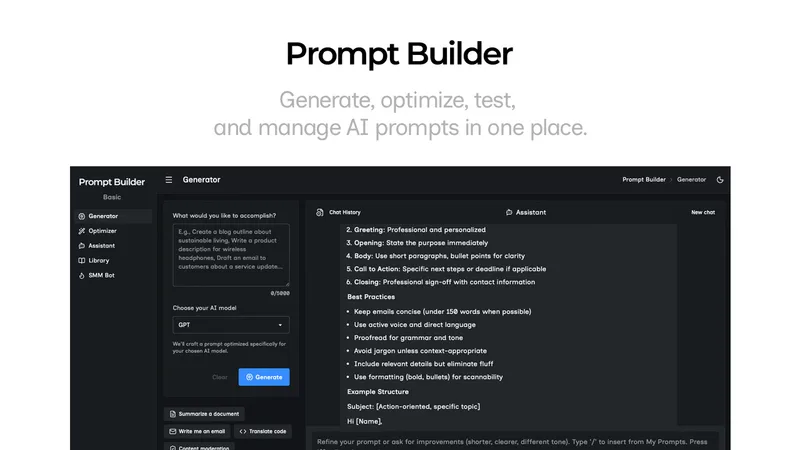
Prompt Builder is a web app that generates, optimizes, tests, and manages AI prompts tuned to specific models (ChatGPT, Gemini, Claude, Grok, etc.), with a prompt library, optimizer, built-in chat assistant, and versioning for prompt workflows.

pandachat-ai
PandaChat runs supervised AI customer operations for complex Adria/DACH e‑commerce stacks: a managed team of specialists and supervisors that connects to your systems, handles multilingual 24/7 support across channels, and sends daily briefings with value reports.
Uncensored
Uncensored AI is a chat and developer platform that provides access to a broad catalog of powerful, minimally filtered AI models for chat, voice, vision, code, and API access, with privacy features like auto-redaction and developer tooling.