
Saner.AI
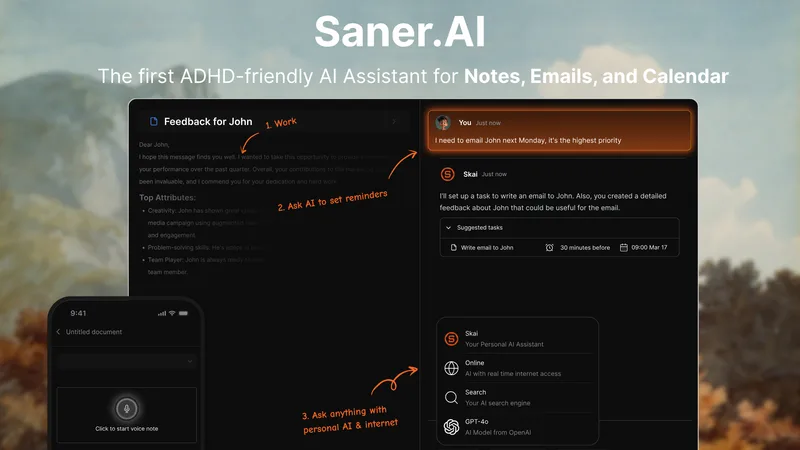
Saner.AI helps professionals capture and search notes, emails, files, and tasks, then use AI to organize information and plan follow-up work. It brings these workflows into one assistant-oriented workspace.
One of 132 tools in Productivity
Who it's for
- Professionals with scattered notes and documents who need to search across saved information and retrieve relevant details.
- Entrepreneurs and managers who want to organize tasks and follow-ups alongside email and calendar information.
- Researchers and content creators who want to capture material and connect ideas across their notes and files.
How it fits your workflow
Capture thoughts and information as text or voice notes, use Chrome, or upload and import material. Connect Calendar, Slack, Drive, and Gmail to pull in information from those services.
Ask questions across notes and files, search the internet alongside saved information, and use AI suggestions to organize notes with tags and folders.
Use Skai to turn emails or brain dumps into tasks, prioritize and schedule work, and review tasks in a calendar timeline.
Pricing
Free: The page says a free package is currently offered. It also mentions a significant discount for beta early adopters but provides no amount or detailed paid-plan pricing.
Free package
Free; the page does not specify limits or included features.
Prices checked on Oct 2, 2026 from the vendor's site. They can change; confirm before you buy.
Key features
- AI search and synthesis
- Ask questions across notes and files to find information, surface insights, and connect related topics.
- Note capture and import
- Capture information with text, voice notes, Chrome, or uploads and imports.
- Task assistant
- Skai can turn emails and brain dumps into tasks, suggest priorities, and help schedule work.
- Automatic organization
- AI suggests tags based on note content and previous tags, and the product includes folders and a smart inbox.
- Relevant-note discovery
- The product surfaces similar information saved previously and can help recall information from notes.
- Integrated workspace
- Search the internet and personal notes and work alongside saved documents in one workspace.
Works with
- Calendar
- Slack
- Drive
- Gmail
- Outlook
Limitations to know
- The product is described as being in beta, with the team actively experimenting with the feature set.
- The page does not provide specific pricing for paid plans or detailed plan limits.
Alternatives to consider
-
Mindly
Choose it if you want a macOS-first second-brain app with on-device AI for capturing, tagging, summarizing, and connecting notes and files.
-
Keymate.AI
Choose it if your main need is to search and generate content from sources such as PDFs, Google Docs, URLs, YouTube, and emails in a shared workspace.
Getting started
- Sign up for a free account; the page says no credit card is required.
- Capture a note using text, voice, Chrome, or an upload or import.
- Connect Calendar, Slack, Drive, or Gmail to pull information into the workspace.
Frequently asked questions
Can I use Saner.AI if I don't have ADHD?
Yes. The page says the app can help people who want to manage information effectively and stay productive, whether or not they have ADHD.
Is Saner.AI free?
The page says Saner.AI currently offers a free package.
Can I import more than 1,000 notes?
Yes. The page says users can import thousands of notes and mentions users who imported more than 3,000 notes.
Can I export my notes?
Yes. The page says notes can be exported using a built-in feature.
How does Saner.AI handle user data?
The page says it does not train on, sell, or share user data, and that data is encrypted in transit and at rest. It also describes backups, user controls, and restricted staff access.