

Sparrow
Sparrow is a powerful, user-driven API testing tool designed for teams seeking efficient, secure, and automated testing solutions. It supports WebSocket, Socket.IO, GraphQL, REST APIs, and offers AI-powered features to enhance testing workflows.
Sparrow is api testing software teams evaluate for software & gaming. Use this page to review pricing, integration signals, and the best alternatives before you commit.
Used in These Packs
Quick Overview
Best for: Software & Gaming
What it does
API Testing software for decision-makers comparing workflow fit and alternatives.
Best fit
Software & Gaming
Pricing snapshot
Freemium from Free
Next step
Compare Sparrow with similar tools before you shortlist it.
Compare this tool before you shortlist it
Review alternatives, pricing posture, and workflow fit side by side.
Sparrow
Sparrow is an advanced API testing platform built to empower teams with secure, user-driven functionality and powerful automation. It supports a wide range of protocols including REST, WebSocket, Socket.IO, and GraphQL, making it versatile for modern API testing needs. Designed for collaboration, Sparrow offers features like centralized credential management, mock servers, AI-powered debugging, and multi-agent support. It is accessible via web and desktop applications, ensuring teams can stay connected and productive across devices. Sparrow also fosters community engagement through quizzes, webinars, and hackathons to help users learn and grow.
A lightweight, fast, and AI-powered API testing platform designed for speed, clarity, and developer control, supporting natural language API calls, self-hosting, and team collaboration.
Own this listing?
Claim this page to add pricing, features, screenshots, and verified owner details.
Claim this listingKey Features
Authentication Profiles
Centralized management of credentials for streamlined authentication across API requests.
AI-Powered Features
Includes AI requests with selectable auth profiles, AI conversation history, smart prompting, and AI-powered debugging assistance.
Mock Server Enhancements
Supports multi-response mock servers with weighted responses, real-time history, and smarter mocking capabilities.
Multi-Protocol Support
Supports REST APIs, WebSocket, Socket.IO, and GraphQL for comprehensive API testing.
Test Flows and Automation
Enables creation and management of test flows with features like partial run support and automated test execution.
Workspace and Team Collaboration
Features teams and workspaces, public workspace links for sharing, and smart workspace refresh.
Cross-Platform Accessibility
Available as a web app and desktop app (Sparrow Edge), allowing API testing from anywhere.
Enhanced UI/UX
Revamped user interface with smooth animations, side navigation rails, and design system enhancements.
API Documentation and cURL Generation
Automated API documentation generation and ability to generate cURL commands.
Feedback and Community Engagement
Integrated feedback management, email verification, and community events like hackathons and webinars.
Pricing
Sparrow offers a free Community plan with basic API testing features and access to community resources.
Community
Free- Basic API testing features
- Access to community resources
- Limited AI requests
Standard
Not specified- Advanced API testing
- Enhanced AI features
- Mock server enhancements
- Team collaboration
Professional
Not specified- Full feature set
- Priority support
- Extended usage limits
- Enterprise integrations
Use Cases
API Testing for Development Teams
Sparrow provides developers with tools to test REST, WebSocket, Socket.IO, and GraphQL APIs efficiently with automation and AI assistance.
Mock Server for API Prototyping
Teams can create and manage mock servers with multi-response support to simulate API behavior during development.
Collaborative API Testing
Workspaces and team features enable multiple users to collaborate on API testing projects with shared resources and public links.
Learning and Skill Development
Interactive quizzes, webinars, and hackathons help users improve their API testing skills and stay updated with latest features.
AI-Assisted Debugging and Automation
Leverage AI-powered debugging and smart prompting to identify issues faster and automate repetitive testing tasks.
Integrations
Canny.io
Integration for feedback management to collect and manage user feedback effectively.
Storybook
Integration to enhance entity management in folders and collections.
Benefits
Limitations
Frequently Asked Questions
Does Sparrow support WebSocket and Socket.IO testing?
Is there a free version of Sparrow available?
Can I collaborate with my team using Sparrow?
Does Sparrow provide AI-powered testing features?
Is Sparrow available on multiple platforms?
Getting Started
- 1 Visit the Sparrow website and sign up for an account.
- 2 Download the Sparrow Edge desktop app or use the web app for immediate access.
- 3 Create or import API collections and set up authentication profiles.
- 4 Start building test flows and utilize AI-powered features for enhanced testing.
- 5 Collaborate with your team by creating workspaces and sharing public links.
Support
Documentation
Comprehensive documentation available on the Sparrow website.
Community
Engage with the community through webinars, hackathons, and quizzes.
Newsletter
Subscribe to the newsletter for latest updates and feature announcements.
API
No specific API documentation for Sparrow's own API is mentioned.
Not available
Compare Sparrow with similar tools
See how it stacks up against alternatives
Related Tools
View all 134 →
AISentinel SDKs
Information about AISentinel SDKs is currently unavailable due to access restrictions on the source page.

ardor-prompt-in-product-out
Ardor is a multi-agent, full-stack software development platform that automates the entire software development lifecycle, enabling users to go from prompt to production-ready product in minutes with minimal manual effort.

stack-studio-ai
Stack Studio is an AI-powered tool that provides a live, interactive map of your software codebase, enabling clear planning, understanding, and confident execution of features and changes for solo builders, teams, and AI-assisted workflows.



apipark
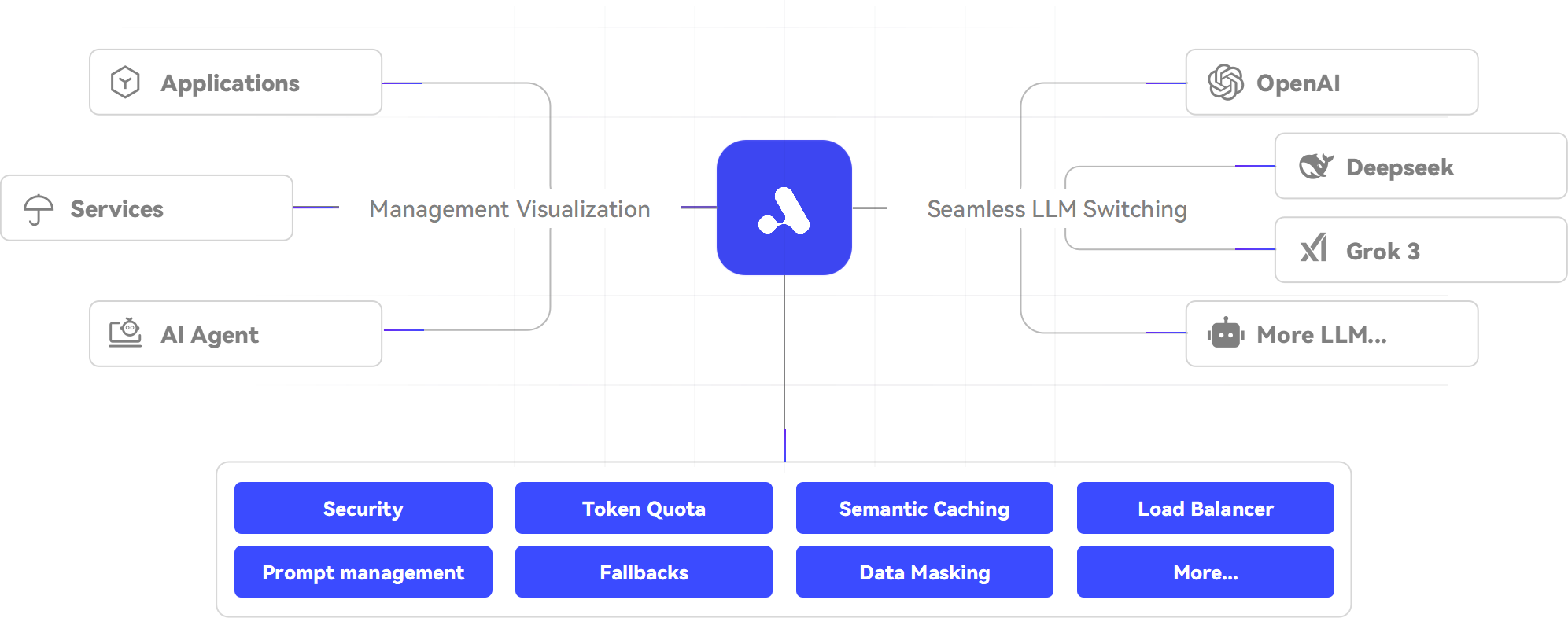
APIPark is an open-source, all-in-one LLM gateway designed for fine-grained, visual management of large language models (LLMs) in production. It ensures safer, more stable LLM calls and supports enterprise operations with features like load balancing, traffic control, and API portal building.
%22%2F%3E%20%3Ctext%20x%3D%2250%25%22%20y%3D%2250%25%22%20dominant-baseline%3D%22central%22%20text-anchor%3D%22middle%22%20font-family%3D%22system-ui%2C-apple-system%2Csans-serif%22%20font-weight%3D%22700%22%20font-size%3D%2250%22%20fill%3D%22white%22%3EP%3C%2Ftext%3E%20%3C%2Fsvg%3E)
Premium Alternatives



AIclicks
AIclicks is an AI and LLM search visibility optimization tool designed to help brands track, analyze, and improve their presence in AI search engines like ChatGPT, Perplexity, and Gemini. It provides actionable analytics, competitor analysis, and AI-generated content to boost AI search rankings.


marketingblocks-ai
MarketingBlocks AI is an all-in-one AI marketing assistant platform that automates the creation of marketing content, including landing pages, social media posts, videos, and more, helping entrepreneurs, agencies, and marketers increase leads, sales, and visibility efficiently.

Candlestick AI
Candlestick AI is an AI-powered investing platform that uses advanced models to analyze global business and financial news, helping regular investors customize portfolios and automate investing with transparency and ease.

Parachute Backup
Parachute Backup is a seamless, set-and-forget backup tool for iCloud Photos and iCloud Drive that automatically syncs your data to your own storage or other cloud providers, ensuring your digital memories and documents are safely backed up without subscriptions or lock-in.
