
SubtitleGenerator
SubtitleGenerator is a browser-based AI subtitle editor that transcribes video locally, flags uncertain words for quick correction, provides 33 animated caption styles, and exports burned-in videos or multiple subtitle formats — free to start with optional Pro/Max upgrades.
SubtitleGenerator is ai tools software teams evaluate for transcription. Use this page to review pricing, integration signals, and the best alternatives before you commit.
Profile facts come from the vendor source. AiMatch labels unknown pricing or API details instead of estimating them.
Review official source →Used in These Packs
Quick Overview
Best for: Transcription
What it does
AI Tools software for decision-makers comparing workflow fit and alternatives.
Best fit
Transcription
Pricing snapshot
Free from $0
Next step
Compare SubtitleGenerator with similar tools before you shortlist it.
Compare this tool before you shortlist it
Review alternatives, pricing posture, and workflow fit side by side.
SubtitleGenerator is a web-based subtitle editor that uses AI transcription to create word-level timed captions, automatically flags low-confidence words for quick correction, and provides an integrated styling and export workflow. It runs entirely in the browser: the source video stays on the user's device, only extracted audio is sent for transcription and deleted afterwards, and exports are rendered locally in the browser. The product targets creators and professionals (podcasters, YouTubers, editors, educators, agencies) and offers a Free tier with optional Pro and Max subscriptions for higher limits, HD/no-watermark exports, and additional features like subtitle translation.
From video to publish-ready AI subtitles—all in one browser Discussion | Link
Own this listing?
Claim this page for a one-time $29 to add pricing, features, screenshots, verified owner details, and a clearly labeled 30-day category position after the profile is live.
Claim this listing for $29Key Features
AI transcription with word-level timing
AI transcribes spoken language with word-level timing and automatically flags low-confidence words for review.
Localized processing & privacy
The source video remains on the device; only extracted audio is sent for transcription and is deleted afterwards. Exports and rendering occur in the browser.
Interactive correction workflow
Uncertain words are highlighted and flagged; users can edit a word, keep it, or re-transcribe just the selected cue or range.
33 caption styles and animations
A curated library of 33 caption styles across six families (typography, framing, highlighting and motion) previewable on the user's video.
Multiple export formats and NLE support
Export burned-in videos or subtitle files in SRT, VTT, ASS, SSA, SBV, SMI, TXT or JSON; workflows for Premiere Pro and DaVinci Resolve are supported.
In-browser rendering and progress
Browser export shows real render progress while creating captioned videos without uploading the original file.
Pro features: high-accuracy mode and translation
Pro offers high-accuracy transcription mode, cue-level re-transcription, subtitle translation, custom fonts and saved brand styles.
Usage limits and PAYG minutes
Free plan includes monthly subtitle time limits; Pro/Max increase video length, file size and monthly subtitle minutes, with optional pay-as-you-go minutes available.
Mobile browser compatibility
Generating and editing work on modern mobile browsers, with longer or high-resolution exports recommended on desktop.
Pricing
Generate and edit one video without signing up (up to 10 minutes per video) with all 33 styles, 720p watermarked export; account holders get 60 minutes of subtitle time per month.
Free
$0- Try the full editor with a small watermark
- Every uncertain word flagged for review
- 60 minutes of subtitle time per month if you create an account
- All 33 styles & animations
Pro
$9 / month or $90 / year- Full editor with no watermark
- Re-transcribe just the part that's wrong
- High-accuracy transcription mode
- 8 subtitle formats
Max
$15 / month or $150 / year- Everything in Pro
- Higher limits: up to 3 GB per video, videos up to 1 hour
- 1,400 minutes of subtitle time a month
Pay-as-you-go
Add time from $3 (every $1 adds 20 minutes)- Add subtitle minutes without another subscription
- Purchased minutes do not expire
Use Cases
Podcasters
Generate captions for spoken-word clips, check and correct names before publishing.
YouTube creators
Produce SRT-style subtitle files or burned-in caption layouts for videos.
Short-form creators
Create 9:16 safe-area captions and choose animated styles tailored for short-form platforms.
Editors
Prepare timed subtitle assets and exports ready for Premiere Pro or DaVinci Resolve workflows.
Educators
Keep dense explanations readable and correct names/phrases efficiently.
Agencies
Start from branded styles and manage subtitle workflows while preserving the correction interface.
Integrations
Premiere Pro
Export subtitle files and assets ready for import into Adobe Premiere Pro as part of NLE workflows.
DaVinci Resolve
Export subtitle files and assets ready for import into DaVinci Resolve for editorial workflows.
Benefits
Limitations
Frequently Asked Questions
What can I do with the free subtitle generator?
Do you keep my video?
What if it misses words?
Can I click anywhere on the timeline to jump there?
Can I add a subtitle where the AI didn’t put one?
Can I edit the subtitles after generating?
What video formats can I upload?
Does it work on my phone?
Getting Started
- 1 Drop your video in (MP4, MOV, WebM, MKV) — no account or install required.
- 2 AI writes the subtitles with word-level timing and flags uncertain words.
- 3 Fix flagged words, adjust cues, choose a style from the 33 available and preview the canvas.
- 4 Export a burned-in video or subtitle files (SRT, VTT, ASS, SSA, SBV, SMI, TXT or JSON).
Support
Docs / Blog
Product documentation and how-to articles are available on the site (Blog and How-to guides).
Contact
Contact link available via the site navigation (Contact us / Company & legal).
API
Compare SubtitleGenerator with similar tools
See how it stacks up against alternatives
Related Tools
View all 51 →

StageWhisper Lite
StageWhisper Lite is a free, on-device Mac app that listens to calls and produces local transcripts, summaries, and action items without uploading audio or screen content to external servers.
Scriber-Pro 2.0
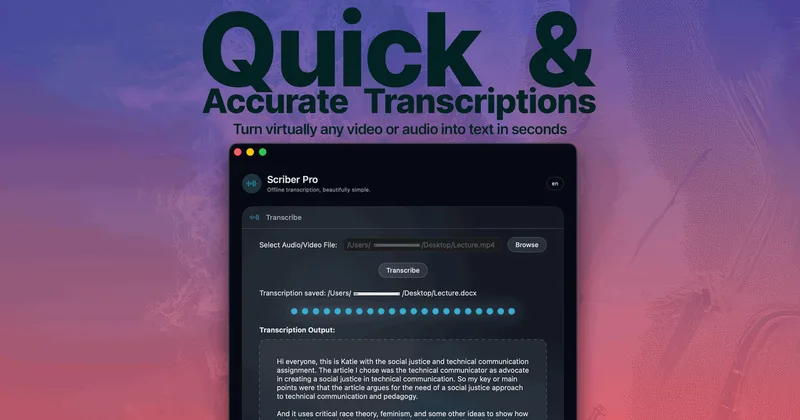
Scriber Pro 2.0 is a macOS app for transcribing audio and video locally, including files, YouTube links, and M3U8/HLS web streams. It saves transcripts in a searchable library and exports them in several document formats.
TrueScribe
TrueScribe is a Windows and Linux desktop app for transcribing, editing, searching, translating, and researching audio and video recordings. Processing runs locally by default, with optional cloud models for selected features.

Recly
Recly is a free, open-source recorder and transcription app for Galaxy Watch, Apple Watch, iPhone, Mac, and Windows. It stores recordings and transcripts in your Google Drive, with on-device transcription or transcription through a provider you choose using your own API key.


Transkriptor
Transkriptor is an AI-powered transcription platform that converts audio and video to text in 100+ languages, provides meeting summaries, speaker diarization, sentiment analysis, and integrates with conferencing and productivity tools for both individual and enterprise use.

Premium Alternatives

transcripci-n
Transcripción+ ofrece servicios de transcripción de audio a texto combinando transcripciones profesionales humanas y transcripción automática potenciada por IA, además de resúmenes, identificación de hablantes, traducción y una API para integraciones.




MeetNote
Meetnote is an AI meeting assistant that captures browser audio without joining calls as a bot, then generates speaker-labeled transcripts, summaries, action items, and searchable meeting records. It works through a Chrome extension and web workspace for Google Meet, Microsoft Teams, Zoom, and other browser audio.